Quick answer
- Quick answer
- Why payment plugins need supply-chain review
- Verify vendor and distribution identity
- Review maintainer access and project governance
- Ask for source, build, and provenance evidence
- Inventory dependencies and vulnerability handling
- Evaluate testing and secure-development evidence
- Verify the update channel and release process
- Assess disclosure, incident response, and EOL
- Score evidence and decide
- Revalidate after purchase
- FAQ
- Sources
Before a payment plugin can run on checkout, review more than features, price, and “tested up to.”
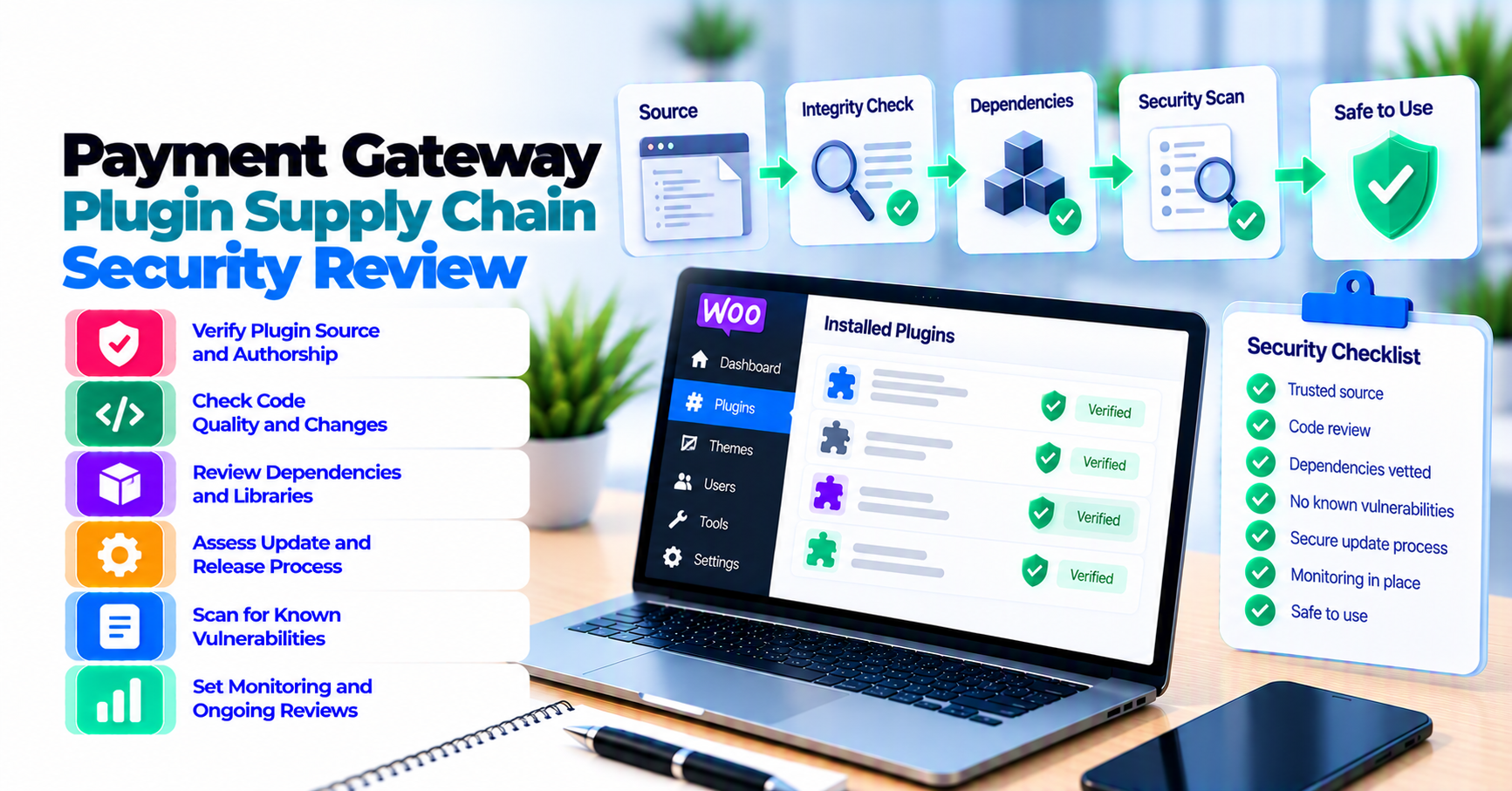
Ask for evidence across nine areas:
- Identity: Who publishes the plugin, and is this the authentic distribution channel?
- Maintainers: Who can change source, builds, releases, update infrastructure, and support systems?
- Source: Is relevant source available and reviewable, including build instructions?
- Build provenance: Can a release be traced to source, builder, dependencies, and a controlled release process?
- Dependencies: Is there an inventory, update policy, vulnerability monitoring, and removal process?
- Testing: Are payment, webhook, refund, authentication, compatibility, and security-critical paths tested?
- Updates: How are packages delivered, authenticated, staged, rolled back, and supported?
- Vulnerability response: Is there a private reporting path, triage owner, remediation process, advisory policy, and customer notification plan?
- Lifecycle: What happens when the plugin, API version, merchant product, or support contract reaches end of life?
Then:
- Mark missing evidence as unknown, not automatically safe.
- Define blockers and compensating controls.
- Sandbox-test the exact release.
- Record an approval owner and expiry date.
- Reassess after ownership, build, dependency, API, update-channel, incident, or EOL changes.
Do not treat marketplace presence as a security certification. Do not treat one automated score as a verdict. Do not demand sensitive internal access, signing secrets, or exploit details that the vendor should not disclose.
Why payment plugins need supply-chain review
A payment gateway plugin sits on a high-impact path:
- Checkout data and customer identity
- Payment tokens and merchant credentials
- Order state and fulfillment
- Refunds, captures, and webhooks
- Subscription renewals
- WordPress administration
- Automatic or one-click updates
The risk is not limited to a coding bug. A plugin can be compromised through:
- Stolen maintainer account
- Malicious ownership transfer
- Compromised source repository
- Unsafe dependency update
- Build-pipeline compromise
- Replaced download package
- Hijacked update server
- Leaked signing or release credentials
- Abandoned project with known vulnerabilities
- Incident response that reaches merchants too slowly
PatSaTECH’s payment-plugin evaluation framework covers processor fit, checkout model, webhooks, compatibility, maintenance, and support. This guide goes deeper into the software supply chain behind the candidate.
Security due diligence does not replace functional fit
A well-governed plugin for the wrong processor product is still the wrong plugin. Confirm functional requirements first, then review how the software is produced and maintained.
Use the buying checklist for payment gateway plugins for licensing, support, sandbox, and purchase terms.
Verify vendor and distribution identity
Start with the package source.
Record:
- Legal or business identity of the vendor
- Official product page
- Official marketplace listing, when applicable
- Official source repository, when public
- Support and security contact domains
- Update host and package-download domain
- License holder account
- Contracting entity and invoicing identity
- Product name, plugin slug, current version, and checksum of the reviewed package
Confirm the channel before downloading
Avoid:
- Search ads that imitate the vendor
- Unofficial mirrors
- “Nulled” premium packages
- ZIP files sent through chat
- Packages copied from another client site
- Shared license accounts with unknown administrators
The source of a payment plugin is part of its security boundary.
Understand what a directory listing does and does not mean
WordPress.org’s Detailed Plugin Guidelines require, among other things, mostly human-readable code, licensing clarity for included libraries, public maintained access to source/build tools where needed, and secure code. WordPress.org can close a plugin with security issues until they are resolved.
Those controls apply to the WordPress.org directory process. They do not prove:
- Every release is vulnerability-free.
- A premium build from another channel matches the directory build.
- The vendor’s own updater has equivalent controls.
- Your gateway account and checkout configuration are secure.
- The plugin remains maintained after purchase.
Document the exact channel you will use.
Review maintainer access and project governance
Ask who can:
- Merge source changes
- Approve pull requests
- Modify CI/CD workflows
- Publish packages
- Change the update feed
- Upload marketplace releases
- Access signing credentials or package storage
- Change support documentation
- Receive vulnerability reports
- Transfer plugin ownership
You do not need employee names for every role. You need a credible control model.
Useful evidence
- Multi-factor authentication requirement
- Least-privilege roles
- Protected branches
- Mandatory code review
- Separate build and release approval
- Logged administrative actions
- Hardware-backed or controlled release credentials
- Offboarding process
- Backup release owner
- Ownership-transfer procedure
Key-person risk
One maintainer can be legitimate and capable, but the store should know:
- What happens if that person is unavailable?
- Can support and security reports still be handled?
- Who controls the update domain and marketplace account?
- Can another reviewer release an emergency fix?
- Is the source and build process documented?
Treat continuity as an operational risk, not a judgment about the developer.
Ownership changes trigger re-review
Do not automatically trust a familiar plugin after:
- Vendor acquisition
- Repository transfer
- New publisher account
- Update-domain change
- Signing-key change
- New outsourced development team
- Long abandonment followed by a sudden release
Freeze automatic deployment until identity and release evidence are revalidated.
Ask for source, build, and provenance evidence
The goal is to connect the installed ZIP to reviewed source and a controlled build.
Minimum source questions
- Is source available for the shipped code?
- Are minified JavaScript and generated assets traceable to source?
- Are build instructions documented?
- Are build tools and versions declared?
- Are release tags immutable or protected?
- Is the changelog tied to source changes?
- Can the vendor identify the commit behind a release?
Provenance
SLSA provenance describes information about where, when, and how an artifact was produced, including the builder, build definition, materials, and resolved dependencies.
A small plugin vendor may not produce formal SLSA attestations. The underlying questions still help:
- Which source revision produced this package?
- Which builder produced it?
- Which inputs and dependencies were used?
- Who initiated and approved the release?
- Was the package modified after build?
Artifact integrity
Possible evidence includes:
- Vendor-published checksum from an authenticated channel
- Signed release or attestation
- Marketplace-managed package identity
- Reproducible or independently verifiable build
- Controlled package repository
- Logged release workflow
A checksum sent beside the ZIP through the same compromised channel is weak evidence. A signature is only useful if the verifying key and its custody are trustworthy.
Do not demand impossible proof
Premium vendors may not publish private repositories or CI internals. Ask for evidence appropriate to store risk:
- Security whitepaper
- Release-process summary
- Independent assessment
- Attestation
- Changelog and source escrow terms
- Contractual notification commitments
Record what is known, unknown, and accepted.
Inventory dependencies and vulnerability handling
A plugin can contain:
- PHP libraries
- Composer packages
- JavaScript packages
- Bundled SDKs
- Payment-provider libraries
- Build-only tools
- Remote services loaded at runtime
Ask for:
- Dependency inventory or software bill of materials
- Direct and transitive dependency policy
- Version-pinning approach
- Automated update tooling
- Vulnerability-scanning sources
- Review before dependency updates
- Removal process for unused packages
- License review
- Response when the upstream package is abandoned
SBOM is an inventory, not a verdict
An SBOM helps answer:
- Is a vulnerable library present?
- Which plugin releases contain it?
- Which stores need an update?
- Which component owner should respond?
It does not prove the dependency is safely configured or exploitable in context.
OWASP guidance
The OWASP Software Supply Chain Security Cheat Sheet covers risks and controls across dependencies, source, build, CI/CD, artifacts, and distribution.
Use it to ask:
- Are dependencies pinned and verified?
- Are build and deployment credentials protected?
- Are third-party actions and tools reviewed?
- Are artifacts stored and distributed through controlled channels?
- Is the dependency and vulnerability inventory current?
Runtime remote code
WordPress.org guidelines restrict directory plugins from sending executable code through third-party systems. Premium and custom channels have their own terms.
Ask whether the payment plugin:
- Downloads executable code after installation
- Evaluates remote code
- Loads admin scripts from third parties
- Changes behavior from a remote feature service
- Sends sensitive telemetry
Remote API data is not automatically remote executable code. Document the boundary.
Evaluate testing and secure-development evidence
WordPress’s Security handbook emphasizes validation, sanitization, late escaping, capabilities, nonces, roles, and common vulnerabilities.
You do not need the vendor’s entire test suite, but ask how it covers:
- Permission and capability checks
- Input validation and output escaping
- Nonce and CSRF protections
- SQL and command injection
- File upload and path handling
- Secret storage and redaction
- Webhook signature and replay handling
- REST and AJAX endpoints
- Checkout Blocks and classic checkout
- HPOS
- Refund, capture, void, and recurring operations
- Upgrade and rollback
Payment-specific critical flows
Request evidence for:
- Success, decline, timeout, and duplicate submission
- Authentication or 3-D Secure
- Browser close before callback
- Webhook retry and duplicate event
- Partial and full refund
- Authorization and later capture
- Subscription renewal and failed renewal
- Currency and amount boundaries
- Permission failure
- Invalid signature
WooCommerce’s extension testing guidance describes quality-focused testing for extensions. A vendor should explain which critical payment flows are automated, manually tested, or not supported.
Security testing evidence
Possible signals:
- Static analysis
- Dependency scanning
- Secret scanning
- Unit, integration, and end-to-end tests
- Fuzzing for parsers or public endpoints
- Penetration test
- Independent review
- Bug bounty or disclosure channel
One clean scan is not permanent assurance. Ask how findings are triaged and fixed.
Verify the update channel and release process
A secure first install can become unsafe through an update.
Document:
- Update source and hostname
- Authentication and integrity mechanism
- Release approval
- Package storage
- Changelog
- Rollout pattern
- Compatibility testing
- Automatic-update behavior
- Emergency update process
- Rollback package access
- License-expiry behavior
Questions for premium updaters
- Does the updater use HTTPS and authenticate the package source?
- How is package integrity checked?
- Can update metadata be altered separately from the package?
- Who can publish an update?
- Can the vendor revoke a malicious or broken release?
- Does the plugin execute migration code on update?
- Can a store stage and approve releases?
Do not accept “WordPress handles updates” if the plugin uses a private update service. Ask which parts WordPress controls and which parts the vendor controls.
Staged deployment
Even a legitimate security release can break checkout.
Use:
- Verified package source
- Changelog and security advisory
- Backup and rollback
- Staging
- Payment regression matrix
- Controlled production window
- Webhook and order monitoring
The local PatSaTECH safe-update draft covers this rollout procedure. For a live environment framework, use staging versus production payment testing.
Assess disclosure, incident response, and EOL
Vulnerability disclosure
Look for:
- Private security contact
- Supported encryption for sensitive reports
- Acknowledgment target
- Severity and triage process
- Coordinated disclosure policy
- CVE/advisory approach where applicable
- Customer notification channel
- Credit and safe-harbor language
Do not send a suspected exploit to ordinary public support.
Incident response
Ask:
- Who can stop distribution?
- How are update credentials rotated?
- How are affected versions identified?
- Can the vendor notify license holders quickly?
- Is an emergency patch available outside normal release cadence?
- What evidence and logs are retained?
- How are compromised packages revoked?
- How are customers told to verify recovery?
NIST Secure Software Development Framework SP 800-218 organizes secure development around preparing the organization, protecting software, producing well-secured software, and responding to vulnerabilities. Use that lifecycle framing when assessing the vendor’s process.
End of life
Record:
- Supported WordPress, WooCommerce, PHP, and API versions
- Minimum notice for EOL
- Last security-fix date
- Data export and migration path
- Token portability limits
- Replacement options
- Contract and source-escrow terms where relevant
An abandoned payment plugin can keep processing until the next platform or processor change exposes the risk.
Score evidence and decide
Use a decision record, not a decorative score.
Blockers
Examples:
- Unverifiable publisher or download channel
- No security contact
- Known critical vulnerability without remediation
- Obfuscated or unexplained executable code
- Remote executable code with no credible control
- Abandoned dependency or API with no migration plan
- Update channel without credible integrity or access control
- Vendor cannot identify the source behind the package
- No safe rollback for a critical checkout migration
High-priority gaps
- No dependency inventory
- No maintained changelog
- One unprotected release account
- No incident notification process
- No compatibility test evidence
- No EOL policy
- Unclear ownership transfer
Compensating evidence
- Independent code review
- Restrictive hosted-payment architecture
- Network isolation
- Manual update approval
- Reproducible build
- Contractual response time
- Source escrow
- Monitoring and rapid disablement
Compensating controls do not erase the gap; document why the residual risk is accepted.
OpenSSF Scorecard
OpenSSF Scorecard checks open-source project signals such as maintenance, security policy, vulnerabilities, code review, branch protection, pinned dependencies, packaging, and signed releases.
Use it as:
- A prompt for questions
- A recurring signal
- A way to detect changes
Do not use it as:
- A certification
- A substitute for payment-flow review
- Proof about a private premium build
- A reason to ignore vendor contracts and incident response
Decision record
Include:
- Candidate and version
- Evidence URLs and dates
- Blockers and gaps
- Scorecard or scan context
- Functional sandbox results
- Compensating controls
- Approval owner
- Review expiry
- Exit triggers
Revalidate after purchase
Re-review when:
- Plugin ownership changes
- Source or update domain changes
- Release process changes
- Critical dependency changes
- New remote service appears
- Major WordPress, WooCommerce, PHP, or gateway API change occurs
- Security advisory or incident occurs
- Release cadence stops
- Marketplace listing is closed
- License expires
- Support ownership changes
Ongoing evidence
Track:
- Latest supported version
- Changelog
- Vulnerability advisories
- Dependency or SBOM delta
- Update-package source
- Checkout regression results
- Webhook health
- Support and security response time
- Next review date
Use the WooCommerce payment-gateway integration checklist for the operational handoff and webhook monitoring after launch.
Exit triggers
Define when to:
- Pause updates
- Disable the method safely
- Replace the plugin
- Move to custom integration
- Notify customers or regulators
- Rotate credentials
- Reconcile transactions
If standard plugin controls cannot meet the risk, revisit the plugin-versus-custom decision framework.
FAQ
Is a WordPress.org or WooCommerce Marketplace listing a security certification?
No. Marketplaces and directories add policies and review processes, but they do not guarantee every version is vulnerability-free or suitable for your environment.
Should every vendor provide an SBOM?
An SBOM is increasingly useful, especially for high-risk software, but maturity varies. If it is unavailable, document the gap and ask for a dependency inventory, vulnerability process, and affected-version identification method.
Must releases be cryptographically signed?
Signed releases can strengthen integrity evidence, but the signature is useful only when key custody and verification are trustworthy. Assess the complete source-build-package-update chain.
Is closed-source premium software automatically riskier?
Not automatically. It provides less public evidence, so request appropriate alternatives: independent assessment, build-process summary, contractual security obligations, disclosure process, provenance evidence, and source escrow where justified.
Can an automated scanner approve a payment plugin?
No. Scanners find specific issues and risky practices. They do not validate business logic, processor fit, incident response, support, ownership, or the exact premium artifact.
How often should the plugin be reassessed?
Set a risk-based cadence and re-review after ownership, update-channel, dependency, security-incident, platform, processor-API, or EOL changes.
What if the vendor cannot answer every question?
Record the unknowns, request the most important evidence, add compensating controls, and decide whether residual risk is acceptable. Lack of evidence is not proof of compromise, but it is not proof of safety.
Should agencies reuse one approval across all clients?
Only when versions, distribution, processor product, checkout architecture, controls, and deployment are equivalent. Client-specific risk and contracts still require review.
Sources
Primary sources accessed September 20, 2026:
- WordPress Common APIs Handbook — Security
- WordPress Plugin Handbook — Detailed Plugin Guidelines
- WooCommerce developer docs — Testing extensions and maintaining quality code
- OWASP Cheat Sheet — Software Supply Chain Security
- NIST SP 800-218 — Secure Software Development Framework
- SLSA v1.1 — Provenance
- OpenSSF Scorecard
This article provides general procurement and security guidance, not a code audit or security certification. Evaluate the exact plugin version, distribution channel, merchant environment, vendor evidence, and contractual obligations.