Quick answer
- Quick answer
- Separate the checkout into load layers
- Build a realistic workload model
- Create a safe test environment
- Run tests from low risk to high stress
- Test payment and webhook paths separately
- Define thresholds before the run
- Observe the full WooCommerce stack
- Analyze failures and plan capacity
- Clean up and preserve evidence
- FAQ
- Sources
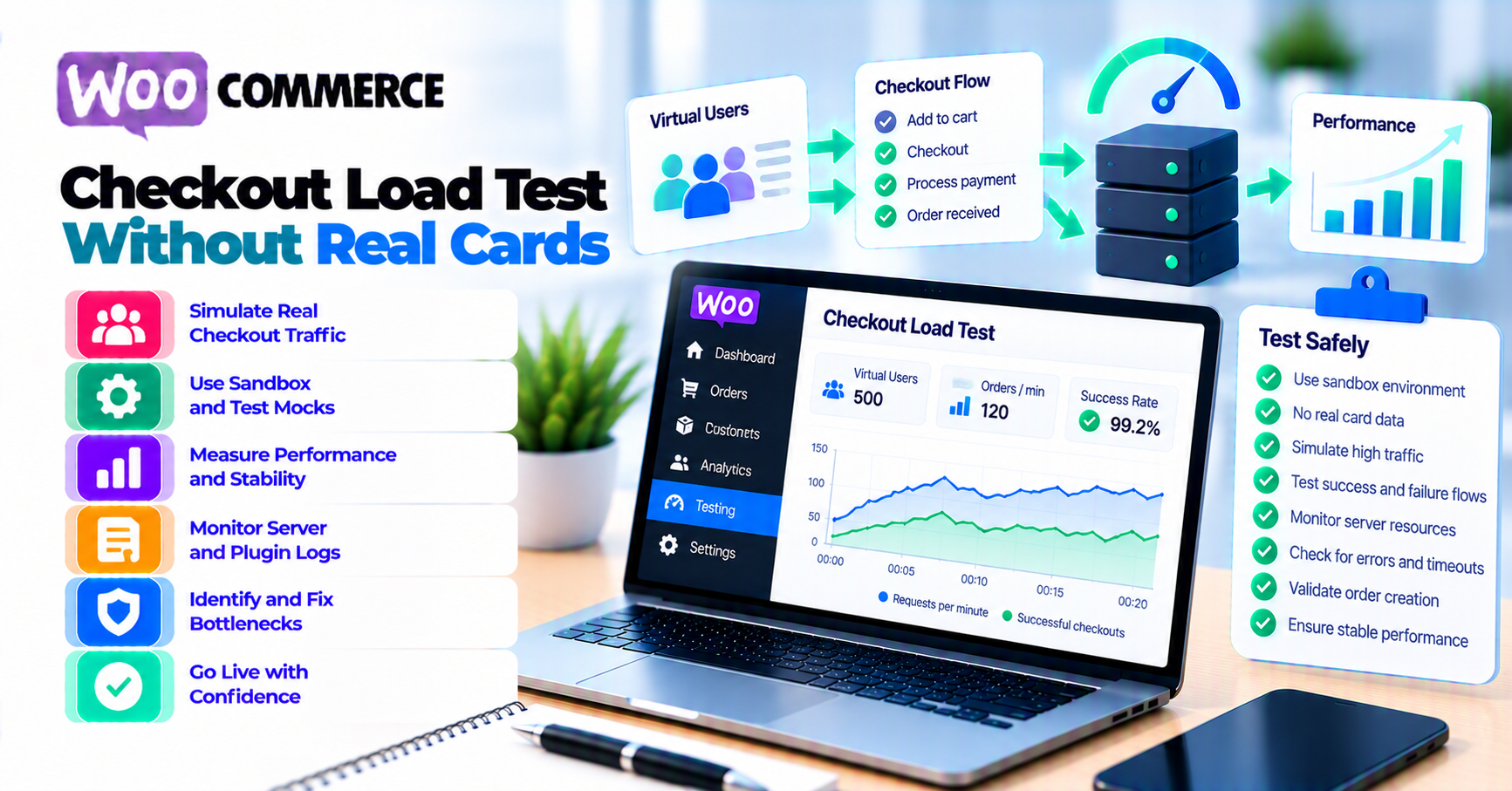
Safe WooCommerce checkout load testing does not mean firing thousands of invented card numbers at a live gateway.
Use a layered plan:
- Model real shopper journeys and expected arrival rates.
- Load-test catalog, cart, session, Store API, tax, shipping, coupon, and checkout calculations in a production-like non-live environment.
- Replace or sandbox external services that have not approved load.
- Exercise payment-provider test mode separately, at provider-approved rates, with provider-supplied test data.
- Test webhook handling with provider test events or controlled fixtures.
- Define latency, error, queue, saturation, and business-correctness thresholds before the run.
- Increase load gradually with abort conditions.
- Observe PHP workers, database, cache, sessions, third-party calls, Action Scheduler, webhooks, and edge controls.
- Reconcile and delete synthetic orders, customers, carts, emails, and events.
- Convert results into a capacity, optimization, rollback, and peak-monitoring plan.
Never:
- Use real cards for synthetic load.
- Generate random card numbers against production.
- Hammer a provider sandbox without checking limits and terms.
- Clone production customers, tokens, or orders into a test environment without sanitization.
- Measure only the homepage and call checkout ready.
- treat a
200response as proof that totals, stock, order state, and payment behavior are correct.
Separate the checkout into load layers
Checkout is a chain, not one URL.
| Layer | What to exercise | What not to assume |
|---|---|---|
| Edge and static | TLS, CDN, HTML, JavaScript, images | Fast cached pages do not prove dynamic checkout capacity |
| Catalog and search | Product queries, variations, inventory reads | Browsing load has different database and session behavior |
| Cart and session | Add, update, remove, coupons, session persistence | Anonymous page tests do not create cart contention |
| Store API/AJAX | Cart, checkout updates, customer/address calculations | Browser and API paths can fail differently |
| Checkout services | Tax, shipping, currency, fraud, address, stock | Third-party services may throttle before WooCommerce |
| Order creation | Totals, stock reservation, emails, order storage | A response can succeed while side effects duplicate or lag |
| Payment provider | Tokenization, authentication, authorization in sandbox | Store capacity is not provider capacity |
| Webhooks and queues | Callback verification, order update, Action Scheduler | Authorization success is not final WooCommerce state |
Why homepage tests mislead
The homepage can be:
- Cached at the CDN
- Free of customer sessions
- Light on database writes
- Unconnected to shipping and tax
- Unconnected to order creation
- Unconnected to payment and webhooks
Checkout creates unique sessions and write-heavy work. It can exhaust PHP workers or database capacity while the homepage remains fast.
Why full end-to-end load is dangerous
One giant test can:
- Trigger fraud or card-testing defenses
- Create real orders and emails
- Reduce stock
- Hit shipping or tax quotas
- Overload a payment sandbox
- Pollute analytics
- Produce webhook retries
- Hide which layer failed
Test the layers separately, then combine only the flows that have safe dependencies.
Build a realistic workload model
Start from observed business traffic, not a round number such as “1,000 users.”
Define journeys
Example journey mix:
- Browse a simple product
- Browse a variable product
- Add to cart
- Change quantity
- Apply or reject a coupon
- Enter shipping address
- Select shipping
- Calculate tax
- Load available payment methods
- Create a test order
- Complete a provider-approved sandbox payment
- Receive a test webhook
Use percentages from analytics, server logs, and store behavior. A campaign for one complex bundle can stress the store differently from broad catalog browsing.
Define arrival rate and concurrency separately
Record:
- Requests or journeys per second
- Concurrent active sessions
- Think time between steps
- Session duration
- Cache hit and miss mix
- Guest versus signed-in mix
- Mobile versus desktop behavior
- Product and cart mix
- Geographic distribution
High concurrency can result from slow responses even when arrival rate is modest. Do not use “virtual users” without understanding what each user does.
Use peak windows
Model:
- Normal busy hour
- Expected campaign peak
- Unexpected spike
- Sustained peak
- Recovery after a dependency outage
Use payment-gateway analytics to ground payment-method and outcome mix. Do not invent a peak multiplier without sales, marketing, and hosting evidence.
Include boundary carts
Test:
- Empty cart rejection
- One simple product
- Multiple quantities
- Large mixed cart
- Variable product
- Virtual-only cart
- Subscription cart when applicable
- Coupons and store credit
- Lowest and highest normal totals
- Supported country, currency, and shipping combinations
The goal is representative work, not every possible SKU.
Create a safe test environment
Use a production-like environment isolated from live money and customers.
Match critical architecture
Mirror:
- WordPress and WooCommerce versions
- Theme and checkout type
- Gateway extension version
- PHP version and worker model
- Database engine and meaningful data volume
- Object cache
- CDN/WAF behavior relevant to checkout
- HPOS setting
- Session storage
- Scheduled-action runner
- Tax, shipping, and other critical integrations
Document intentional differences. A larger production database with a smaller staging dataset can hide query and index problems.
Sanitize data
Do not clone:
- Live card data
- Payment tokens
- API or webhook secrets
- Customer passwords
- Unredacted addresses and emails
- Active subscriptions pointing to live processors
Use synthetic customers, products, and orders. Disable outbound customer email or route it to a mail trap.
Separate environments
Follow PatSaTECH’s staging versus production payment-testing guide:
- Sandbox keys only
- Sandbox webhook endpoint
- Test tax and shipping accounts where supported
- Isolated analytics property
- Synthetic order prefix
- Cleanup owner
Coordinate external services
Before load:
- Review sandbox and API rate limits.
- Ask providers about approved test volume.
- Confirm test windows with host/CDN/WAF.
- Stub a dependency when its terms prohibit load.
- Mark synthetic traffic so operations can identify it.
- Define emergency contact and abort control.
Do not assume “sandbox” means unlimited.
Run tests from low risk to high stress
Grafana k6 test-type guidance distinguishes common tests such as smoke, average-load, stress, spike, and soak tests. Use each for a specific question.
1. Smoke test
Question:
Does the script and environment work with minimal traffic?
Verify:
- Authentication and test data
- Cart correctness
- Order creation
- Threshold collection
- Cleanup
- No production endpoints
2. Average-load test
Question:
Can the store handle normal busy traffic within its service objectives?
Use a representative journey mix and gradual ramp.
3. Stress test
Question:
Where does the store leave acceptable behavior, and how does it fail?
Increase load beyond expected peak in controlled steps. Stop before causing uncontrolled damage to shared infrastructure.
4. Spike test
Question:
Can the store absorb a sudden campaign or queue-release burst?
Watch autoscaling, cold starts, connection pools, cache stampedes, rate limits, and recovery.
5. Soak test
Question:
Does sustained load reveal memory leaks, table growth, queue lag, or resource exhaustion?
Use a duration appropriate to the suspected failure. Do not run a long test solely because the tool supports it.
Use scenarios
k6 scenario documentation supports multiple workload patterns, executors, start times, graceful stops, and environment tags.
Use separate scenarios for:
- Browsing
- Cart/session work
- Checkout recalculation
- Order creation
- Provider-approved sandbox payments
- Webhook fixtures
That separation makes results explainable.
Test payment and webhook paths separately
Store infrastructure test
For the main capacity run:
- Stop before a real payment authorization.
- Use a controlled offline or test payment path where appropriate.
- Prevent external side effects.
- Still exercise totals, tax, shipping, sessions, order validation, and order creation as safely designed.
If an offline method changes the checkout work materially, record the limitation.
Provider sandbox test
Stripe’s testing documentation provides test-mode cards, payment methods, and flows for simulation. Test-mode data is isolated from live-mode data.
Use provider-supplied values only in the provider’s test environment.
Stripe explicitly says not to use its testing environments to load-test an integration because sandbox rate limits can be hit. Treat this layer as low-volume functional and concurrency verification unless the provider has approved a specific load plan. Keep the main capacity test on store infrastructure, controlled substitutes, or mocks that preserve the relevant application work.
Test:
- Successful authorization
- Documented decline
- Authentication flow
- Processing or delayed method
- Refund or void when supported
- Webhook completion
Keep volume within the provider’s documented limits and approved test plan.
Rate limits
Stripe’s rate-limit documentation documents API limiters and 429 behavior. Limits can vary by API and product.
Do not interpret provider throttling as WooCommerce capacity. Track:
- Store response
- Provider request
- Provider response
- Retry/backoff
- Order effect
Card-testing controls
Stripe’s card-testing prevention documentation explains that automated validation attempts can use card setup or small payments and that simplistic defenses are insufficient.
Large repeated payment attempts can resemble abuse, even in test mode. Do not load-test live authorization with real or generated cards.
Webhook load
Use:
- Provider test-event tooling
- Sanitized fixtures
- Controlled event generator
- Unique event IDs
- Valid signatures for the test environment
Test:
- Valid event
- Duplicate event
- Retry after temporary failure
- Short burst
- Out-of-order event
- Invalid signature
- Processing latency and queue lag
Do not reuse production payloads casually.
Define thresholds before the run
A graph without pass/fail criteria invites post-test rationalization.
k6 thresholds documentation defines thresholds as pass/fail criteria for metrics.
Define thresholds for:
User-facing behavior
- Checkout page latency
- Store API/AJAX latency
- Cart-update latency
- Error rate
- Timeout rate
- Successful journey rate
Business correctness
- Correct cart totals
- Correct tax and shipping
- One order per journey
- No negative stock
- No duplicate payment or fulfillment
- Correct payment-method availability
- Correct order status
- One customer email where expected
Infrastructure
- PHP worker saturation
- CPU and memory
- Database query latency and connections
- Lock waits
- Object-cache hit rate and evictions
- Session contention
- Disk and network
- External dependency latency
Asynchronous systems
- Webhook receipt-to-order-update latency
- Action Scheduler backlog age
- Failed action count
- Email queue lag
- Retry count
Set values from:
- Current baseline
- User experience objectives
- Host and provider limits
- Business peak requirement
- Error budget
Do not copy another store’s p95 target and call it evidence.
Abort conditions
Examples:
- Error rate exceeds the safe ceiling.
- Database or worker saturation threatens shared services.
- Production endpoint appears in the target list.
- Real customer or live payment data appears.
- Provider requests stop using test mode.
- Duplicate financial effects occur.
- Cleanup or observability fails.
Every operator should know how to stop the test.
Observe the full WooCommerce stack
Correlate one test timeline.
Edge
- Request rate
- Cache status
- WAF/rate-limit action
- Origin latency
- 4xx and 5xx
WordPress/PHP
- PHP workers
- Request duration
- Fatal errors
- Slow hooks
- Memory
- External HTTP calls
Database
- Query latency
- Slow queries
- Locks
- Connections
- Read/write volume
- Table growth
Cache and sessions
- Object-cache hit rate
- Evictions
- Cart/session consistency
- Lock contention
- Cache stampede
WooCommerce
- Store API and AJAX timings
- Cart recalculations
- Order creation
- HPOS operations
- Stock changes
- Emails
- Scheduled Actions
Providers
- Tax and shipping latency
- Gateway sandbox requests
- Rate limits
- Webhook deliveries
- Authentication returns
Tag metrics with:
- Test run ID
- Scenario
- Journey
- Environment
- Release/version
- Product/cart type
Do not log card data, secrets, or full payment payloads.
Analyze failures and plan capacity
Classify bottlenecks:
Saturation
Symptoms:
- PHP queue grows
- Database connections max out
- CPU stays high
- Latency rises with concurrency
Action:
- Increase capacity where justified.
- Reduce expensive work.
- Tune only after identifying the bottleneck.
Contention
Symptoms:
- Session or table locks
- Slow cart updates
- Duplicate waits
- Irregular latency at modest load
Action:
- Find shared resources and critical sections.
- Test HPOS, sessions, and cache behavior.
- Do not solve locks by adding unlimited workers.
External dependency
Symptoms:
- WooCommerce remains healthy until tax, shipping, fraud, or gateway latency rises.
Action:
- Define timeout, caching, fallback, and circuit behavior.
- Coordinate service limits.
Application correctness
Symptoms:
- Duplicate orders
- Wrong totals
- Missing methods
- Stock inconsistencies
- Repeated emails
Action:
- Stop. Correctness failures can be worse than latency.
Edge or rate-limit policy
Symptoms:
403,429, challenge HTML in API calls- Shopper and machine paths treated identically
Action:
- Review exact path rules and test cases.
Capacity decision
Document:
- Proven sustainable load
- Thresholds met and missed
- Bottleneck and evidence
- Safe operating margin
- Required host or database change
- Extension or query optimization
- External-service coordination
- Rollback
- Peak monitoring
- Next test date
Use the incident framework in payment-gateway outage resilience for provider degradation and recovery bursts.
Clean up and preserve evidence
After every run:
- Stop traffic generators.
- Confirm no process remains running.
- Delete or archive synthetic orders according to policy.
- Restore stock.
- Clear test carts and sessions.
- Remove synthetic customers.
- Purge test coupons or keys.
- Stop mail capture jobs.
- Remove temporary credentials and access.
- Confirm no production data entered the environment.
- Export summarized metrics and logs.
- Record test version, time, workload, thresholds, result, and owner.
Do not delete evidence before reconciling:
- Order count
- Payment sandbox objects
- Webhook events
- Email count
- Inventory changes
- Scheduled-action effects
Update the WooCommerce payment-gateway integration checklist with the proven capacity and remaining limitations.
The goal is not to create the largest traffic chart. It is to know which checkout load is safe, where the next constraint sits, and how the store behaves when it reaches that constraint.
FAQ
Can I load-test live WooCommerce checkout?
Test read-only production behavior only with explicit authorization and tight controls. Do not generate live payment attempts, customer emails, stock changes, or orders. Prefer a production-like non-live environment for dynamic checkout.
Can I use Stripe test cards on production?
No. Provider test data belongs in test mode. Never send test, random, or generated card numbers to live payment endpoints.
Does a provider sandbox allow unlimited load?
No assumption is safe. Review rate limits and terms, then coordinate the planned volume. A sandbox may be shared or differently provisioned from production.
Should the main load test submit payments?
Usually separate high-volume store-infrastructure load from lower-volume provider-approved sandbox payments. This isolates bottlenecks and avoids turning the provider into the test target.
What should I use instead of a payment submission?
Use a controlled test or offline path that exercises the intended WooCommerce work without live money. Document any behavior it bypasses, then test that omitted layer separately.
How many virtual users should I test?
Derive arrival rate, concurrency, journey mix, think time, and peak duration from expected traffic and service objectives. A virtual-user count without behavior is not a capacity requirement.
What is the difference between load and synthetic monitoring?
Load testing generates substantial planned traffic to evaluate capacity and failure behavior. Synthetic monitoring sends sparse recurring journeys to detect availability regressions. The planned monitoring bundle covers the latter.
What if checkout passes but webhooks lag?
The system is not fully healthy. Include receipt-to-order-update latency and queue age in thresholds, then test webhook bursts and retries separately.
Should I test during Black Friday week?
Run major load tests before the peak window, leaving time to fix, retest, and roll back. During the event, rely on monitoring and pre-approved operational changes.
Sources
Primary sources accessed September 20, 2026:
- WooCommerce developer docs — Performance best practices
- WooCommerce developer docs — Store API rate limiting
- WooCommerce developer docs — Testing extensions and maintaining quality code
- Grafana k6 — Test types
- Grafana k6 — Scenarios
- Grafana k6 — Thresholds
- Stripe Docs — Testing
- Stripe Docs — Rate limits
- Stripe Docs — Protect yourself from card testing
This article provides general performance-testing guidance. Obtain authorization, follow provider and host terms, isolate live payment systems, protect data, and use qualified performance and payment engineers for high-risk testing.