

1. Overview
MyFatoorah Gateway for Gravity Forms by PatSaTECH lets any Gravity Form take payments with MyFatoorah, the payment gateway for businesses in Kuwait, Saudi Arabia, the UAE, Qatar, Bahrain, Oman, Jordan and Egypt. When the form is submitted, the add-on creates a MyFatoorah payment and sends the customer to MyFatoorah’s secure Hosted Payment Page (in English or Arabic), with KNET, mada, Visa / Mastercard, Apple Pay, Google Pay, Benefit, STC Pay and every other method enabled on your account. Card details never reach your site.
It is built on the Gravity Forms Payment Add-On Framework, so entries get the usual Payment Status, Transaction ID and payment notifications. An entry is marked Paid only after the payment has been read back from the MyFatoorah API (invoice, status, amount, currency). This happens on the customer’s return, from webhooks and in a final check. Notifications and other add-ons’ feeds can wait until the payment is received. Refunds are made from the entry screen.
2. Features
- MyFatoorah Hosted Payment Page (API v3)
- English or Arabic payment page
- KNET, mada, cards, Apple Pay, Google Pay, Benefit, STC Pay…
- Products and Services feeds
- Delayed notifications (sent only when paid)
- Post Payment Actions for other add-ons (shown when a supporting add-on such as Mailchimp or User Registration is active)
- Delayed post creation
- 8 GCC/MENA currencies added to Gravity Forms
- Token checked on save, enabled methods listed
- Webhook V2 with MyFatoorah-Signature (V1 accepted)
- Every payment re-read from the API
- Per-entry lock, idempotent requests
- Clear decline reason + Try again link
- Full & partial refunds from the entry
- Portal refunds recorded
- Minimum amount check
- Unpaid entries marked Failed on a timer
- Name, email and mobile sent to MyFatoorah
- Logging (tokens never logged)
- Translation-ready (.pot)
3. Requirements
| Component | Minimum |
|---|---|
| WordPress | 6.0 (tested up to 7.1.3) |
| Gravity Forms | 2.5 (tested up to 2.10.3) |
| PHP | 7.4 |
| SSL / HTTPS | Required for live payments and for webhooks. |
| MyFatoorah | A test token (the public demo token or your own demo account) or a live account’s API token with permission to create and get payments (plus Make Refund for refunds) |
| Gravity Forms currency | One of KWD, SAR, AED, QAR, BHD, OMR, JOD, EGP (Forms → Settings → Currency). See Currency. |
Tested on: WordPress 7.1.3, Gravity Forms 2.10.3, PHP 8.1.34, MyFatoorah test environment (KWD). See Tested on.
4. Installation
- In WordPress admin go to Plugins → Add New → Upload Plugin.
- Choose
gravityforms-myfatoorah-1.0.0.zipand click Install Now. - Activate MyFatoorah Gateway for Gravity Forms. Gravity Forms must be active.
5. Step-by-step setup with screenshots
- Card payment (Mastercard 0007): entry 9636 Paid 10.000 KWD, confirmed by customer return; the admin notification was sent only after payment. Entry 9639: Paid, confirmed by webhook
- KNET declined (“Your card has expired”) with a Try again button and one failure note. The retry reused entry 9637, was paid by KNET and confirmed by webhook, and the notification came after the payment. Entry 9640: KNET declined, left Processing
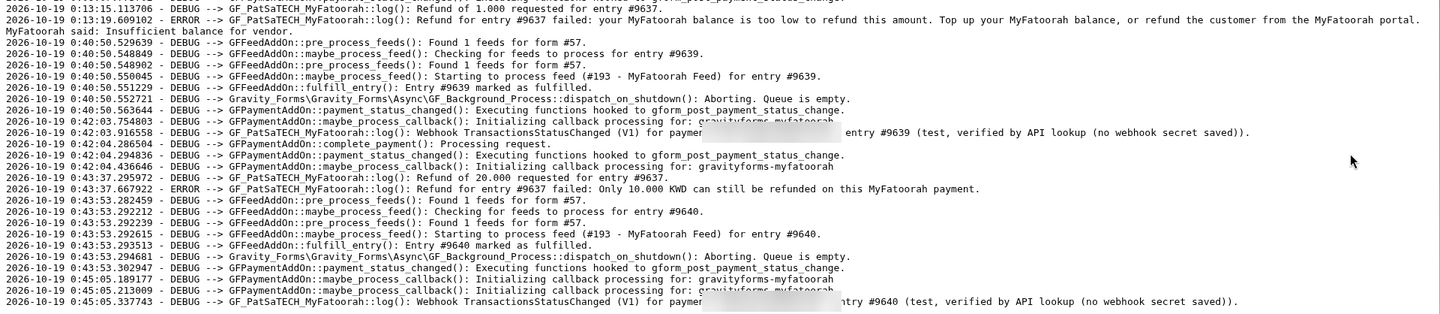
- Refund refused for low balance (shared demo account) with a clear message and note; a refund above the remaining amount refused (“Only 10.000 KWD can still be refunded”)
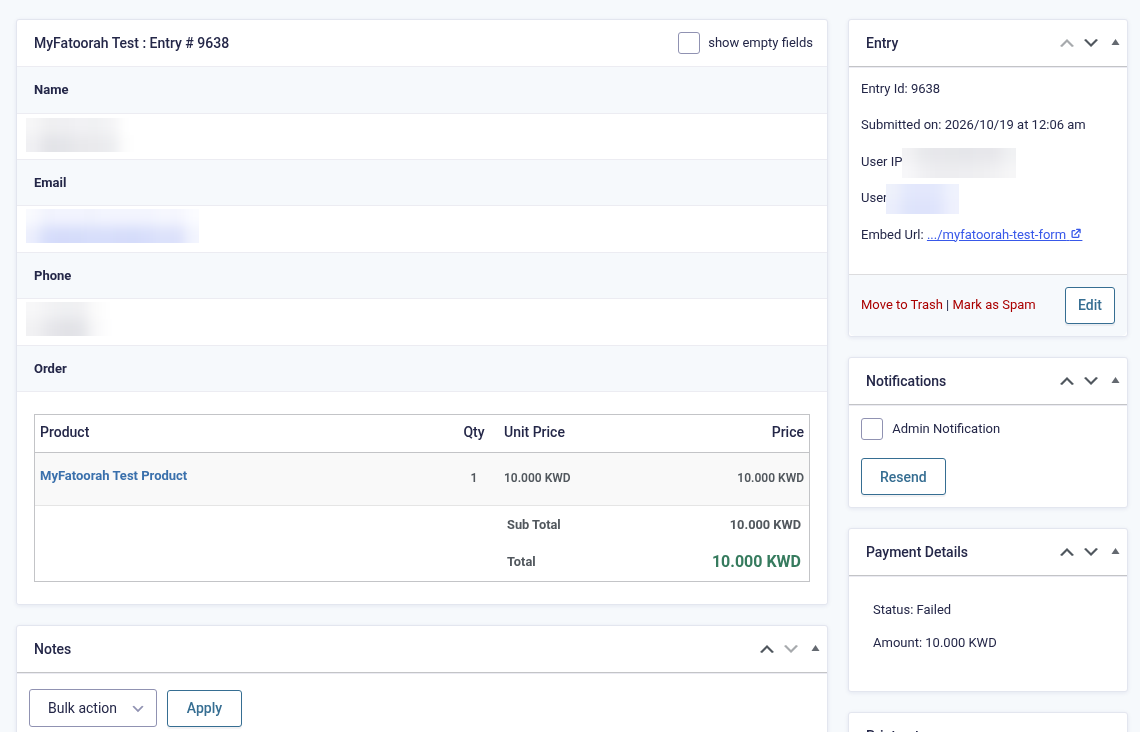
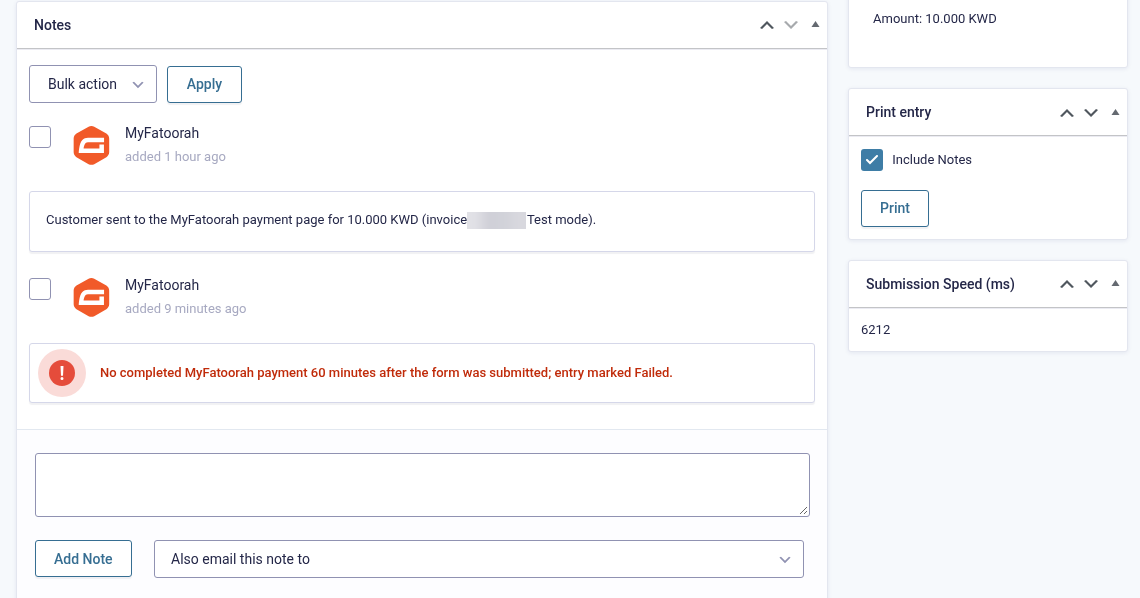
- Abandoned entry 9638: Processing with one note and no notification; at the time limit WP-Cron marked it Failed with the expiry note, and still no notification was sent
- KWD saved as the Gravity Forms currency with no warnings; no PHP errors and no token in the log
Click any screenshot to open it full size. Tokens, webhook secrets, MyFatoorah payment / invoice / refund IDs, email addresses, phone numbers and IP addresses are blurred or left out.
Part A: MyFatoorah token
Get a test token
Copy MyFatoorah’s public test token from
docs.myfatoorah.com › API Key › Test (Demo) Token, or create a token in your own demo portal (Integration Settings › API Key). Full details: Getting your MyFatoorah token.Optional: set the webhook
In your own (demo or live) portal open Integration Settings › Webhook Settings, enable Webhook V2, set the endpoint to
https://your-site.com/?callback=gravityforms-myfatoorah, tick Transaction Status Changed and Refund Status Changed, and copy the secret key. Not required: the add-on sends its webhook URL with each payment.
Part B: WordPress / Gravity Forms
Upload and activate
Plugins → Add New → Upload Plugin, choose
gravityforms-myfatoorah-1.0.0.zip, install and activate.
MyFatoorah Gateway for Gravity Forms 1.0.0 active. Set the currency
Forms → Settings → Currency: choose a MyFatoorah currency, for example Kuwaiti Dinar. The add-on adds the eight MyFatoorah currencies (KWD, BHD, OMR and JOD with 3 decimals) where Gravity Forms doesn’t have them.
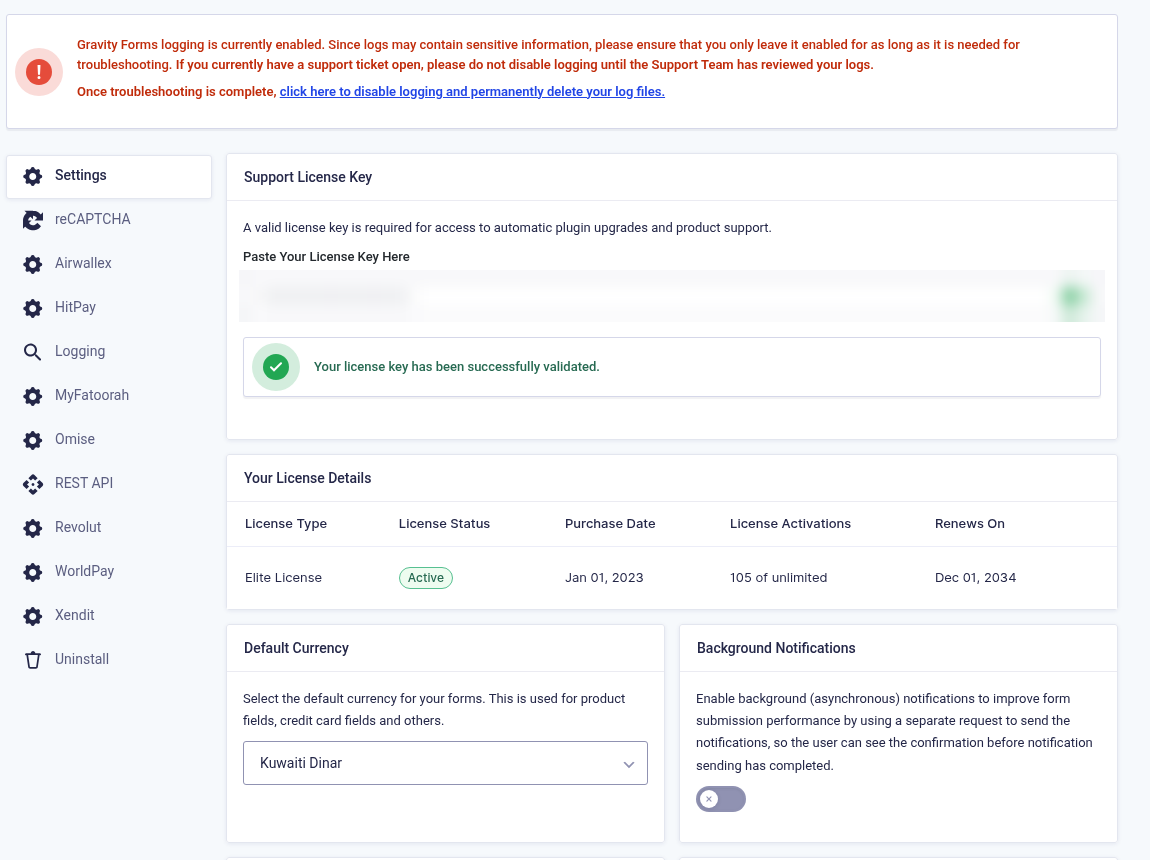
Forms → Settings → Currency set to Kuwaiti Dinar. Paste the token
Open Forms → Settings → MyFatoorah, keep Mode on Test, paste the Test API token and save. The add-on checks it: “MyFatoorah Test token verified. Enabled payment methods: …”.
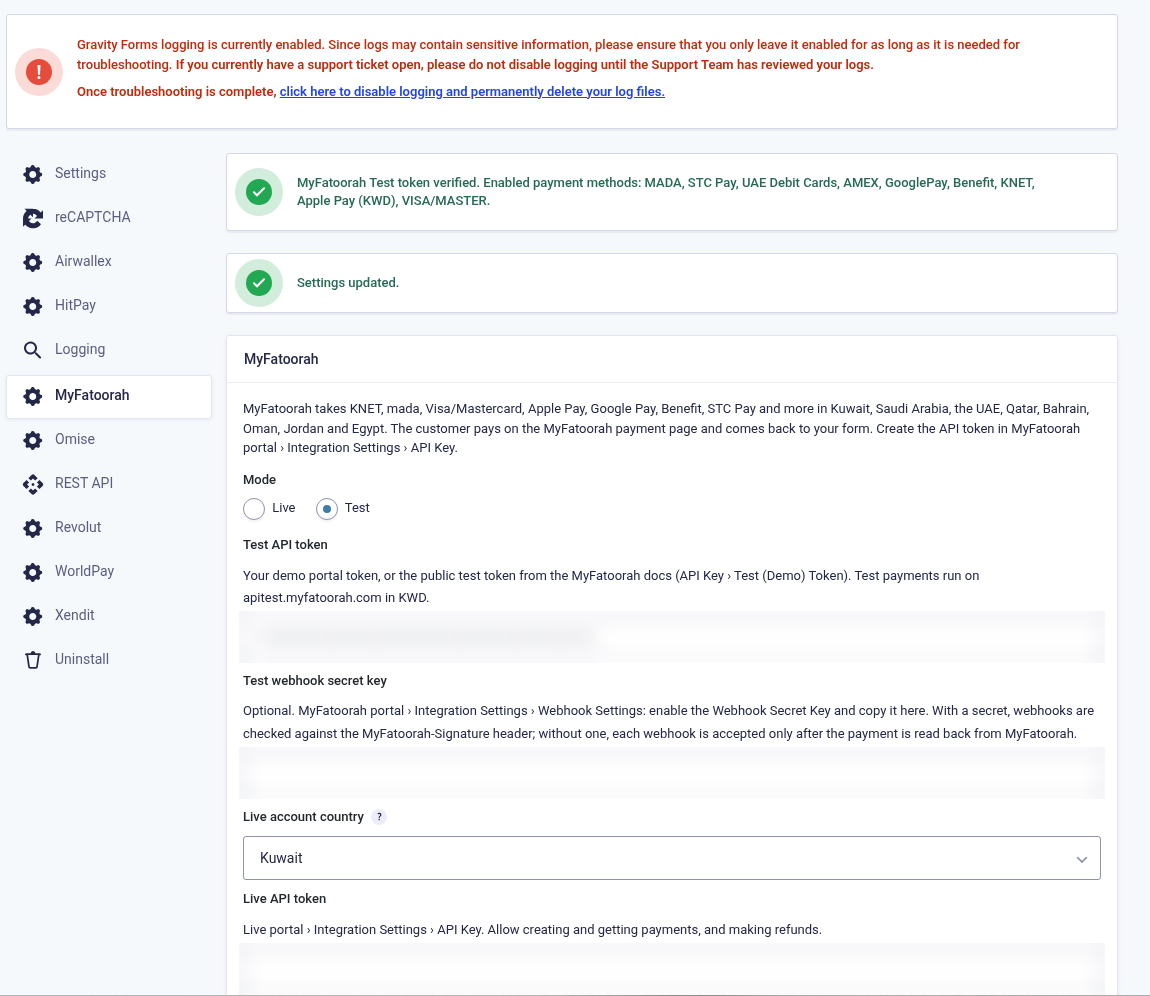
Mode, live account country, masked tokens and the “token verified” notice. 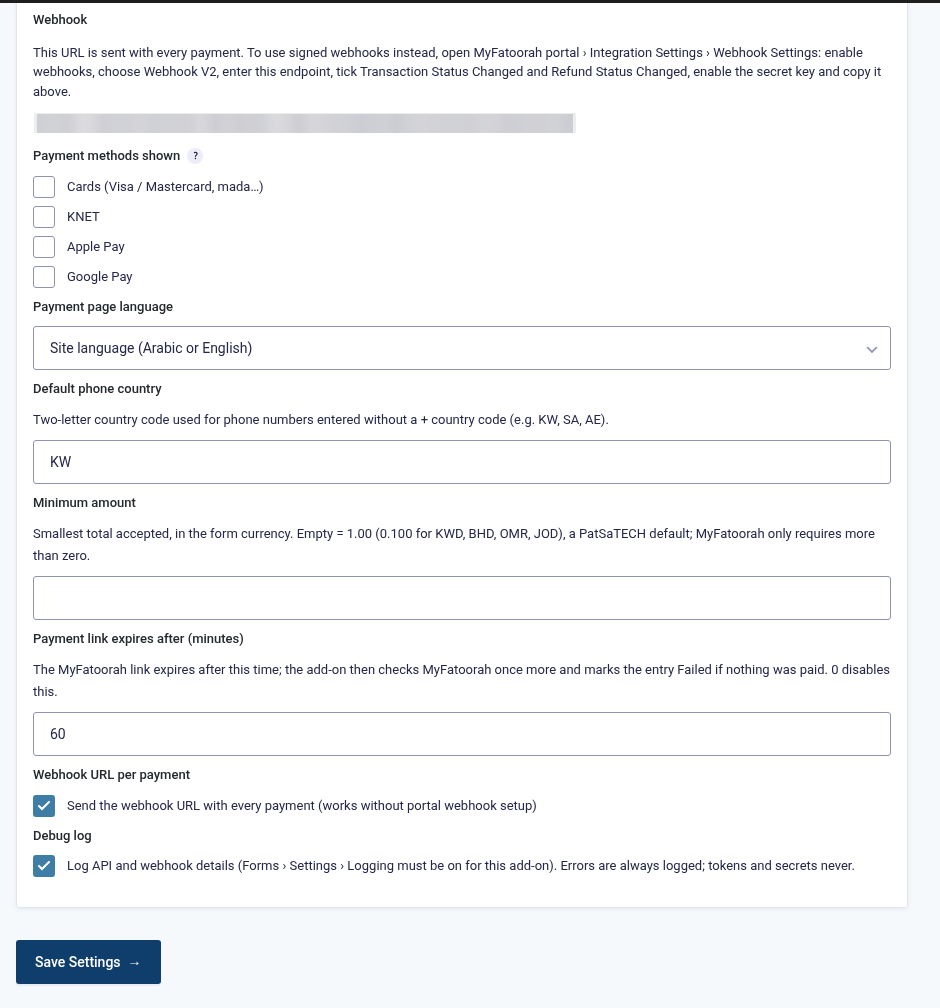
Webhook URL, Payment methods shown, Payment page language, Default phone country, Minimum amount, Payment link expires after, Webhook URL per payment and Debug log. Add a MyFatoorah feed
Open your form → Settings → MyFatoorah → Add New. Name the feed, choose Products and Services, pick the payment amount (Form Total) and map First name, Last name, Email and Phone. Tick Send notifications only when payment is received for the notifications that should wait. A Post Payment Actions section appears below it only when another add-on that supports delayed actions (for example Mailchimp, User Registration or Zapier) is active; on the test form none is, so the section isn’t shown.
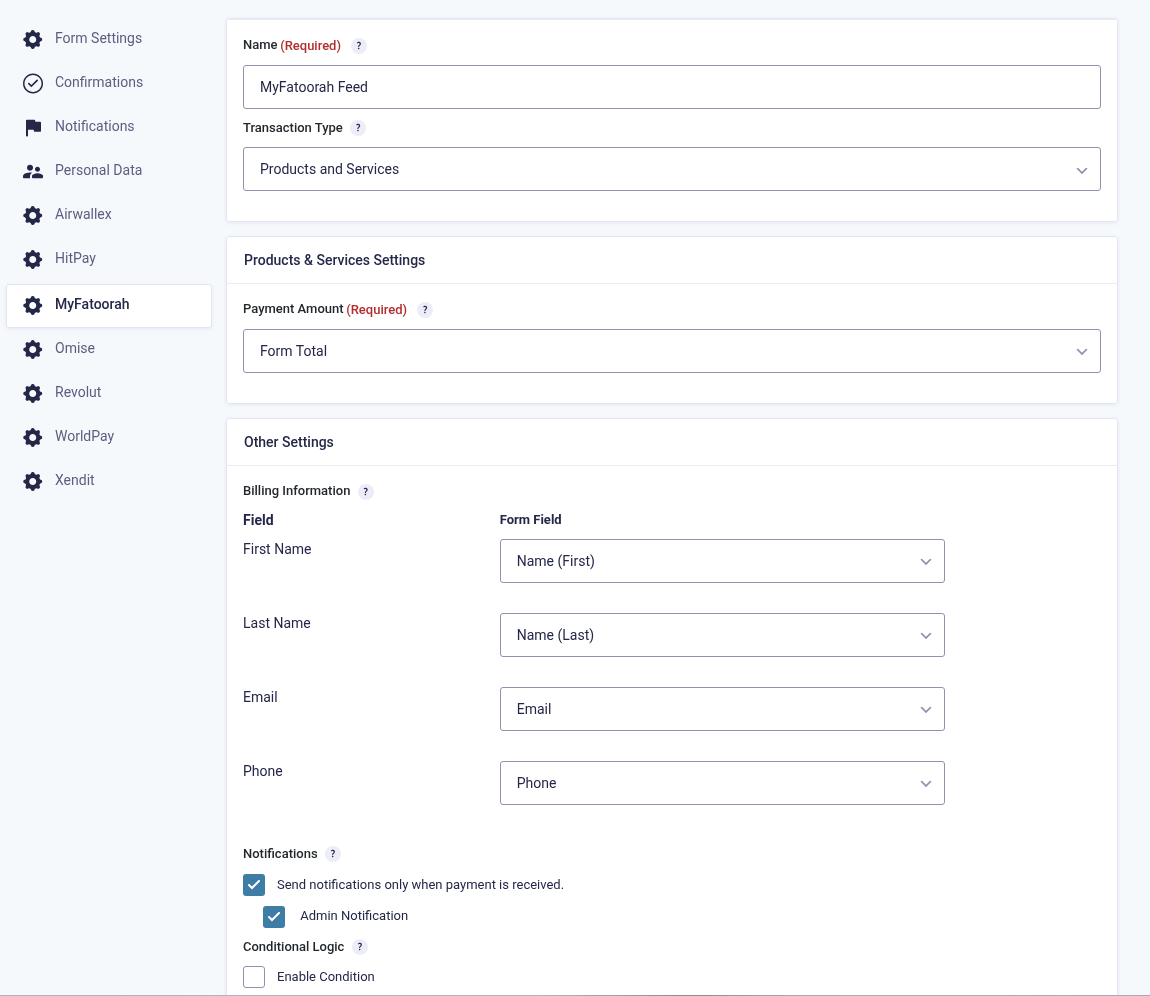
Feed: name, transaction type, payment amount and billing field mapping. 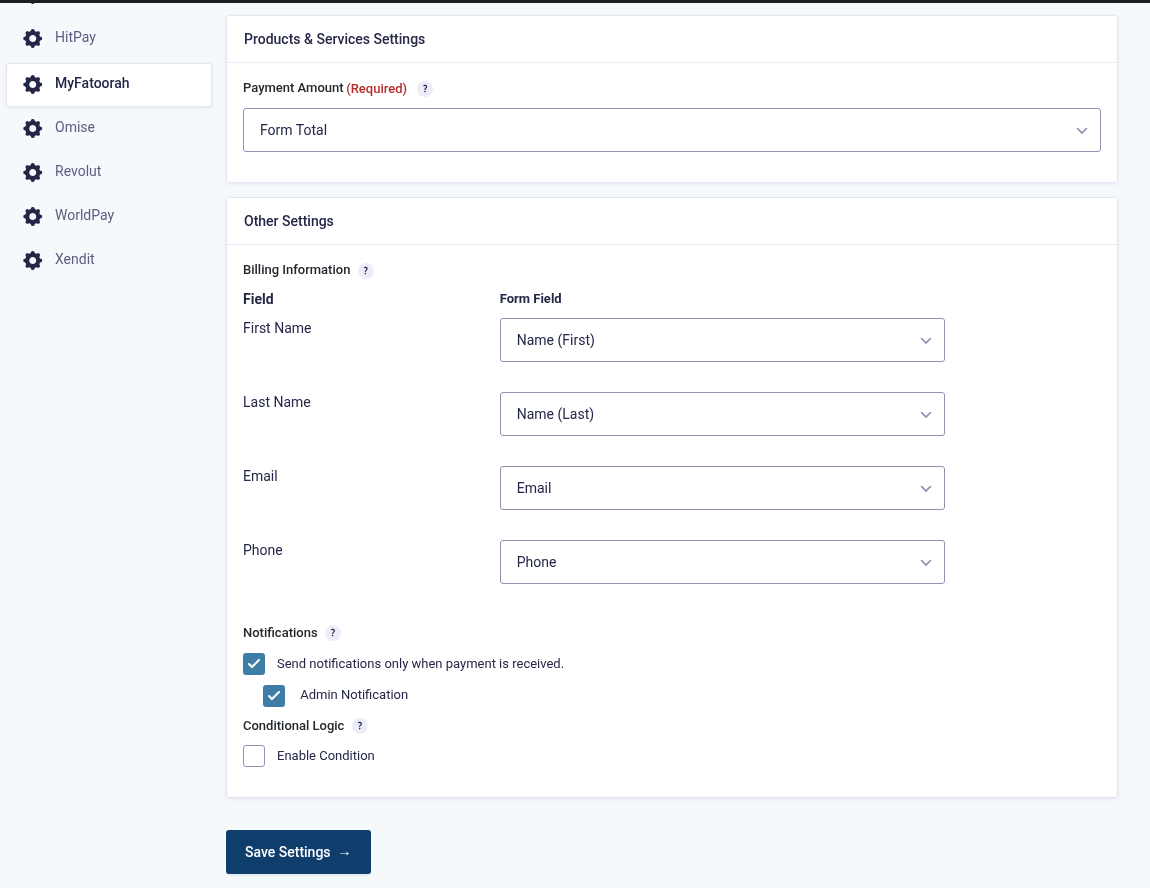
The same feed lower down (feed 193): delayed notifications with the admin notification selected. No Post Payment Actions section here, because no add-on that supports it is active on this site.
Part C: Test payment
Submit the form
Fill in the form on the front end and submit. The customer is sent to MyFatoorah.
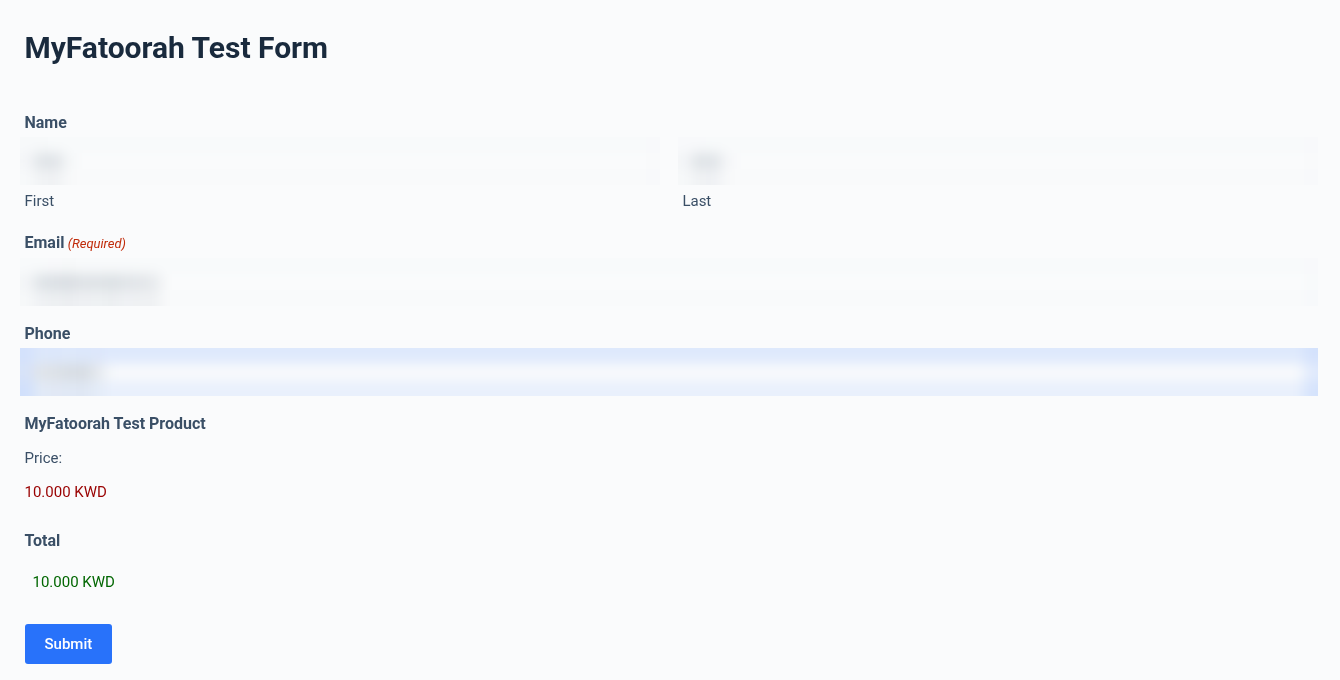
Form with a 10.000 KWD product and dummy customer details. Pay on the MyFatoorah page
Card
2223 0000 0000 0007, 01/39, CVV 100, then choose the success option in the 3-D Secure simulator. KNET:8888 8800 0000 0001, expiry 09/30.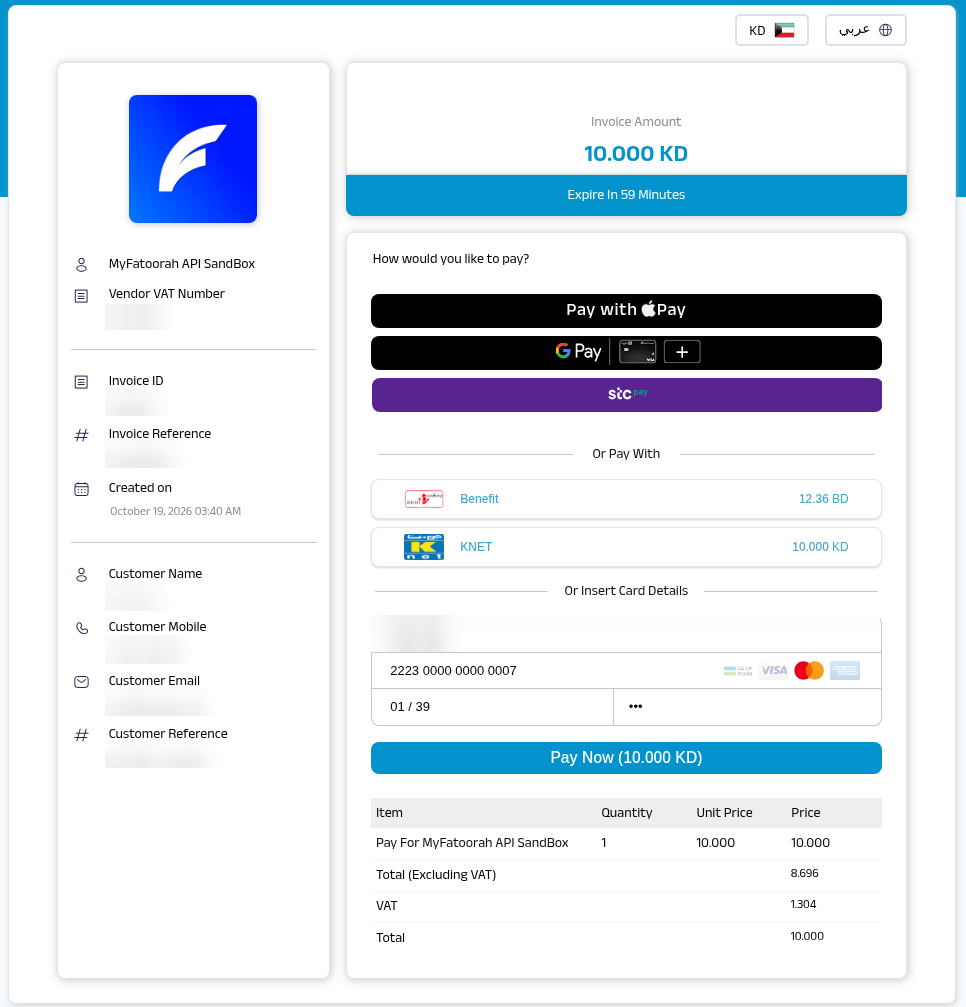
MyFatoorah Hosted Payment Page for the form payment. Confirmation
After payment the customer sees the form’s confirmation.

Form confirmation after a successful MyFatoorah payment. Entry is Paid
The entry shows Payment Status: Paid, the amount and the MyFatoorah payment ID as the Transaction ID. A note records the method and how it was confirmed (customer return or webhook). Delayed notifications are sent now.
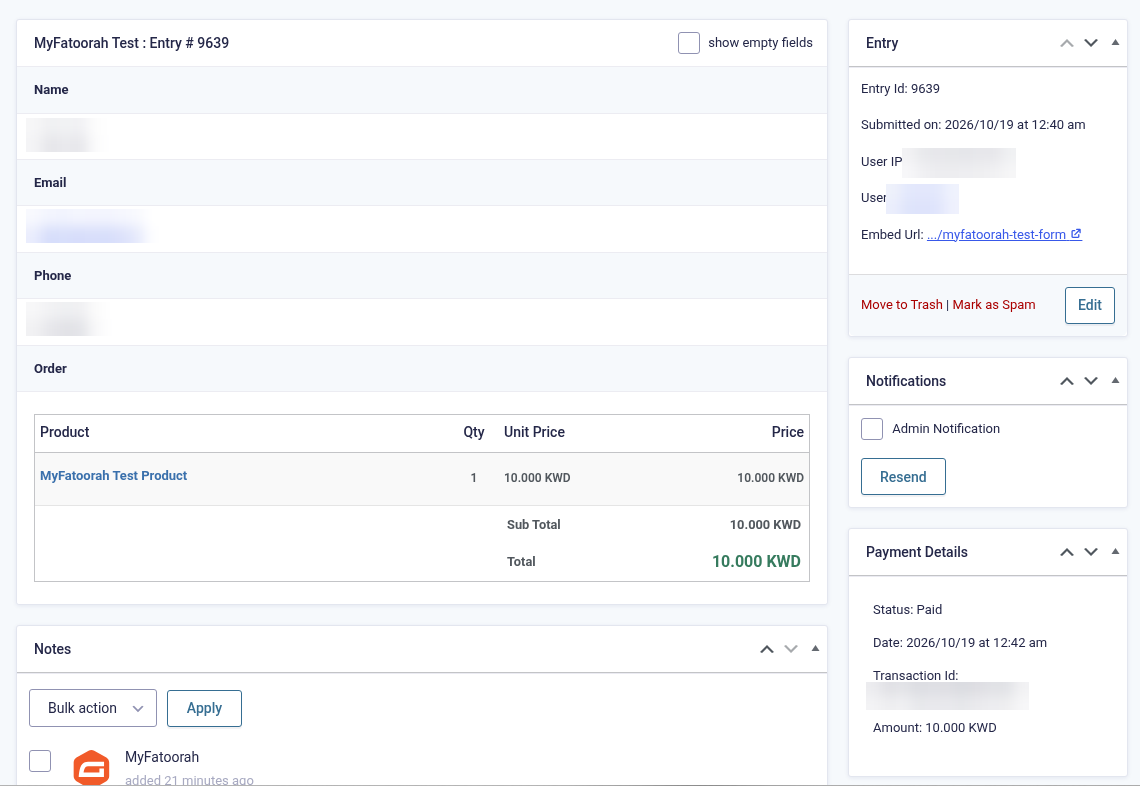
Entry 9639: MyFatoorah Test Product, Payment Status Paid, 10.000 KWD, Transaction ID set; confirmed by webhook (IDs and customer details blurred). 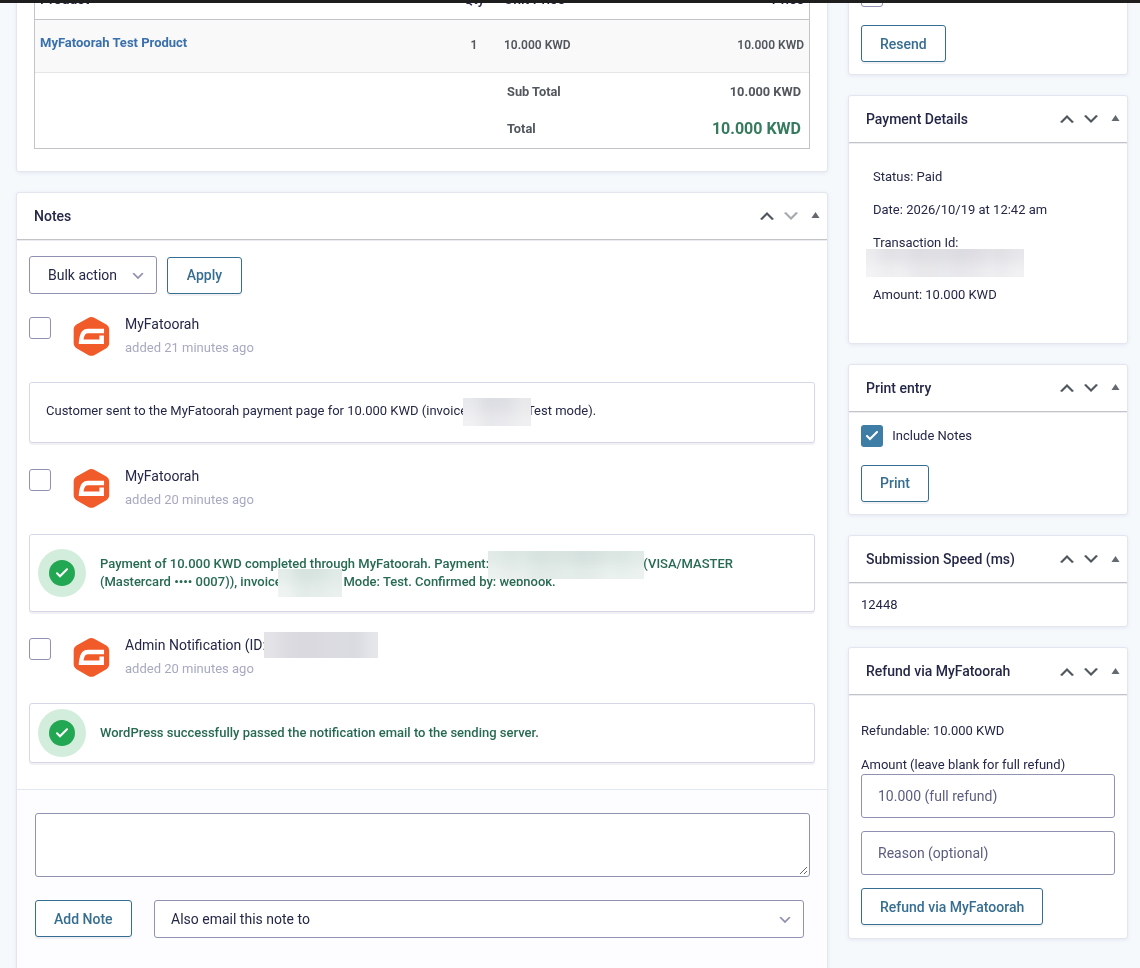
Entry 9639 notes: “Customer sent to the MyFatoorah payment page…”, then “Payment of 10.000 KWD completed through MyFatoorah. Payment: … (VISA/MASTER (Mastercard •••• 0007)), invoice …. Mode: Test. Confirmed by: webhook.” and the admin notification sent after payment (IDs blurred).
6. Getting your MyFatoorah token and webhook secret
Test token (no sign-up needed)
- Quickest: MyFatoorah publishes a public test token in its docs: docs.myfatoorah.com › API Key › Test (Demo) Token. Use the page’s copy button and paste it straight into Forms → Settings → MyFatoorah (Test API token). It works with
apitest.myfatoorah.comfor payments, but it belongs to a shared account: you cannot test refunds with it or see its portal, and you cannot set its webhook secret. - Your own demo account (recommended for full testing): register at registertest.myfatoorah.com, sign in to the demo portal (
demo.myfatoorah.com) and open Integration Settings › API Key. Create a token that is allowed to create and get payments and to Make Refund, then copy it. With your own demo account you can test refunds, signed webhooks and portal refunds.
Live token
- Sign in to your live MyFatoorah portal (your account manager activates the account and the API after verification). If the portal asks for a one-time code (2FA / OTP), enter it yourself. The token itself doesn’t need 2FA.
- Open Integration Settings › API Key and create or copy the token with the permissions above.
- In the plugin choose the Live account country (it picks the API host), paste the Live API token and save. The plugin checks it and shows “MyFatoorah Live token verified. Enabled payment methods: …”.
Webhook and webhook secret (recommended)
- In the portal open Integration Settings › Webhook Settings.
- Tick Enable Webhook, choose Webhook V2, set the endpoint to
https://your-site.com/?callback=gravityforms-myfatoorah, and tick the events Transaction Status Changed and Refund Status Changed. - Turn on the secret key. V2 requires it. Copy the secret into the plugin’s webhook secret key field. Webhooks must then carry a valid
MyFatoorah-Signature. - Without a secret, every webhook is accepted only after the payment or refund has been read back from MyFatoorah, which is just as safe. The plugin also sends its webhook URL with every payment (on by default), so events arrive even before the portal is set up.
7. Add-on settings
Forms → Settings → MyFatoorah
| Setting | Description |
|---|---|
| Mode | Test (default, apitest.myfatoorah.com, no real money) or Live. Entries keep the mode they were created in. |
| Test API token / Test webhook secret key | Demo-portal token or MyFatoorah’s public test token. Optional webhook secret: when set, webhooks must carry a valid MyFatoorah-Signature; when empty, each webhook is confirmed by reading the payment or refund back from MyFatoorah. |
| Live account country | Kuwait, Saudi Arabia, UAE, Qatar, Bahrain, Oman, Jordan or Egypt. Selects the live API host. |
| Live API token / Live webhook secret key | From your live portal › Integration Settings › API Key and Webhook Settings. |
| Webhook | Shows the URL for the portal: https://your-site.com/?callback=gravityforms-myfatoorah |
| Payment methods shown | Cards, KNET, Apple Pay, Google Pay. None ticked = every method enabled on your account. |
| Payment page language | Site language (Arabic or English), English or Arabic. |
| Default phone country | Default KW. Used to send the mobile number in international format when it was typed without a country code. |
| Minimum amount | Empty = 1.00 (0.100 for KWD, BHD, OMR, JOD), a PatSaTECH default. MyFatoorah itself only requires more than zero. |
| Payment link expires after (minutes) | Default 60. The add-on then checks MyFatoorah once more and marks the entry Failed if nothing was paid. 0 disables it. |
| Webhook URL per payment | On by default: the webhook URL is sent with every payment, so it works without portal webhook setup. |
| Debug log | Adds API and webhook details to the Gravity Forms log (Forms → Settings → Logging must be on for this add-on). Errors are always logged; tokens and secrets never are. |
8. Gravity Forms currency (required)
MyFatoorah takes payments only in KWD, SAR, AED, QAR, BHD, OMR, JOD, EGP. Gravity Forms 2.10.3 doesn’t include any of these, so the add-on adds all eight to Forms → Settings → Currency with the right symbols and decimals (3 decimals for KWD, BHD, OMR and JOD). A currency already defined by another plugin keeps its settings.
If the site currency is something else (for example USD), no payment is created. The entry is marked Failed with a note, the customer sees a short message, and an admin notice on the Gravity Forms pages says: “MyFatoorah cannot take payments in USD. Set Forms › Settings › Currency to one of: KWD, SAR, …”. The notice disappears once a supported currency is saved.
9. Feed settings, delayed notifications & Post Payment Actions
| Feed setting | Description |
|---|---|
| Name | For your reference. |
| Transaction Type | Products and Services (one-time payments). |
| Payment Amount | Form Total or a product field. |
| Billing Information | First Name, Last Name, Email and Phone, sent to MyFatoorah for the payment page and receipt. |
| Notifications | Tick Send notifications only when payment is received and choose which ones. They are held while the entry is unpaid and sent after payment (tested on entries 9636, 9637 and 9639). |
| Post Payment Actions | Shown only when another add-on that supports delayed actions (e.g. Mailchimp, User Registration, Zapier) is active. It lets that add-on’s feeds wait until the payment is received. Gravity Forms hides the section otherwise. |
| Posts | “Create post only when payment is received” for forms that create posts. |
| Conditional Logic | Use MyFatoorah only when a condition is met. |
10. Webhooks
Webhooks tell the site about a payment even if the customer closes the browser before coming back. Set them in your portal under Integration Settings › Webhook Settings. The add-on also sends its URL with each payment.
Webhook endpoint: https://your-site.com/?callback=gravityforms-myfatoorah
| Portal event (tick it) | Payload | What the plugin does |
|---|---|---|
| Transaction Status Changed | V2 event code 1 (PAYMENT_STATUS_CHANGED) / V1 TransactionsStatusChanged | A payment succeeded, failed or was cancelled. The plugin reads the payment back from MyFatoorah (invoice, status, amount, currency) and only then updates the entry. A SUCCESS result is final; KNET can send several events for one payment, and repeats are ignored. |
| Refund Status Changed | V2 event code 2 (REFUND_STATUS_CHANGED) / V1 RefundStatusChanged | A refund was completed or cancelled, whether it came from the plugin or the MyFatoorah portal. A completed refund gets a note (portal refunds are recorded too). A cancelled refund gets a clear warning that the customer was not refunded. |
Other events (Balance Transferred, Supplier events, Recurring…) are acknowledged with HTTP 200 and ignored. Both Webhook V2 (recommended, signed) and the older V1 format are accepted. The shared demo account behind MyFatoorah’s public test token sends V1. Events for invoices that this site didn’t create are acknowledged quietly and never touch a entry. A shared test account sends every merchant’s events, roughly every 15 seconds, and the plugin logs that only once per 10 minutes.
11. Payment flow & entry statuses
| Situation | Payment Status |
|---|---|
| Form submitted, customer on the MyFatoorah page | Processing |
| Payment successful (amount and currency match) | Paid, delayed notifications and actions run |
| Declined, cancelled or 3-D Secure not completed | Stays Processing with one note; the customer sees the reason and a Try again button that opens a new payment link for the same entry |
| Time limit reached without a payment | Failed, after one last check with MyFatoorah |
| Below the minimum, unsupported currency or no token | Failed at once with a note; no payment is created |
| Fully refunded | Refunded |
12. Refunds
On a paid entry, the sidebar has a Refund via MyFatoorah box. Enter an amount (empty = the full remaining amount) and click Refund. MyFatoorah completes refunds in the background: the first note says “Refund of … requested from MyFatoorah (refund …, status PENDING)…”, and a second note follows when it is completed. If MyFatoorah cancels the refund, a warning note says the customer was not refunded. The entry becomes Refunded once the whole amount is refunded.
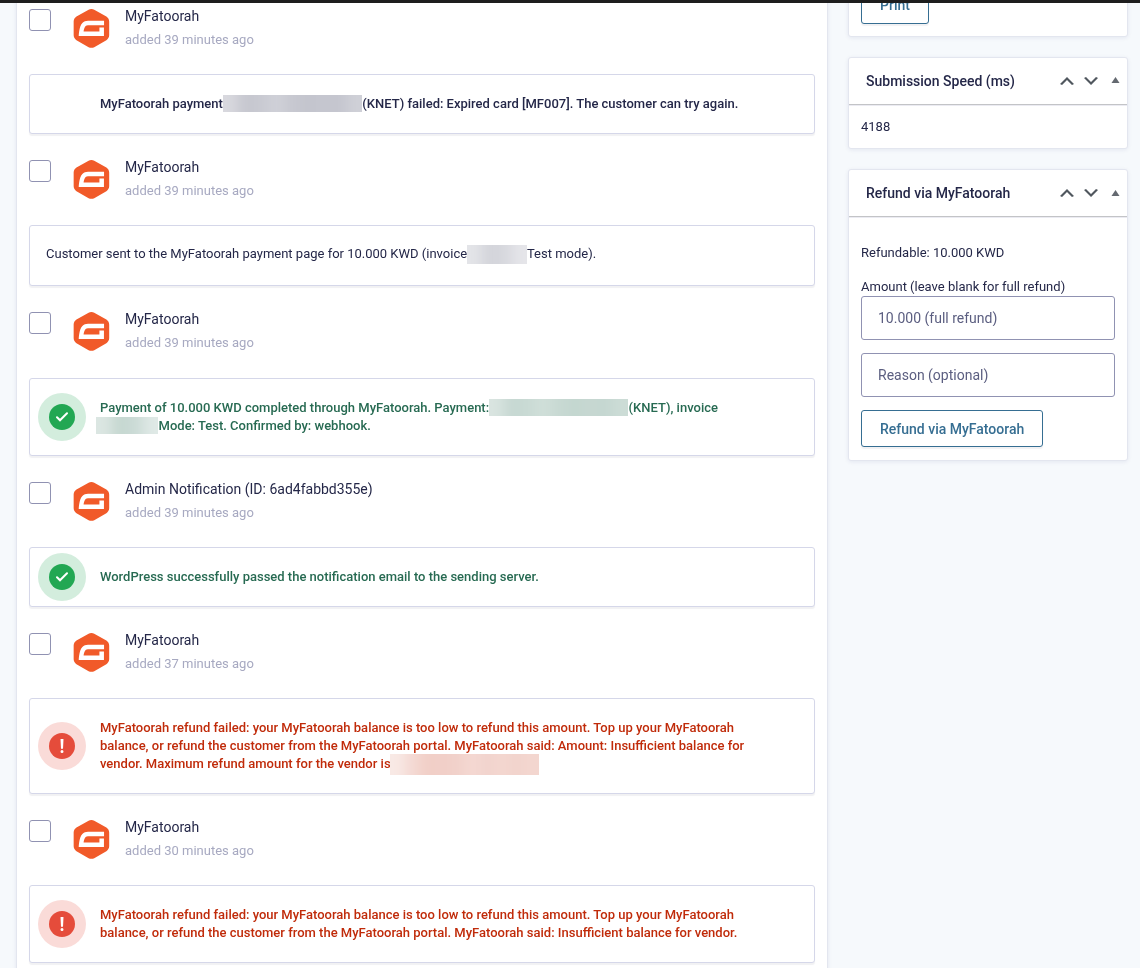
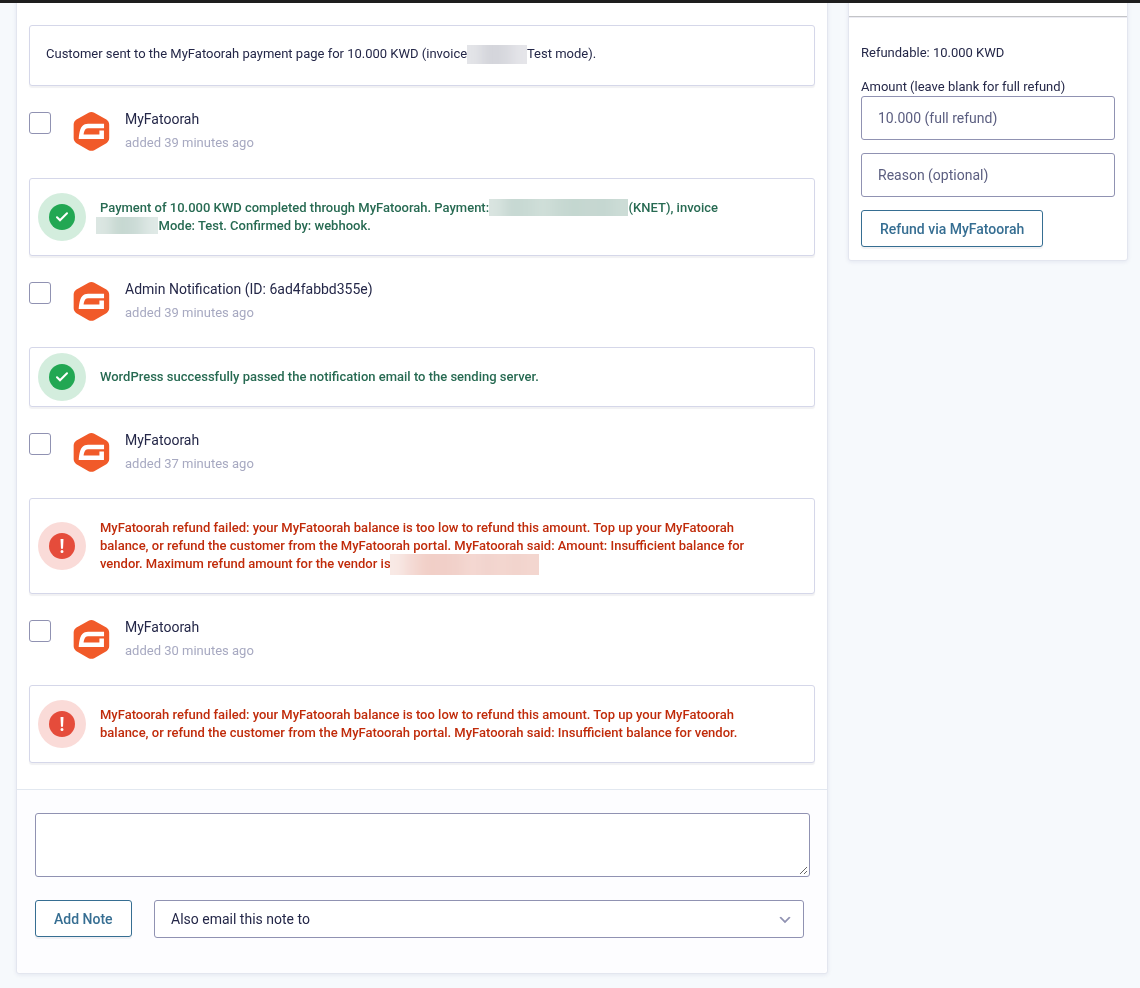
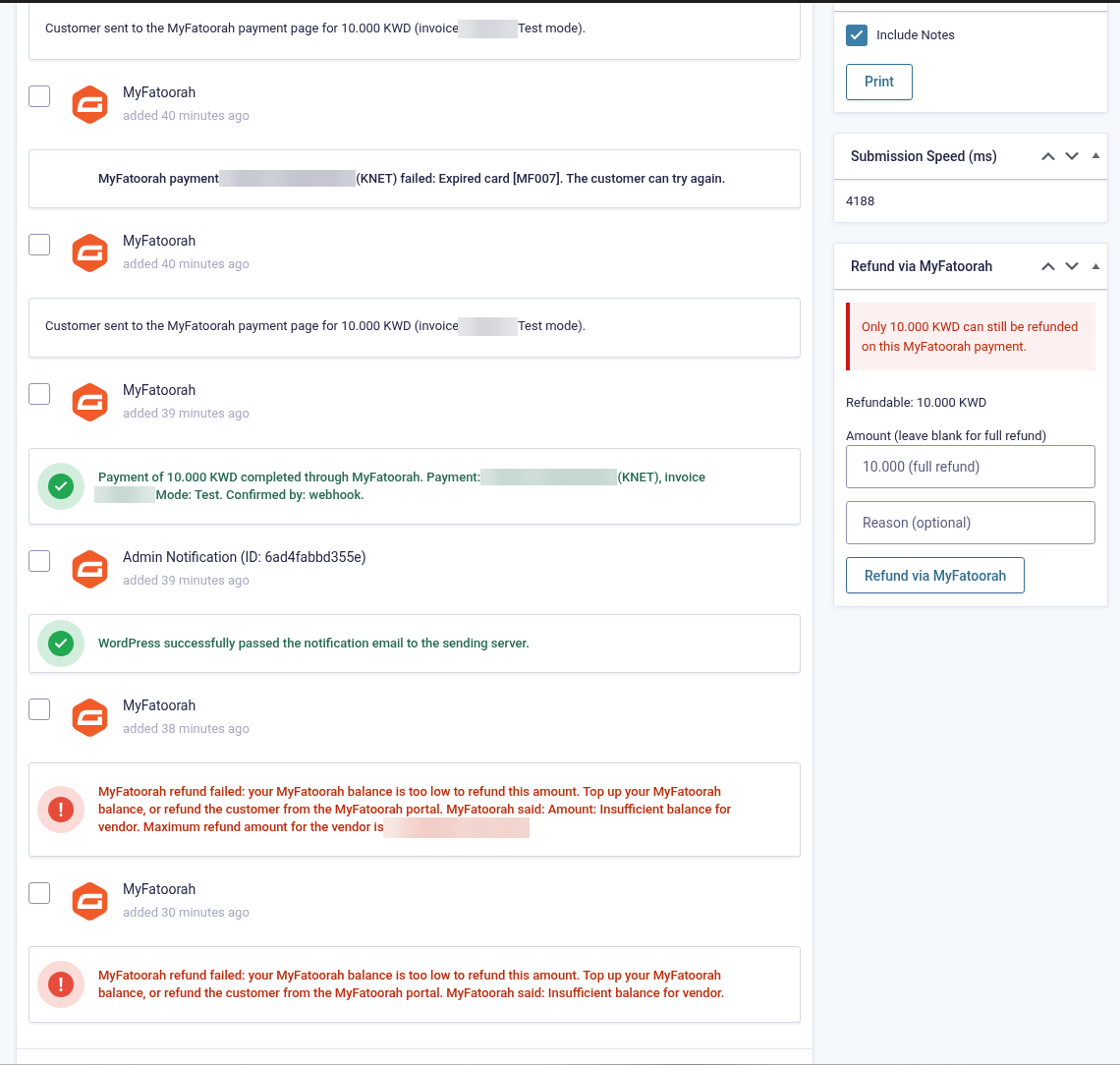
Refunds are sent in your MyFatoorah account (base) currency and converted using the payment’s own rate. Every refund request and result is written to the log (failures as errors).
13. Declines, minimum amount and time limit
Declined payments
The customer comes back to the site with the reason (for example “Your card has expired. Please use another card.”) and a Try again button. The entry stays Processing with exactly one failure note (for example “Expired card [MF007]. The customer can try again.”). No notification is sent until the payment succeeds.

Minimum amount
A total below the minimum (default 0.100 KWD/BHD/OMR/JOD, 1.00 for the others) creates no MyFatoorah payment. The customer sees “The minimum amount for online payment is 0.100 KWD.” and the entry is marked Failed with a note.
Time limit and abandoned payments
A customer who leaves the MyFatoorah page leaves the entry in Processing, with no notification. The payment link expires after Payment link expires after (default 60 minutes). Two minutes later the add-on checks MyFatoorah once more. If nothing was paid, the entry is marked Failed with the note “No completed MyFatoorah payment 60 minutes after the form was submitted; entry marked Failed.” The check runs through WP-Cron, so on a quiet site it runs at the first page visit after that time. There is only one check per entry, timed from the latest payment link. If MyFatoorah can’t be reached, it retries every 15 minutes, up to three times.
14. Testing (test cards)
Test cards from MyFatoorah’s docs (Test Cards). Use any card-holder name (two words). They work only with a test token on apitest.myfatoorah.com.
| Method | Card / details | Result |
|---|---|---|
| Visa / Mastercard | 5123 4500 0000 0008 or 2223 0000 0000 0007, expiry 01/39, CVV 100 | Paid, after MyFatoorah’s 3-D Secure simulator (choose the success option). Used for entries 9636 and 9639. |
| KNET | 8888 8800 0000 0001, expiry 09/30 | Captured (paid). |
| KNET | Same card, any other expiry (e.g. 01/30) | Not captured. The customer sees “Your card has expired. Please use another card.” and can try again (entries 9637 and 9640). |
| AMEX | 3456 7890 1234 564, expiry 04/37 | Declined (MyFatoorah error MF003). A friendly “declined” message is shown. |
| mada (SAR) | 4464 0400 0000 0007, 02/29, CVV 123 | Paid (Saudi riyal payments). |
| Benefit (BHD) | 4600 4101 2345 6789 paid · 4550 1201 2345 6789 expired · 4845 5501 2345 6789 wrong PIN | As listed. |
| STC Pay | Mobile 0557877988, OTP 1234 | Paid. |
- Apple Pay / Google Pay appear on the payment page only when they are enabled on the MyFatoorah account (Apple Pay only in Safari or on Apple devices).
- Test payments run in KWD, the test account currency. Other store currencies are converted at MyFatoorah’s rate.
15. Countries, currencies & payment methods
Who can use MyFatoorah. MyFatoorah serves businesses in Kuwait, Saudi Arabia, the UAE, Qatar, Bahrain, Oman, Jordan and Egypt. Each country has its own portal and API token, and the plugin picks the right live API host from the Live account country setting (Saudi Arabia, the UAE, Qatar and Egypt have their own hosts). A live account is opened with MyFatoorah: their account manager activates it after business verification (KYC).
Currencies. The Gravity Forms currency must be one of KWD, SAR, AED, QAR, BHD, OMR, JOD, EGP. MyFatoorah settles in your account (base) currency and converts other display currencies at its own rate. Refunds are sent in the base currency, and the plugin converts them using the payment’s own rate.
Minimum amount. The MyFatoorah API only requires an amount above zero and publishes no per-method minimums. The plugin has a Minimum amount setting: empty means 0.100 for KWD, BHD, OMR and JOD (3-decimal currencies) and 1.00 for the others. Below it the customer sees “The minimum amount for online payment is 0.100 KWD…” before anything is created (tested with a 0.050 KWD order).
Payment methods. Whatever is enabled on your MyFatoorah account: KNET, Visa / Mastercard, mada, AMEX, Benefit / BenefitPay, UAE and Qatar debit cards, Apple Pay, Google Pay, STC Pay, Tamara, Samsung Pay, Fawry, Meeza and others. When you save the token, the plugin lists the methods enabled on your account. You can limit the payment page to Cards, KNET, Apple Pay and Google Pay, or leave it empty to show everything.
In your MyFatoorah portal (Sales › Invoices / Transactions), each form payment has the external identifier gf-<entry>-<attempt>-…, and the MyFatoorah payment ID is the entry’s Transaction ID.
16. Logging
Enable Forms → Settings → Logging and turn logging on for MyFatoorah Gateway for Gravity Forms, then view the log from the same page. Real failures are written as ERROR lines (warnings start with “Warning:”). Normal events such as applied webhooks (“… verified by API lookup”) and refund requests and results are DEBUG lines. Tick the add-on’s Debug log setting for full API details. Tokens, secrets and card data are never logged.
17. Troubleshooting & FAQ
The currency list has no Kuwaiti Dinar / “payments in USD are not possible”
Make sure the add-on is active, then choose one of KWD, SAR, AED, QAR, BHD, OMR, JOD, EGP under Forms → Settings → Currency and save.
“The token does not have the required permissions” when saving
Some tokens, including the public demo token, can’t call MyFatoorah’s newer method list. The add-on falls back to the v2 list and still shows your methods. If the message stays, allow creating and getting payments (and Make Refund) under Integration Settings › API Key.
Paid on MyFatoorah but the entry is still Processing
Check that Webhook URL per payment is on and the site uses https, or set the portal webhook to https://your-site.com/?callback=gravityforms-myfatoorah. The return page and the expiry check also read the payment. Check the log.
A refund says “your MyFatoorah balance is too low”
Top up your MyFatoorah balance or refund from the portal. With the public test token this always happens; use your own demo account to test refunds.
The log shows “not for an invoice of this site”
Normal with the shared public test token, whose account sends every merchant’s events. They are ignored and never touch an entry.
Notifications were sent before payment
In the feed, tick “Send notifications only when payment is received” and select those notifications.
Subscriptions?
No. One-time payments only.
18. Tested on
- WordPress 7.1.3
- Gravity Forms 2.10.3
- PHP 8.1.34; PHP 7.4 or later required
- MyFatoorah test environment with the public demo token, Gravity Forms currency Kuwaiti Dinar. Live payments not yet tested.
- Scenarios: card payment with delayed notification, KNET declined with Try again and retry confirmed by webhook, refund refused for low balance and over-refund, abandoned entry, currency setup without warnings, log without errors or tokens
- Not yet tested live: successful refunds, signed Webhook V2, Apple Pay / Google Pay, live payments
19. Changelog
1.0.0 — 2026-10-19
- Initial release on the Gravity Forms Payment Add-On Framework.
- MyFatoorah Hosted Payment Page (API v3), English or Arabic; 8 countries with the live host chosen by country.
- Webhooks V2 (MyFatoorah-Signature) and V1, verified by signature or API lookup; webhook URL sent with each payment.
- Every payment re-read from the API under a per-entry lock; decline reasons with Try again.
- Full and partial refunds with currency conversion and background status tracking; portal refunds recorded.
- Delayed notifications, delayed posts and Post Payment Actions; KWD, SAR, AED, QAR, BHD, OMR, JOD, EGP added to Gravity Forms; minimum amount; unpaid entries marked Failed on a timer; logging.
20. Support
PatSaTECH · [email protected] · www.patsatech.com
Please include your WordPress, Gravity Forms and PHP versions, the mode and account country, and the relevant log lines. Never send your token or webhook secret.








