Quick answer
- Quick answer
- Classify the credential before rotating it
- Check the provider’s trust and overlap model
- Inventory every endpoint and verifier
- Prepare dual verification safely
- Run the routine rotation
- Replay and negative-test the cutover
- Monitor and retire the old secret
- Use a separate compromise path
- Handle outbound WooCommerce webhook secrets separately
- FAQ
- Sources
To rotate a payment webhook secret safely, treat it as a verification cutover—not a text-field replacement.
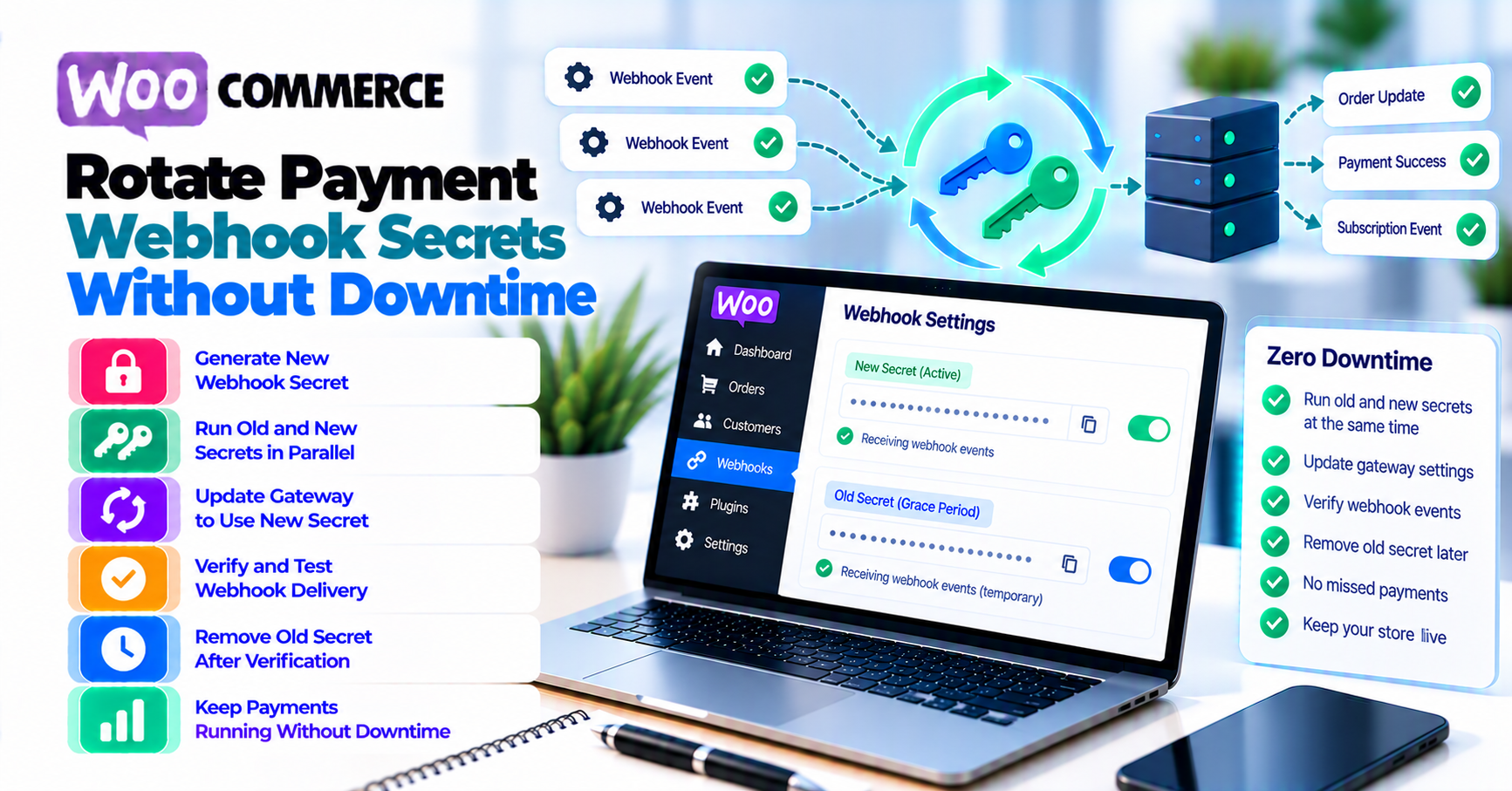
Use this sequence:
- Identify the exact inbound endpoint, provider, environment, and signature scheme.
- Confirm whether the provider supports two active secrets, delayed expiry, multiple endpoints, or no overlap.
- Inventory every application instance, worker, queue consumer, and secret store that verifies events.
- Prepare a verifier that accepts the provider-supported old/new set without weakening timestamp, raw-body, event-ID, account, or order checks.
- Generate or roll the new secret through a trusted provider session.
- Deploy the new secret to every verifier during the documented overlap.
- Send provider-supported test events and replay safe test deliveries.
- Confirm valid events pass, invalid and stale events fail, and duplicates do not repeat business actions.
- Monitor provider delivery, signature failures, verification by secret label, and WooCommerce order updates.
- Expire the old secret at the provider, prove it no longer verifies, then remove it from the application and vault.
There is no universal “zero-downtime webhook rotation” recipe. Stripe currently documents an optional overlap of up to 24 hours for an endpoint secret. Other providers can switch keys differently or use certificate-based verification rather than a merchant-held HMAC secret.
If the old secret may be compromised, containment can require immediate expiry. Do not preserve a leaked secret merely to keep the rollout comfortable.
Classify the credential before rotating it
Several values near a payment integration can be called a “secret,” but they protect different directions.
| Credential | Direction and purpose | This runbook? |
|---|---|---|
| API secret or access token | WooCommerce or middleware authenticates outbound API calls to the provider | No |
| Inbound webhook signing secret or HMAC key | WooCommerce verifies provider events received at its callback endpoint | Yes |
| Provider certificate/public-key verification | WooCommerce verifies a provider signature without a shared endpoint secret | Provider-specific |
| Outbound WooCommerce webhook secret | An external receiver verifies events sent by WooCommerce | Separate procedure |
| TLS private key | Server identity and HTTPS | No |
| WordPress nonce or application password | WordPress request/session authentication | No |
Rotating an API key does not rotate a webhook signing secret. Rotating the signing secret does not repair an expired API credential.
The completed PatSaTECH API-key rotation bundle deliberately excludes webhook secrets. Keep separate owners, change records, test cases, and rollback conditions.
If the secret change is part of a processor replacement rather than routine credential hygiene, follow the broader WooCommerce payment-gateway migration plan.
Confirm direction with one event
For the endpoint being changed, document:
- Who sends the HTTP request
- Who verifies it
- Which header or payload field carries the signature
- Which endpoint ID, webhook ID, or account context participates
- Which secret, key, or certificate the verifier uses
- Whether the raw request body must remain unchanged
Do not rotate a field until those answers are clear.
Check the provider’s trust and overlap model
Provider capabilities determine the runbook.
Stripe: documented delayed expiry
Stripe’s webhook documentation says endpoint signing secrets can be rolled in Workbench. The current secret can expire immediately or after a delay of up to 24 hours. During that overlap, multiple secrets are active and Stripe generates one signature per active secret.
That documented window allows:
- Roll the endpoint secret with delayed expiry.
- Add the new secret to all verifiers.
- Observe new-secret verification.
- Expire the old secret.
- Remove the old secret from the application.
Use the current Stripe interface and documentation; do not assume another processor copies this behavior.
Adyen: endpoint-linked HMAC keys
Adyen’s HMAC verification documentation says each secret HMAC key is linked to one webhook endpoint and that test and live require different keys. It documents generating or entering a key in the webhook configuration and then saving it for signing subsequent events.
The page does not promise the same delayed dual-secret behavior as Stripe. Confirm Adyen’s current cutover procedure for the webhook type before changing the key. Do not invent overlap in the WooCommerce verifier.
PayPal: certificate and webhook-ID verification
PayPal’s webhook integration documentation describes cryptographic verification using transmission headers, the webhook ID, the original raw body, and PayPal’s certificate, or the Webhooks Management verification endpoint.
That is not the same merchant-held HMAC model. A runbook titled “replace the webhook secret” may not apply. Rotate the actual trust material or registration element that PayPal documents rather than forcing a shared-secret pattern.
Build a capability record
For each endpoint, record:
| Capability | Evidence |
|---|---|
| Trust model | Shared HMAC, endpoint secret, certificate/public key, verification API |
| Endpoint identity | Provider endpoint or webhook ID |
| Test/live separation | Exact provider account and environment |
| Overlap support | None, delayed expiry, dual key, multiple endpoint, provider-assisted |
| Maximum overlap | Provider-documented value |
| Signature behavior during overlap | One or multiple signatures; library behavior |
| Replay tooling | Test event, resend, event simulator, CLI |
| Retry behavior | Duration, backoff, failure response |
| Emergency revocation | Immediate control and support path |
| Source | Current provider URL and review date |
If overlap is unknown, stop and confirm with provider support. Do not silently treat “Generate new key” as “both keys remain valid.”
Inventory every endpoint and verifier
A secret can be correct in wp-admin while another runtime still verifies with the old value.
Inventory:
- Production and sandbox callback endpoints
- Canonical host and path
- Provider endpoint or webhook ID
- WooCommerce gateway extension and version
- WordPress option or extension setting
- Environment variable or secret-vault entry
- Edge Worker or middleware
- Queue consumer
- Multiple PHP/web nodes
- Blue/green or regional deployment
- Serverless verifier
- Background replay or reconciliation tool
- Monitoring that sends signed test events
For each consumer, record:
- Owner
- Deployment method
- Secret-store path, not the secret value
- Last reload or restart requirement
- Current version or fingerprint
- Health check
- Rollback method
Keep this inventory with the store’s WooCommerce payment-gateway integration checklist so callback ownership does not disappear after launch.
Never place both secrets in one unstructured setting
Dual verification needs an explicit supported configuration:
- Secret array or versioned secret entries
- Stable labels such as
currentandprevious - Controlled read access
- Audited deployment
- Defined removal time
Do not concatenate secrets, paste comma-separated values into a single-key field, or modify a vendor plugin’s database value unless the extension explicitly supports that format.
Preserve the raw body
Stripe’s signature troubleshooting documentation requires the original request body, signature header, and endpoint secret. Parsing and reserializing the body can invalidate verification.
Review:
- Reverse proxies
- Edge Workers
- WAF transforms
- Framework body parsers
- WordPress security plugins
- Custom logging middleware
Secret rotation should not be combined with a body-processing refactor.
Prepare dual verification safely
Dual verification means accepting either approved secret during the documented overlap. It does not mean accepting an unsigned event or skipping replay controls.
Verification requirements that stay unchanged
For every event:
- Use the provider’s supported library or algorithm.
- Verify the signature against the exact raw payload.
- Enforce the provider’s timestamp policy.
- Confirm expected endpoint, account, and environment.
- Deduplicate the provider event ID.
- Validate the related order, amount, currency, and state transition.
- Return the provider’s expected response.
Label verification without logging secrets
Record:
secret_version=currentorprevious- Endpoint ID
- Event ID
- Event type
- Verification outcome
- Failure reason category
- Timestamp
Never log:
- Secret value
- Derived signing key
- Full signature header in unrestricted logs
- Raw customer payment payload
The label lets the team see whether any legitimate events still require the old secret.
Deploy to all nodes before trusting the overlap
Use a deployment checklist:
- New secret is stored in the approved vault.
- Every application node can read it.
- Cache or process reload occurred where required.
- Old secret remains available only for the provider-supported window.
- Health checks verify both expected secret labels.
- Rollback can restore the last trusted verifier configuration.
Do not assume an environment-variable edit reached long-running PHP workers, containers, or serverless versions.
Run the routine rotation
This sequence assumes the old secret remains trusted and the provider documents overlap.
1. Establish a baseline
Before changing anything, record:
- Webhook success and signature-failure rate
- Provider delivery latency and retry count
- WooCommerce orders stuck Pending
- Event volume by endpoint
- Current verifier version
- Last event verified by the old label
Use PatSaTECH’s webhook-monitoring guide for HTTP, signature, latency, and order-correlation evidence.
2. Confirm environment and endpoint
Check:
- Sandbox versus production
- Provider account
- Exact endpoint or webhook ID
- Canonical URL
- Current secret storage
- Every consumer
Rotating the sandbox endpoint while deploying the production secret is an avoidable outage.
3. Roll or generate the new secret
Use a trusted provider administrator session. Select delayed expiry only when the provider offers and documents it.
Copy the new value once into the approved secret store. Do not stage it in email, chat, a ticket, a screenshot, shell history, or Git.
4. Deploy dual verification
Deploy the verifier configuration that accepts the provider-supported old/new set. Keep:
- Raw-body handling
- Timestamp checks
- Event deduplication
- Account and environment validation
- Safe order transitions
5. Send a provider-supported test event
Verify:
- Event reaches the intended endpoint.
- Signature passes with the new label.
- WooCommerce records the expected safe result.
- Duplicate delivery is a no-op.
- Response arrives within provider expectations.
6. Observe real and replayed events
During the overlap:
- Monitor new-secret verification.
- Identify nodes still using only the old secret.
- Replay safe test or non-destructive events with provider tooling.
- Confirm provider retries do not fail signature checks.
- Check order notes and gateway logs.
7. Expire the old secret
After every verifier uses the new secret and old-secret legitimate traffic reaches zero, expire or revoke the old value through the provider’s supported control.
Do not extend overlap indefinitely. Two active secrets increase the credential set that must be protected.
8. Remove the old application secret
Remove it from:
- Vault
- Environment configurations
- Previous deployment version where required
- WordPress settings if stored there
- Worker or serverless bindings
- Runbooks and temporary deployment variables
Retain only non-secret evidence: secret label, endpoint, timestamps, approvals, tests, and retirement confirmation.
Replay and negative-test the cutover
A single successful delivery is not enough.
| Test | Expected result |
|---|---|
| Valid event signed under new secret | Accepted and processed once |
| Valid event during supported overlap | Accepted by an approved secret |
| Invalid signature | Rejected; no order change |
| Missing signature | Rejected; no order change |
| Stale signed payload | Rejected according to provider timestamp rules |
| Duplicate event ID | Safe no-op or idempotent response |
| Wrong endpoint/account/environment | Rejected |
| Event replayed after old-secret expiry | Accepted only if provider re-signs with the active model; otherwise rejected as documented |
Provider retry after temporary 5xx |
Verified and applied once |
| Signature passes but order data mismatches | Rejected or quarantined; no unsafe transition |
Do not replay captured payloads casually
A copied production payload can contain customer or payment metadata. Use provider test tooling, sanitized fixtures, or a controlled replay system with restricted access.
Verify the business effect
For a payment-success test:
- One event ID
- One order transition
- One stock or access effect
- One customer email
- One transaction reference
For refund, dispute, or subscription events, choose a sandbox test that cannot affect live money or customers.
Check old-secret rejection explicitly
After retirement, verify the old application secret is absent and cannot validate a controlled old-signature fixture under the provider’s rules.
Do not send the retired secret to an external testing tool.
Monitor and retire the old secret
Correlate three views:
Provider
- Delivery status
- Response code
- Retry schedule
- Endpoint ID
- Event ID
- Signing-secret roll and expiry time
Application
- Verification result
- Secret label
- Timestamp result
- Event deduplication
- Handler outcome
- Order/subscription reference
WooCommerce
- Gateway log
- Order note
- Order and subscription status
- Refund, capture, or fulfillment effect
Use a shared cutover window and timezone.
Retirement checklist
- New secret verifies live or provider-supported test events.
- Every node is on the intended verifier version.
- Old-secret legitimate verification count is zero.
- No signature-failure spike exists.
- Provider retries are healthy.
- Pending WooCommerce orders are at baseline.
- Old provider secret is expired.
- Old application secret is removed.
- Temporary access is revoked.
- Runbook and owner are updated.
Rollback boundaries
For a routine rotation, rollback can mean restoring the previous trusted verifier deployment while the old secret remains active.
Rollback must not mean:
- Reactivating a compromised secret
- Disabling signature verification
- Accepting all timestamps
- Processing duplicate events twice
- Copying secrets into plugin code
If the provider switch is immediate and irreversible, test and stage the verifier before the provider-side change or use the provider-supported alternative.
Use a separate compromise path
Routine rotation optimizes continuity. Compromise response optimizes containment.
If the signing secret appears in source control, logs, a ticket, a screenshot, or an unauthorized party’s possession:
- Open a security incident.
- Generate or roll a replacement from a trusted session.
- Use immediate expiry when risk requires it.
- Deploy the replacement to all verifiers.
- Review signature-verification and event-processing logs.
- Reconcile affected orders, refunds, subscriptions, disputes, and fulfillment.
- Check whether API keys or other credentials were exposed separately.
- Preserve evidence without preserving the leaked value in ordinary tickets.
- Contact the provider, acquirer, host, or security adviser as required.
Do not keep the compromised secret active for a full overlap merely to avoid a brief operational impact. Do not claim rotation proves no forged event was processed.
Investigate forged-event impact
Review high-impact event handlers:
- Payment succeeded
- Refund completed
- Dispute opened or closed
- Subscription renewed or canceled
- Payout or account status changed
Compare provider objects with WooCommerce effects. Signature verification proves event origin only when the secret remained secret and the implementation was correct.
Handle outbound WooCommerce webhook secrets separately
WooCommerce’s Webhooks documentation describes outbound webhooks created under WooCommerce → Settings → Advanced → Webhooks. WooCommerce uses the configured secret to generate a hash included in request headers and sends the event to a delivery URL.
That direction is:
WooCommerce → external receiver
An inbound payment-provider webhook is:
Provider → WooCommerce gateway callback
For an outbound WooCommerce webhook secret:
- Coordinate the sending WooCommerce configuration and receiving service.
- Determine whether the receiver can accept old/new secrets.
- Test the initial ping and event delivery.
- Monitor WooCommerce delivery failures.
- Know that WooCommerce can disable a webhook after consecutive failures according to its documented behavior.
Do not rotate the outbound secret when the incident concerns an inbound gateway callback unless evidence requires both.
Use staging versus production payment testing to keep endpoint URLs and secrets separated by environment.
FAQ
Can every payment webhook secret be rotated with dual overlap?
No. Stripe documents delayed old-secret expiry for up to 24 hours. Other providers may use immediate HMAC replacement, multiple endpoints, public-key verification, or a verification API. Follow the exact provider model.
How long should old and new secrets coexist?
Use the provider’s documented maximum and only as long as needed to update every verifier and prove new-secret traffic. Do not leave the previous secret indefinitely.
Should I rotate the payment API key at the same time?
Not by default. API keys authenticate outbound requests; webhook secrets authenticate inbound events. Separate the changes unless the provider’s incident guidance requires both.
What if my WooCommerce plugin accepts only one signing secret?
Do not invent a comma-separated or concatenated value. Check whether the provider supports staging a second endpoint, whether the extension has a documented rotation mode, or whether the vendor must supply a compatible update.
Can I temporarily disable signature verification?
No. That turns the overlap window into an unauthenticated callback endpoint. Use the provider-supported trust model and fail closed on invalid events.
Why does signature verification fail after rotation?
Common causes include updating the wrong environment or endpoint, incomplete deployment across nodes, stale process configuration, changed raw-body handling, wrong signature header, clock issues, or an already expired old secret.
Should I replay old events after rotation?
Use provider-supported replay or test tooling. Confirm how replayed events are signed, keep event processing idempotent, and avoid reapplying the business action.
Is a webhook ID the same as a secret?
No. Some schemes include a webhook or endpoint ID as context while relying on HMAC, certificates, or a provider verification API for authenticity. Treat each value according to provider documentation.
What should the change record contain?
Endpoint and environment, non-secret old/new labels, provider capability, owner, overlap start and expiry, verifier deployments, tests, monitoring results, old-secret retirement, and any incidents. Never include secret values.
Sources
Primary sources accessed September 20, 2026:
- Stripe Docs — Receive events in your webhook endpoint
- Stripe Docs — Resolve webhook signature verification errors
- Adyen Docs — Verify HMAC signatures
- PayPal Developer — Integrate webhooks
- PayPal Developer — Webhooks Management API
- WooCommerce — Webhooks
This article provides general technical guidance, not a universal secret-rotation guarantee. Confirm overlap, verification, replay, retry, and emergency-revocation behavior with the current provider and WooCommerce extension documentation.