Quick answer
- Quick answer
- Separate four payment channels
- When a virtual terminal fits
- Understand PCI boundaries
- Keep card data out of WooCommerce
- Reconcile a virtual-terminal payment to an order
- Compare fraud, authentication, cost, and UX
- Set staff and workstation controls
- Test the complete MOTO workflow
- FAQ
- Sources
Use WooCommerce checkout when the customer can enter payment details through the store’s supported ecommerce flow.
Use a provider-hosted virtual terminal only when:
- The merchant account supports staff-entered card-not-present or MOTO payments.
- The business has a legitimate phone or mail-order use case.
- Trained, authorized staff enter details directly into the processor’s terminal.
- The environment and process meet the acquirer’s PCI requirements.
- Card data is not typed, copied, pasted, recorded, or stored in WooCommerce.
- The resulting provider transaction is reconciled to one WooCommerce order.
Prefer a hosted payment link when the customer can enter their own card details remotely. It keeps staff away from card data and can provide a cleaner authentication and receipt flow.
Use a physical terminal for genuine card-present payments where the card can be read through supported hardware.
Do not build a “virtual terminal” by adding card-number fields to the WooCommerce admin. Do not ask customers to send card details by email, chat, ticket, SMS, or an ordinary form.
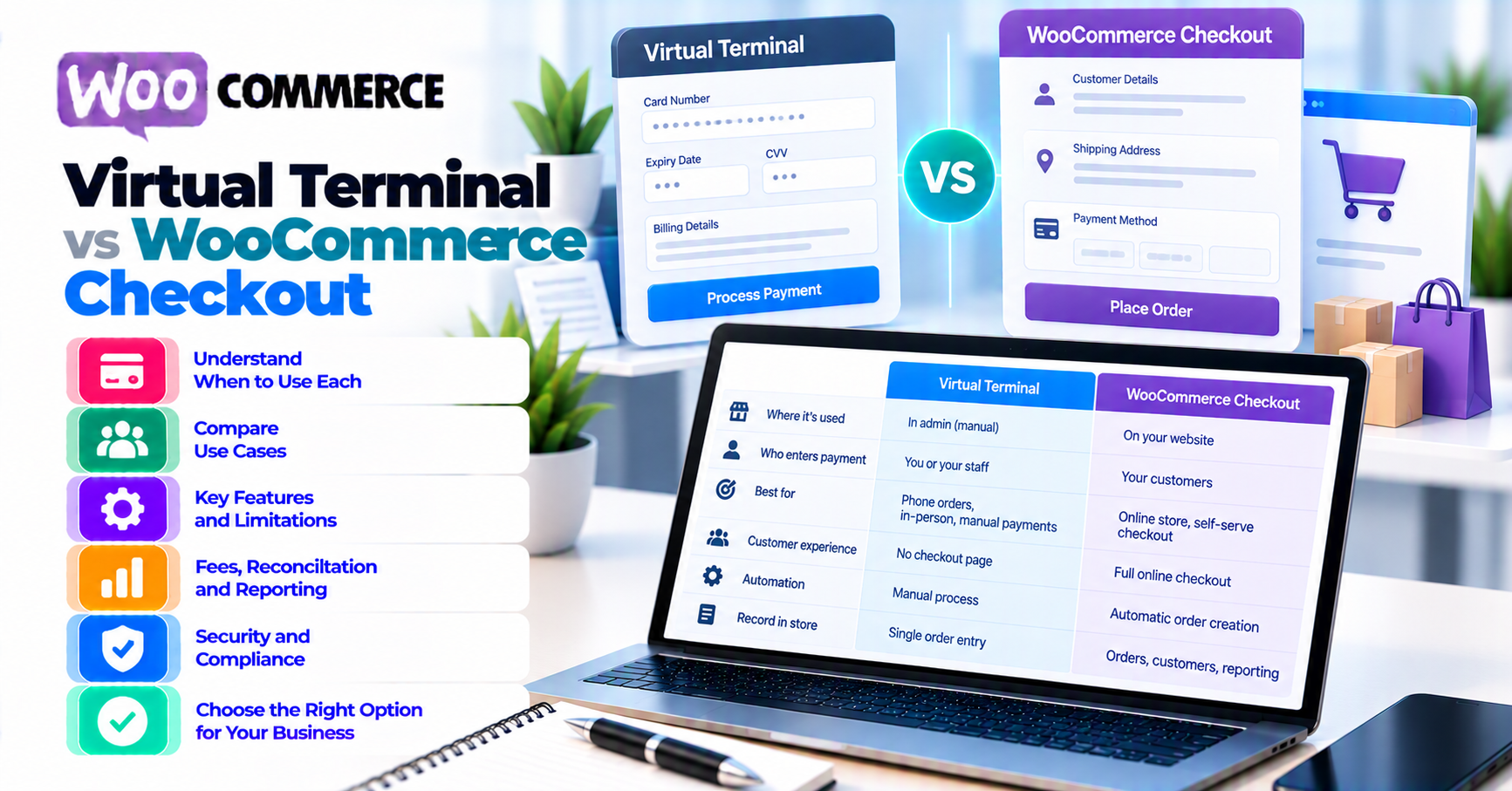
Separate four payment channels
These channels solve different problems.
| Channel | Who enters payment details? | Where? | Typical use |
|---|---|---|---|
| WooCommerce ecommerce checkout | Customer | Store checkout plus provider-hosted or integrated fields | Online self-service orders |
| Provider virtual terminal | Trained merchant staff | Acquirer/processor/provider browser interface | Phone or mail-order card-not-present payment |
| Hosted payment link or invoice | Customer | Provider-hosted payment page | Remote customer payment without staff handling card data |
| Physical payment terminal | Customer/cardholder interaction | Approved hardware | In-person card-present payment |
WooCommerce checkout
The store:
- Builds the order.
- Collects customer and shipping information.
- Presents supported payment methods.
- Sends or tokenizes payment data according to the gateway integration.
- Receives the provider result and webhooks.
- Updates stock, email, fulfillment, and order status.
For architecture differences, see hosted versus integrated payment gateways.
Virtual terminal
PCI SSC’s Virtual Payment Terminal glossary defines it as web-browser access to an acquirer, processor, or third-party provider site where the merchant manually enters payment card data. It does not read the card directly like a physical terminal and is typically used for lower-volume manual transactions.
The provider processes the payment. WooCommerce does not need to receive the card details.
Hosted payment link
The merchant sends a provider-hosted page to the customer, who enters their own details.
This can be preferable when:
- The customer is remote.
- Staff should not handle card data.
- The provider supports the desired order, invoice, or customer reference.
- The store can reconcile the provider result safely.
Physical terminal
Use supported card-reading hardware for in-person payments rather than keying the card into a browser simply because the customer is standing at the counter.
Provider and card-scheme treatment can differ between keyed and card-present transactions.
When a virtual terminal fits
Potential use cases:
- Customer calls to place a low-volume order.
- Mail-order process is part of the approved merchant program.
- Staff takes a deposit for a service after following provider policy.
- B2B buyer authorizes a one-off card payment by phone.
- Ecommerce checkout is not the customer’s channel and a hosted payment link is unavailable or inappropriate.
Preconditions
Confirm:
- Merchant account permits virtual-terminal/MOTO transactions.
- Staff and location are authorized.
- Provider terms permit the intended use.
- Fees and settlement are understood.
- Fraud and dispute controls fit the risk.
- Recording, retention, receipt, and privacy procedures are approved.
- PCI validation path is confirmed with the acquirer.
- WooCommerce reconciliation steps are documented.
When it does not fit
Avoid a virtual terminal as a workaround for:
- Broken ecommerce checkout
- Missing gateway extension
- Failed 3-D Secure flow
- Customer unwilling to use secure checkout
- Staff wanting to bypass fraud checks
- Bulk card uploads
- Repeated subscription charges keyed manually
- Card-present payments that should use a physical terminal
- Storing card details for later
Fix the actual integration or use a provider-supported link, invoice, card-on-file, or terminal flow.
B2B alternatives
For B2B customers, compare:
- Purchase order
- Net terms
- Bank transfer
- Hosted invoice
- Customer-entered card checkout
- Virtual terminal
Use PatSaTECH’s B2B invoicing and payment guide before defaulting every phone order to a keyed card.
Understand PCI boundaries
This article does not choose a Self-Assessment Questionnaire for the merchant.
PCI SSC definition
PCI SSC FAQ: “What is a VT or Virtual Terminal?” describes a provider-hosted browser interface where the merchant manually enters card data one transaction at a time. It says virtual terminals do not store or process cardholder data at the merchant site under the described model.
That statement depends on implementation. If staff puts card data into another system, recording, browser tool, spreadsheet, or note, the boundary changes.
SAQ C-VT is conditional
PCI SSC FAQ: “What is SAQ C-VT?” describes a specific validation option for eligible brick-and-mortar or mail/telephone-order merchants that process through provider-hosted virtual terminals and do not store card data electronically.
The FAQ lists conditions including:
- Virtual-terminal-only payment processing for that environment
- Provider-hosted PCI DSS validated solution
- Isolated computer in a single location
- No software or hardware that stores cardholder data
- One manually keyed transaction at a time
- No other electronic receipt or transmission of card data
- No electronic cardholder-data storage
Merchants must consult their acquirer or compliance-accepting entity to determine whether an SAQ is required and whether C-VT applies.
Do not self-select C-VT because the provider calls a screen “Virtual Terminal.”
Other channels affect scope
PCI SSC’s merchant resources note that card-present, MOTO/card-not-present, and ecommerce channels involve systems and processes that must be evaluated and protected.
Examples that can change the environment:
- Call recording
- Email or chat containing card data
- Remote desktop
- Browser extensions
- Clipboard managers
- Screenshots
- Paper notes
- Customer relationship management fields
- Batch files
- Other software on the workstation
Use PatSaTECH’s plain-English PCI scope guide and current PCI SSC documents with your acquirer or QSA.
Keep card data out of WooCommerce
Create the WooCommerce order without entering payment-card data.
Safe order data can include:
- Customer name and contact details according to policy
- Products and quantities
- Shipping
- Taxes
- Discounts
- Total and currency
- Internal sales channel such as
Phone / MOTO - Provider transaction reference after payment
Do not enter:
- Full card number
- CVV/CVC
- Magnetic-stripe or chip data
- PIN
- Card photo
- Full provider payload
- Virtual-terminal password
No card data in order notes
Order notes are visible to administrative roles and can be exported, backed up, emailed, logged, or exposed by plugins.
A support-safe note can record:
MOTO payment captured in provider terminal. Transaction reference: [ID]. Amount: [amount/currency]. Operator: [approved staff ID]. Time: [UTC].
Never use notes as a temporary card-data clipboard.
No ordinary WordPress form
A custom admin page with card fields is not automatically a compliant virtual terminal. It sends card data through WordPress and changes scope and risk.
Use the provider-hosted interface documented for MOTO.
Reconcile a virtual-terminal payment to an order
The goal is one provider transaction and one WooCommerce order representing the same sale.
Step 1: Create or verify the WooCommerce order
WooCommerce’s Managing Orders documentation confirms administrators and shop managers can manually add orders. Its single-order and manual-order documentation covers adding and editing an order.
Before payment:
- Add the correct customer.
- Add products and quantities.
- Calculate shipping and tax.
- Apply discounts with approval.
- Confirm total and currency.
- Check stock.
- Set a status that does not falsely claim payment.
- Record the intended MOTO channel without card data.
Step 2: Verify customer authorization
Follow approved call or mail-order procedures:
- Confirm identity using non-card information.
- State amount and currency.
- Explain merchant descriptor.
- Obtain any required authorization or consent.
- Follow call-recording and privacy policy.
Do not record card data in ordinary call recordings.
Step 3: Key the payment in the provider terminal
Use:
- Authorized provider account
- MFA
- Approved workstation
- Correct merchant account
- Correct environment
- Correct amount and currency
- Correct transaction type
Square’s Virtual Terminal documentation is one provider example: it describes taking remote or phone payments in a browser and manually entering card details in the provider interface.
That is an example, not a recommendation or a universal workflow.
Step 4: Read the provider result
Record:
- Approved, declined, processing, or error
- Authorization and capture state
- Transaction ID
- Amount and currency
- Provider timestamp
- Receipt reference
Do not mark WooCommerce paid from a browser spinner or staff assumption.
Step 5: Update WooCommerce
Use the approved admin or integration workflow to:
- Add the provider transaction reference.
- Record method/channel as MOTO or virtual terminal.
- Record authorized versus captured state.
- Move to the correct WooCommerce order status.
- Trigger stock and fulfillment once.
- Send the correct receipt or order email.
WooCommerce Order Statuses documentation defines the operational meanings of Pending payment, On hold, Processing, Completed, Failed, Canceled, and Refunded.
Step 6: Reconcile
Finance should match:
- WooCommerce order ID
- Provider transaction ID
- Amount and currency
- Authorization/capture
- Fees
- Settlement or payout
- Refund/void
- Staff/operator
- Timestamp
Do not create a second WooCommerce order merely because the provider terminal generated its own receipt.
Step 7: Refund and dispute handling
Know where refunds begin:
- Provider terminal/dashboard
- WooCommerce through a supported integration
- Finance workflow
If the virtual-terminal transaction is not linked to a gateway plugin, WooCommerce’s refund button may not send money back automatically. Reconcile both systems and add a safe order note.
Use authorization versus capture before choosing void or refund.
Compare fraud, authentication, cost, and UX
Fraud and disputes
Keyed card-not-present transactions can have different risk and dispute treatment from card-present or authenticated ecommerce payments.
Ask the provider:
- Which fraud tools apply?
- Is AVS/CVV supported and how should results be handled?
- What evidence should the merchant retain?
- What liability and dispute flow applies?
- Are keyed payments allowed for this merchant category?
Do not bypass a checkout fraud block by keying the same card into a terminal without provider guidance.
3-D Secure and SCA
Customer-facing ecommerce can support 3-D Secure authentication. MOTO treatment can differ by region, scheme, acquirer, and transaction classification.
Do not declare a transaction exempt from SCA yourself. Use the provider’s supported MOTO product and acquirer guidance.
Fees
Virtual-terminal keyed pricing can differ from ecommerce and card-present pricing.
Compare:
- Per-transaction fees
- Cross-border and currency fees
- Monthly terminal fee
- Chargeback cost
- Staff time
- Reconciliation effort
- Fraud loss
- PCI control cost
Verify the merchant’s contract rather than copying public list prices.
Customer experience
WooCommerce checkout:
- Customer controls data entry.
- Cart, tax, shipping, discounts, and receipts are integrated.
- Authentication can remain in the ecommerce flow.
Virtual terminal:
- Staff must collect and key details.
- Customer waits during the call or correspondence.
- Manual errors and reconciliation work increase.
- Provider can issue a separate receipt.
Hosted payment link:
- Customer enters details.
- Staff avoid handling card data.
- Order reconciliation still needs design.
Choose the least risky channel that meets the business need.
Set staff and workstation controls
Access
- Named user accounts
- MFA
- Least privilege
- No shared passwords
- Immediate offboarding
- Periodic access review
- Audit logs
Workstation
- Acquirer-approved environment
- Supported operating system and browser
- Security updates
- Endpoint protection
- Screen lock
- Restricted browser extensions
- Network controls
- No clipboard sync to personal devices
- No unapproved remote access
SAQ C-VT eligibility can require isolation and other specific conditions. Confirm the exact architecture.
Call and paper handling
- Prevent card data in call recordings.
- Prohibit card details in email and chat.
- Do not leave paper notes.
- Secure any paper receipts according to approved policy.
- Train staff to stop and escalate when the channel is wrong.
WooCommerce roles
Only staff who need order access should create or update manual orders. Separate:
- Order creation
- Payment terminal access
- Refund approval
- Fulfillment
- Reconciliation
Where business size permits, use dual review for high-value keyed transactions and refunds.
Test the complete MOTO workflow
Use provider test tools and synthetic WooCommerce orders.
Channel tests
- Customer can use ecommerce checkout.
- Staff can use virtual terminal in the approved environment.
- Hosted payment link works as an alternative.
- Card-present transaction uses supported hardware.
- Staff can explain which channel applies.
Order tests
- Manual order totals are correct.
- Tax and shipping are correct.
- Stock is available.
- Status is unpaid before payment.
- One provider transaction maps to one order.
- Transaction ID and channel are recorded safely.
- One receipt and fulfillment event occur.
Payment tests
- Approval
- Decline
- Authorization only
- Capture
- Void
- Refund
- Partial refund
- Duplicate submission
- Timeout or unknown result
Security tests
- Wrong staff role denied
- MFA required
- Card data not present in WooCommerce, logs, tickets, chat, or recordings
- Shared-account use detected
- Workstation/session timeout
- Export and backup review
- Access revocation
Reconciliation tests
- Order total equals terminal transaction.
- Currency matches.
- Provider payout includes transaction.
- Refund appears in both records.
- Chargeback can be traced.
- Finance can close the day without card data.
Record versions, provider account, test IDs, operator, expected result, actual result, and corrective actions.
FAQ
What is a virtual terminal?
PCI SSC defines it as browser-based access to an acquirer, processor, or third-party provider where the merchant manually enters card data for a transaction.
Is a WooCommerce admin card form a virtual terminal?
Not automatically. A provider-hosted virtual terminal keeps card entry in the provider interface. Adding card fields to WordPress changes the data flow and PCI scope.
Is virtual terminal the same as card-present?
No. Virtual-terminal transactions are manually entered and generally card-not-present. A physical terminal reads a card or device through approved hardware.
Is SAQ C-VT always the right questionnaire?
No. PCI SSC publishes detailed eligibility criteria, and the merchant must consult its acquirer or compliance-accepting entity.
Can staff write down the card number and enter it later?
Do not design that process. It creates storage, handling, and exposure risk. Enter data directly into the approved terminal under the acquirer’s process.
Should phone calls be recorded?
Do not allow ordinary recordings to capture card data. Work with legal, compliance, telecom, and acquirer teams on approved pause/resume or non-recorded processes.
Can virtual-terminal payments update WooCommerce automatically?
Only if an approved integration supports it. Otherwise staff must reconcile the transaction ID, amount, currency, status, stock, email, and refund state through a controlled process.
Can a virtual terminal process subscriptions?
Do not manually re-key recurring payments. Use a provider-supported stored-credential or recurring-billing flow and confirm the merchant agreement and consent requirements.
Is a hosted payment link safer than taking cards by phone?
It can reduce staff handling of card data because the customer enters details on the provider page. Scope and risk still depend on implementation and provider guidance.
Sources
Primary sources accessed September 20, 2026:
- PCI SSC — Merchant Resources
- PCI SSC — Document Library
- PCI SSC FAQ — What is a VT or Virtual Terminal?
- PCI SSC FAQ — What is SAQ C-VT?
- PCI SSC Glossary — Virtual Payment Terminal
- Square — Virtual Terminal
- WooCommerce — Managing Orders
- WooCommerce — View, edit, or add an order
- WooCommerce — Order Statuses
This article provides general operational guidance, not legal, PCI, card-scheme, tax, or acquirer advice. Confirm virtual-terminal use, MOTO classification, workstation controls, validation method, fees, and reconciliation with the merchant’s provider and compliance-accepting entity.