Quick answer
- Quick answer
- Availability is a policy, not an error
- Separate hard constraints from merchant preferences
- Define the input vocabulary
- Build the availability matrix
- Set rule precedence and fallbacks
- Keep classic and Checkout blocks aligned
- Test boundaries and negative cases
- Operate the policy over time
- FAQ
- Sources
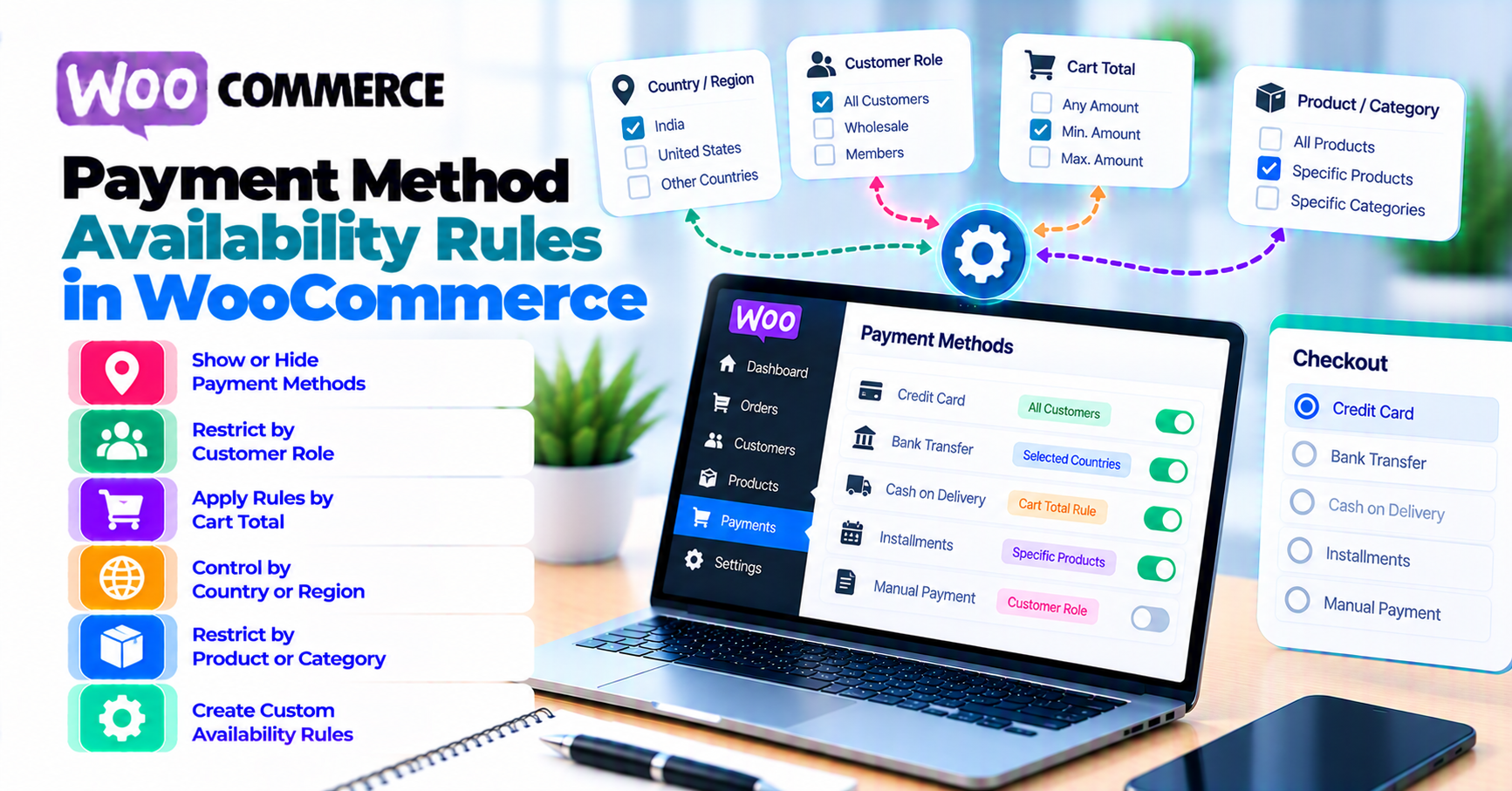
Treat WooCommerce payment method availability rules as a versioned business policy.
For every payment method, document:
- Which merchant account and environment it uses
- Supported shopper and merchant countries
- Supported charge currencies
- Minimum, maximum, and zero-total behavior
- Physical, virtual, subscription, pre-order, and saved-method capabilities
- Shipping-zone and shipping-method dependencies
- Guest, signed-in, role, or account requirements
- Checkout block, classic, order-pay, and express-checkout support
- Hard denials, merchant preferences, and rule precedence
- What the shopper sees when no method qualifies
- Which positive, negative, and boundary tests prove the rule
- Who owns the rule and which provider document supports it
Use this evaluation order:
- Confirm the method is enabled and configured.
- Apply non-negotiable provider and account capabilities.
- Apply order and cart requirements.
- Apply country, currency, shipping, and customer conditions.
- Apply merchant preference rules.
- Confirm the same decision appears on server-side and Checkout block paths.
- Verify at least one deliberate fallback or a clear unsupported-state message.
Do not force-show a payment method that cannot process the order. Do not hide every method through overlapping rules and call that a checkout bug. Do not use an outage fallback or multi-processor retry design as an ordinary availability rule.
Availability is a policy, not an error
A payment method can be installed and enabled yet intentionally unavailable to one order.
Availability is evaluated before an authorization attempt. It answers:
Should this method be offered for this exact order context?
That is different from:
- A displayed method being declined
- A browser timeout after payment submission
- A webhook failing to update the order
- A gateway outage
- A processor failover decision
The completed PatSaTECH missing-method diagnostic starts from a broken or empty checkout. This guide starts earlier: it creates the policy that makes an empty state explainable and testable.
WooCommerce has server and client availability layers
WooCommerce’s Payment Gateway API documentation describes gateway integrations for the default checkout. The current WooCommerce code reference defines is_available() as checking whether a gateway is available for use. Extensions commonly add provider- and order-specific conditions.
For Checkout blocks, WooCommerce’s payment-method integration documentation defines canMakePayment. It receives current-order data including the cart, totals, shipping need, addresses, selected shipping methods, and payment requirements, then returns a Boolean or a promise resolving to one.
If those layers disagree, the method can:
- Appear in Blocks but fail on submission.
- Be available server-side but never register in the browser.
- Flicker when checkout recalculates.
- Disappear only after address or shipping selection.
The policy should produce one result from the same inputs.
Separate hard constraints from merchant preferences
Put every rule into one of three classes.
1. Hard capability constraints
The method or account cannot process the order as configured.
Examples:
- Unsupported charge currency
- Unsupported merchant or customer region
- Order amount below or above provider limits
- No recurring-payment capability for a subscription
- No saved-method support where the order requires it
- Method cannot process the product or transaction type
- Required account onboarding is incomplete
- Checkout surface is not supported by the extension
Hard constraints should win before merchant preference. Showing an incompatible method creates a later failure.
2. Merchant policy preferences
The method can process the order, but the store chooses when to offer it.
Examples:
- Bank transfer only above a B2B order threshold
- Cash on delivery only for selected shipping methods
- Manual invoice only for approved customer roles
- Expensive method hidden below a margin threshold
- Local payment method offered only in its target market
These rules need a written business reason, owner, customer impact, and fallback.
3. Temporary operational controls
A method is temporarily disabled or deprioritized because of an incident, maintenance window, or degraded provider.
Do not mix temporary health state into a static eligibility table without an expiry and incident owner. The planned multi-gateway failover and active disablement bundles handle operational switching; this article defines normal availability.
Why classification matters
If a rule is labeled only “hide gateway,” nobody knows whether widening it is:
- Impossible because the provider cannot support the order
- A commercial preference
- A temporary incident workaround
- A stale rule that should be removed
Classify first, then approve the change.
Define the input vocabulary
Rules fail when teams use ambiguous words such as “country,” “currency,” or “total.”
Country
Specify which location the rule reads:
- Store base country
- Gateway account country
- Shopper billing country
- Shopper shipping country
- Geolocated country
- Issuer country, when the provider exposes it after submission
Availability normally needs data known before payment. Geolocation can be wrong, and issuer country may not exist yet. Do not use one as a silent substitute for another.
WooCommerce General settings define selling locations, shipping locations, default customer location, and store currency. Start with those store boundaries, then apply narrower provider rules.
Currency
Distinguish:
- Store base currency
- Display currency
- Currency actually sent to the gateway
- Settlement currency
A method can be available for a displayed price while the processor rejects the actual charge currency. Use PatSaTECH’s international payments and currency guide for the display, charge, and settlement distinction.
Stripe’s supported-currencies documentation is one provider-specific example: it documents payment and payout currencies, conversion, amount formatting, minimum and maximum charge amounts, and currency-specific rules. The provider’s current documentation—not a generic WooCommerce rule—defines capability.
Amount
Name the value:
- Cart subtotal
- Cart total before shipping
- Order total including shipping and tax
- Recurring total
- Initial signup total
- Amount after coupons or store credit
WooCommerce’s Conditional Shipping and Payments documentation distinguishes condition types and notes, for example, that order total and cart total are not the same. Even if a store uses another tool or custom code, the vocabulary lesson remains useful.
Test exact boundaries: one unit below, equal to, and one unit above a threshold, using the currency’s minor-unit rules.
Cart and product requirements
Record whether the rule depends on:
- Physical or virtual products
- Product, category, tag, or shipping class
- Subscription or one-time item
- Mixed subscription and non-subscription cart
- Pre-order or delayed capture
- Gift card or store credit
- Zero-total order
- Saved payment requirement
Avoid scattered rules across multiple plugins that evaluate the same product differently.
Shipping
WooCommerce Shipping Zones documentation explains that zone configuration determines which shipping options and rates customers see in cart and checkout.
For payment availability, record:
- Matched zone
- Selected shipping method and instance
- Shipping class or package when applicable
- Whether shipping has been calculated
- What happens when the address changes
Do not evaluate a shipping-dependent payment method before WooCommerce has enough address and method context.
Customer and account state
Potential inputs include:
- Guest or signed-in
- Customer role
- Approved B2B account
- Saved payment method
- Previous order or risk status, where lawfully and appropriately used
Document privacy, fairness, and customer-support implications. A convenience rule should not become unexplained customer exclusion.
Checkout surface
Inventory:
- Checkout block
- Classic checkout
- Order-pay page
- My Account add-payment-method page
- Subscription change-payment page
- Express wallet button
A method is not operationally available until the supported surfaces work.
Build the availability matrix
Create one row per payment method and environment.
| Field | Example of useful evidence |
|---|---|
| Method ID and display name | Stable gateway ID plus shopper-facing label |
| Merchant account | Account identifier, country, sandbox/live mode—no secrets |
| Global enablement | Enabled, configured, onboarding complete |
| Hard country constraints | Provider source and reviewed date |
| Charge currencies | Exact supported set and amount rules |
| Amount range | Named total type and inclusive/exclusive boundaries |
| Cart capabilities | Physical, virtual, subscription, pre-order, saved method |
| Shipping conditions | Zone, method instance, class, package |
| Customer conditions | Guest, role, account approval |
| Checkout surfaces | Blocks, classic, order-pay, saved method, wallet |
| Merchant preference | Written reason and approver |
| Rule precedence | Which denial or allow rule wins |
| Fallback | Next available method or clear unsupported-state action |
| Source documents | Provider, extension, WooCommerce references |
| Owner and review date | Named role, last verified, next review |
Example policy matrix
This is illustrative—not provider capability advice.
| Method type | Hard constraints | Merchant preference | Deliberate fallback |
|---|---|---|---|
| Card gateway | Supported account, currency, amount, order type | Offered broadly | Alternate supported method or clear contact path |
| Digital wallet | Supported device/browser, domain, country, currency, gateway | Prioritized on compatible mobile | Standard card form |
| Bank debit | Supported country/currency and mandate flow | Offered for eligible high-value orders | Card or invoice, if supported |
| Cash on delivery | Physical shipment and allowed shipping method | Restricted by zone or total | Online method or clear delivery restriction |
| Manual invoice | Store policy and customer approval | Approved B2B roles | Supported online method |
For wallet-specific prerequisites and fallbacks, use PatSaTECH’s digital-wallet guide.
Add source and confidence
For each hard constraint, link the current provider or extension documentation and record the date checked. If support gave a contract-specific answer, store the case reference and approved summary.
Do not infer capability from a logo shown in the provider dashboard.
Set rule precedence and fallbacks
A collection of conditions is not yet a policy. Define how conflicts resolve.
Recommended precedence
- Environment and account ready
- Provider hard capability
- Order-type and payment requirements
- Country and currency constraints
- Amount constraints
- Shipping constraints
- Customer/account policy
- Merchant preference
- Display ordering
The exact order can differ, but it must be explicit.
Deny hard constraints before applying preferences
Example:
- The merchant prefers bank debit for orders above 500.
- The shopper’s country is unsupported for that bank-debit product.
Country capability must deny the method before the amount preference can allow it.
Define AND versus OR
Write rules as plain statements:
Offer Method A when currency is EUR AND billing country is in the approved list AND the cart contains no subscription.
Do not let a UI’s nested rule groups hide whether one condition or all conditions must pass.
Define the fallback before launch
For each denied state, choose:
- Another compatible method
- A standard card fallback after a wallet is unavailable
- Manual invoice for approved customers
- A message explaining supported country, currency, shipping, or order limits
- A contact path for genuinely unsupported orders
Fallback does not mean forcing an incompatible gateway visible. A clear unsupported state is safer than a button that always fails.
Prevent an accidental empty intersection
Two individually reasonable rules can eliminate every method:
- Method A supports subscriptions but is hidden for the selected currency.
- Method B supports the currency but not subscriptions.
Add a test row for every multi-constraint intersection the store intends to sell.
Keep active incidents separate
Do not silently make a static rule depend on current provider health unless the store has designed and tested a routing system. Blindly switching a timed-out or unknown payment to another processor can create duplicates. Availability is not failover.
Keep classic and Checkout blocks aligned
The server is authoritative for processing, while Checkout blocks also need client-side registration and availability.
Server-side availability
WooCommerce’s WC_Payment_Gateway::is_available() provides the server-side availability entry point. The current core code checks whether the gateway is enabled and can enforce a maximum amount; extensions can add their own conditions.
Do not edit WooCommerce core. Use the gateway extension’s supported settings, an official conditions extension, or reviewed custom code.
Checkout block availability
canMakePayment can evaluate:
- Cart and totals
- Whether shipping is needed
- Billing and shipping addresses
- Selected shipping methods
- Payment requirements
The client decision should mirror the approved policy. It must not be a separate business-rule implementation that drifts from the server.
For checkout-surface compatibility and regression cases, use PatSaTECH’s WooCommerce Blocks payment-gateway guide.
Common drift patterns
- Method appears in Blocks but server rejects it.
- Classic checkout honors a condition plugin that Blocks ignores.
- Address change updates shipping but not the method list.
- Wallet button uses device checks absent from the server fallback.
- Async initialization hides a method temporarily with no loading state.
- Cached checkout serves another customer’s availability state.
Parity test
For each matrix row:
- Evaluate the expected result.
- Load classic checkout where supported.
- Load Checkout blocks.
- Change one input.
- Confirm both surfaces converge on the same available-method set.
- Submit one supported sandbox method.
- Confirm an unavailable method cannot be forced through the server.
Do not test visibility only with CSS or DOM inspection.
Test boundaries and negative cases
The full combination count can grow quickly. Use risk-based pairwise coverage plus exact boundary tests.
Baseline positive rows
- Base country, base currency, simple physical cart
- Virtual-only cart
- Lowest normal total
- Highest normal total
- Guest and signed-in customer
- Each supported shipping method
- Subscription signup where offered
- Saved-method checkout where offered
- Each supported checkout surface
Deliberate negative rows
- Unsupported billing country
- Unsupported shipping country
- Unsupported currency
- One unit below minimum
- One unit above maximum
- Zero-total order
- Subscription with a non-recurring gateway
- Physical cart with no valid shipping method
- Guest using an account-restricted method
- Wallet on unsupported browser or unverified domain
Intersection rows
Test combinations most likely to remove every option:
- Subscription + foreign currency
- Subscription + coupon producing zero initial total
- Restricted shipping zone + cash on delivery
- Virtual cart + shipping-dependent method
- Multi-currency + minimum amount
- Saved method + changed billing country
- Wallet + Blocks + mobile + 3-D Secure
Expected result for every test
Record:
- Available method IDs and order
- Hidden method and the exact reason
- Customer-facing message or fallback
- Classic/Blocks parity
- Provider sandbox result for an allowed method
- Evidence and timestamp
Use provider-supplied sandbox data. Do not send invented card details to live rails. Keep environments separate with the staging versus production payment-testing checklist.
Operate the policy over time
Availability changes when:
- The provider adds or removes a country, currency, method, or amount rule.
- The merchant account or contract changes.
- Store currency or selling locations change.
- A shipping zone or method instance changes.
- WooCommerce, the checkout surface, or the gateway extension updates.
- A subscription, pre-order, wallet, or multi-currency extension is added.
- A merchant preference or customer-role policy changes.
Change workflow
- Identify the policy row affected.
- Link the new authoritative source.
- Update the rule and precedence.
- Add or update positive, negative, boundary, and intersection tests.
- Test classic and Blocks where supported.
- Verify the fallback.
- Record approval, deployment, result, and review date.
Monitoring
Track:
- Empty-method checkout rate
- Method visibility by country, currency, and cart type
- Checkout abandonment after a method disappears
- Server rejections for methods shown client-side
- Support contacts for missing or unexpected options
- Conversion and decline rates by method
Monitoring should identify policy drift, not silently route an unknown payment elsewhere.
Review cadence
Review the matrix after every gateway, checkout, shipping, currency, subscription, or provider-capability change and on a regular owner-defined schedule.
The goal is a small number of explicit rules with clear ownership—not a complex conditional maze that only one administrator understands.
FAQ
Why is an enabled WooCommerce payment method hidden?
Enabled is only the global starting state. Provider capability, country, currency, amount, cart type, shipping, account, checkout-surface, or merchant-policy rules can still make it unavailable.
Should I hide unsupported methods or show them disabled?
Do not offer a method that cannot process the order. Whether to hide it or explain why it is unavailable depends on the extension and UX. Ensure a useful fallback or message exists.
Which country should a payment rule use?
State it explicitly. Billing country, shipping country, store country, account country, and geolocation are different inputs. Use the field required by the provider and business policy.
Can a currency switcher make a gateway support more currencies?
No. It can change display or charge behavior, but the provider account and payment method still define supported charge and settlement rules. Verify the actual currency sent.
Why does a method work on classic checkout but not Blocks?
The server-side gateway may be available while the client integration is missing, unsupported, or returning false from canMakePayment. Test the same context on both surfaces.
Can I route failed payments to another gateway with these rules?
That is failover, not normal availability. Reconcile the original payment before retrying elsewhere, then use a separately designed idempotent routing strategy.
How do subscriptions change availability?
The gateway, extension, and processor must support the required recurring features. Start with PatSaTECH’s subscriptions and payment-gateway requirements. WooCommerce Subscriptions payment-gateway documentation distinguishes automatic and manual recurring payments and documents gateway feature support. Verify renewals, payment-method changes, retries, and tokens—not only signup.
How do I avoid having no methods available?
Test every supported intersection, define rule precedence, and provide a deliberate fallback or clear unsupported-state message. Never force an incompatible method visible solely to avoid an empty list.
Sources
Primary sources accessed September 20, 2026:
- WooCommerce developer docs — Payment Gateway API
- WooCommerce Code Reference —
WC_Payment_Gateway::is_available() - WooCommerce developer docs — Payment method integration for Checkout blocks
- WooCommerce — General settings
- WooCommerce — Setting up Shipping Zones
- WooCommerce Subscriptions — Payment methods and gateways
- WooCommerce — Conditional Shipping and Payments
- Stripe Docs — Supported currencies
This guide provides general configuration guidance. Provider availability, regional rules, recurring capabilities, wallet eligibility, amount limits, and extension behavior vary; follow current provider and WooCommerce extension documentation for your merchant account.