Introduction
- Introduction
- 1. Sandbox keys on a live domain (or the reverse)
- 2. Currency or zero-decimal mismatches
- 3. Webhooks pointing to staging or blocked URLs
- 4. Caching or optimization plugins breaking checkout
- 5. Theme or checkout block conflicts after updates
- 6. SSL mixed content or wrong site URL
- 7. Ignoring processor maintenance windows
- 8. Refunding only in WooCommerce (or only in the gateway)
- 9. No runbook for Black Friday / campaign traffic
- 10. Buying a plugin without a support path
- Checklist before you blame the gateway
- Related reading
Most “gateway bugs” are not mysterious. They come from environment drift: staging keys on production, a theme update that broke checkout, or a processor rotation nobody documented. Below are the mistakes we see most often when supporting WooCommerce stores—whether they use our payment gateway plugins or another vendor’s extension.
If you are still choosing a plugin, start with how to evaluate payment gateway plugins and our integration checklist.
1. Sandbox keys on a live domain (or the reverse)
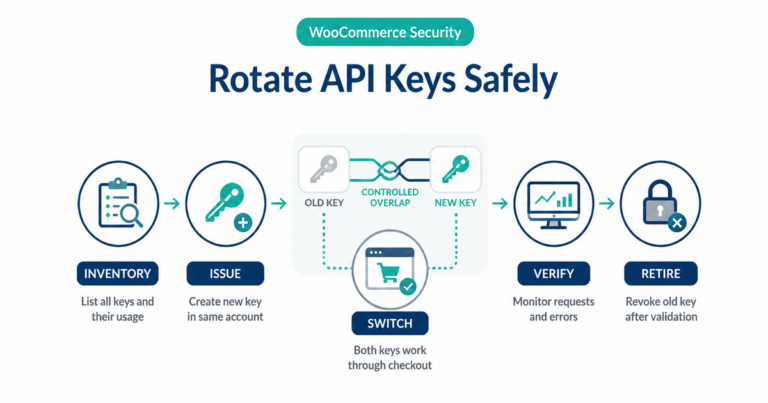
Symptom: Transactions never settle, or the gateway dashboard shows “test” traffic on what you thought was live.
Fix: In your gateway plugin settings, confirm mode matches environment. Use separate browser profiles or staging hosts so you never copy-paste the wrong key block.
2. Currency or zero-decimal mismatches
Symptom: Orders in the wrong amount, or “minor unit” errors from the API.
Fix: Align WooCommerce currency settings with what your acquirer expects. Some gateways require explicit configuration for zero-decimal currencies (e.g. JPY). Verify in sandbox with small test amounts.
3. Webhooks pointing to staging or blocked URLs
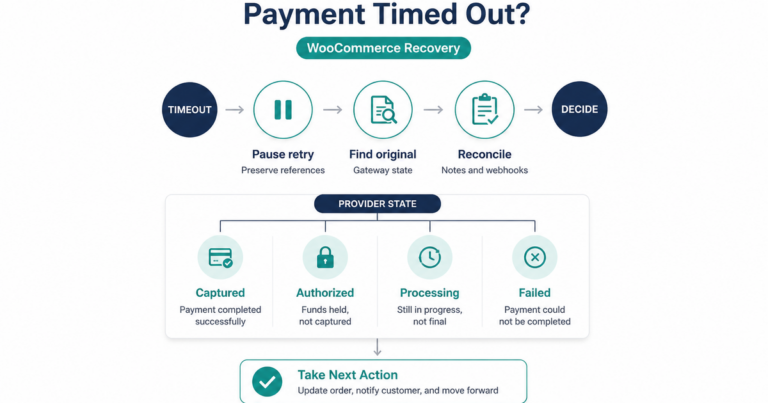
Symptom: Orders stay “pending” while the customer sees success; refunds look fine in the gateway but not in WooCommerce.
Fix: Webhook URLs in the processor portal must hit production endpoints. Firewalls and security plugins can block POSTs—whitelist the gateway’s IP ranges only per official documentation. See webhook monitoring for WooCommerce.
4. Caching or optimization plugins breaking checkout
Symptom: Intermittent JS errors, duplicate charges, or empty cart on return from redirect.
Fix: Exclude checkout, cart, my account, and payment endpoints from full-page cache and aggressive minify. Test in a private window after each “speed” plugin change.
5. Theme or checkout block conflicts after updates
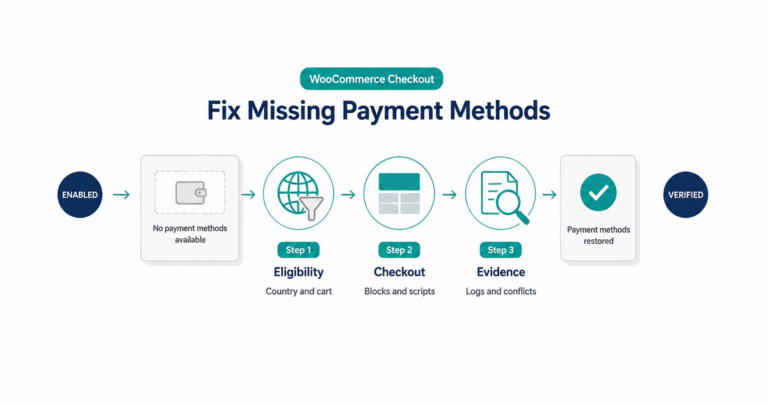
Symptom: Fields disappear, or payment method never initializes.
Fix: Switch temporarily to a default Storefront-class theme on staging. If checkout works, merge theme fixes or update the theme. For Blocks checkout, confirm the gateway supports the checkout block version you run.
6. SSL mixed content or wrong site URL
Symptom: Browser warnings; Apple Pay / wallet buttons disabled.
Fix: Force HTTPS everywhere; fix mixed content (images/scripts). Align WordPress Address and Site Address with your canonical host—see fixing insecure checkout and SSL on WooCommerce.
7. Ignoring processor maintenance windows
Symptom: Sudden spikes in soft declines during a known API migration.
Fix: Subscribe to processor status pages and changelog emails. Schedule plugin updates after reading release notes.
8. Refunding only in WooCommerce (or only in the gateway)
Symptom: Accounting mismatch; partial refunds stuck.
Fix: Know your source of truth. Many setups initiate refunds from Woo admin through the gateway API—if that fails, use the gateway portal and reconcile order notes. Our chargebacks vs refunds piece explains dispute vs merchant-initiated flows.
9. No runbook for Black Friday / campaign traffic
Symptom: Rate limits or timeouts under load.
Fix: Load-test checkout paths, not just the homepage. Verify hosting PHP workers and database capacity; pre-warm critical endpoints.
10. Buying a plugin without a support path
Symptom: Stuck on a deprecated API with no updates.
Fix: Prefer vendors who publish changelogs and support boundaries. PatSaTECH lists extensions in the shop with integration help available for complex cases: custom payment gateway integration.
Checklist before you blame the gateway
- [ ] Correct mode (sandbox vs live) and keys
- [ ] Currency and capture model match processor contract
- [ ] Webhooks received (logs/order notes)
- [ ] Cache exclusions for checkout
- [ ] HTTPS and canonical URLs clean
Related reading
- How to evaluate payment gateway plugins
- Payment gateway glossary
- Webhook monitoring for WooCommerce
- How to test your payment gateway like a pro
- Payment gateway failure: causes and prevention
- Contact PatSaTECH