Quick answer
A WooCommerce card testing attack is usually a burst of automated payment attempts using many card details, often against a cheap product or a card-saving endpoint. Treat it as an incident, not a sudden wave of customers.
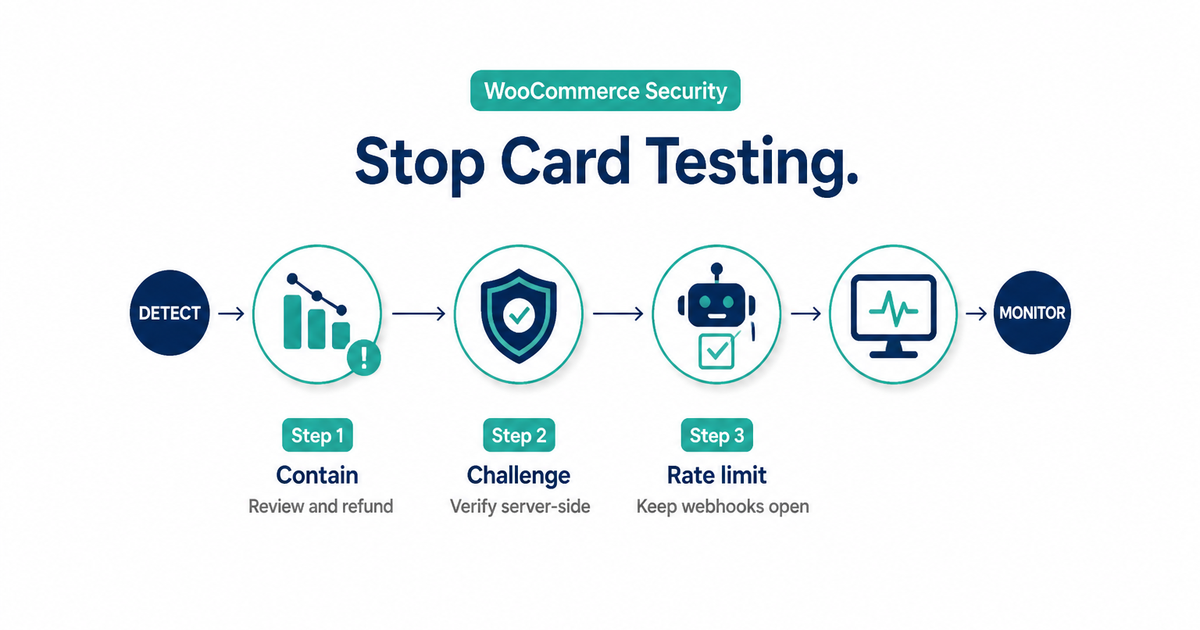
Use this order:
- Confirm the pattern in WooCommerce and the gateway dashboard.
- Review successful attempts and urgently refund transactions you reasonably believe are unauthorized.
- Contact the payment provider and preserve transaction IDs, timestamps, response codes, products, and order notes.
- Reduce the exposed path: temporarily restrict the targeted low-value product or guest flow if necessary.
- Add layered controls: a server-validated bot challenge, checkout-specific rate limits, session checks, and provider fraud rules.
- Keep gateway callbacks reachable and monitor legitimate approval rates while tuning.
Do not rely on one IP block. Do not challenge payment webhooks. Do not copy full card numbers or security codes into tickets or WooCommerce notes.
What a card testing attack is
Card testing—also called carding, card checking, or enumeration—is an attempt to learn which stolen or generated card details are valid. Attackers automate card setup or small payments, then use the issuer or gateway response to separate usable cards from rejected ones.
WooCommerce’s card-testing guidance describes a common pattern: many low-value purchases, each using a different card. Stripe’s card-testing documentation also distinguishes two routes:
- Card setup: attaching or validating a card without a normal purchase.
- Payment: making a small charge that a cardholder might not notice immediately.
The damage is not limited to the value of successful orders. A sustained attack can create disputes, authorization costs, infrastructure load, polluted analytics, and a high decline rate that makes legitimate activity appear riskier.
Card testing is narrower than “payment fraud.” That distinction matters. PatSaTECH’s guide to fraud screening false positives helps tune ordinary risk rules; this runbook is for a patterned, automated validation attack.
How to tell card testing from ordinary declines
One failed order proves nothing. Look for several signals moving together over a short period and compare them with the store’s normal traffic.
| Signal | Why it supports a card-testing hypothesis | Plausible alternative |
|---|---|---|
| Abrupt spike in failed orders | Automated attempts produce many issuer or gateway declines | A broken gateway release or expired live credentials |
| Many card attempts against one cheap item | Low-value products provide an inexpensive validation path | A real promotion or social referral |
| Many cards tied to one session, account, device, or network pattern | Repeated validation is not normal shopper behavior | A shared corporate network by itself |
| Nonsensical names, disposable-looking emails, or repeated address patterns | Automation often reuses synthetic identity data | Legitimate privacy-conscious shoppers |
| A few small successes among many failures | Successful authorizations identify usable cards | Normal low-ticket sales |
| Sudden gateway error or decline-code concentration | The provider is rejecting repeated authorization attempts | Processor outage or issuer-region issue |
In WooCommerce, inspect:
- Orders → Failed and the order-note timestamps.
- Product, amount, email domain, billing country, IP or device signals your stack lawfully records.
- Gateway transaction IDs and decline categories.
- Gateway dashboard trends for failed, blocked, and successful payments.
- Infrastructure traffic to checkout and card-saving endpoints.
Do not call every decline “fraud.” A gateway outage, checkout regression, incorrect currency, or 3-D Secure failure can also cause a burst. Compare the browser experience, gateway status, and payment analytics before tightening controls globally.
Contain an active attack in the right order
1. Preserve useful evidence
Create one incident record with:
- Start and last-seen timestamps, including timezone.
- WooCommerce order IDs and gateway transaction or request IDs.
- Product, amount, currency, order status, and response category.
- Counts of attempts, failures, blocks, and successes by a consistent interval.
- The controls changed, who changed them, and when.
Use references—not payment credentials. Follow your gateway and PCI SSC merchant guidance for payment-data handling. Full card data and security codes do not belong in WordPress logs, screenshots, chat, or support tickets.
2. Review successful attempts and involve the provider
WooCommerce advises merchants to review transactions and urgently refund those believed to be fraudulent. Use the processor’s supported refund path, record the refund ID, and reconcile the result in WooCommerce.
A refund can reduce dispute risk, but it is not a promise that processing fees will be returned. Confirm the provider’s policy and use the workflow in refunds, voids, and gateway reconciliation.
Contact the gateway or acquirer with the incident window and transaction IDs. Ask what account-side protections are available and whether they see a broader attack pattern. If a secret credential might be exposed, follow the provider’s rotation procedure; do not rotate keys blindly in the middle of an incident without a cutover plan.
3. Reduce the easiest validation path
If attackers are hammering one donation, name-your-price, or very cheap product, temporarily make that product unavailable while controls are applied. WooCommerce also lists temporarily restricting guest checkout as an option.
These are containment measures, not automatic permanent policies. Disabling all checkout can stop revenue, and forcing account creation can hurt legitimate conversion. Record why the restriction was enabled and define the evidence required to remove it.
4. Add a bot challenge at the actual payment path
A checkout CAPTCHA or privacy-focused alternative such as Turnstile can add friction to automated attempts. The widget alone is not the control.
Cloudflare’s Turnstile documentation says server-side token validation is mandatory: client tokens can be forged, expire, and are single-use. Whatever product you choose, verify that the server rejects a payment attempt when the challenge token is absent, invalid, expired, or replayed.
Protect every endpoint that can validate a card, including saved-card or add-payment-method flows when present. A challenge only on the visible cart page leaves a direct checkout endpoint exposed.
5. Rate-limit payment attempts—not the whole store
Apply a rate rule narrowly to the abused operation. Base the threshold on normal traffic, then test it. Useful keys can include a combination of session, account, device, IP, email, and payment-attempt velocity, depending on what the platform and provider support.
Cloudflare’s rate-limiting documentation notes that edge counters are not exact accounting controls and enforcement can lag briefly. Keep gateway-side controls and application monitoring in place.
Explicitly exclude payment-provider webhook and callback endpoints from browser challenges. Those requests come from systems, not shoppers. Blocking them can leave paid orders stuck in Pending even while the gateway captured funds—one reason webhook monitoring remains essential.
Harden checkout without breaking legitimate payments
Card testers adapt, so combine controls that fail differently.
| Layer | Practical control | Common failure to avoid |
|---|---|---|
| Gateway | Current supported integration and provider fraud tools | Assuming the plugin alone configures every account-side rule |
| Browser | Risk-based challenge on payment and card-saving flows | Rendering a checkbox without server validation |
| Edge | Path-specific rate limit or managed challenge | Challenging webhooks, wallets, or all site traffic |
| Application | Session or account checks; attempt velocity | Trusting IP address as the only identity |
| Payment | AVS/CVV and 3-D Secure where the provider and region support them | Treating one mismatch as universal proof of fraud |
| Catalog | Temporary restriction for the abused low-value item | Leaving the workaround permanent without review |
| Monitoring | Alerts for failed-order and decline-rate deviation | Alerting on a fixed number unrelated to store baseline |
Keep supported gateway protections enabled and send the provider the risk data its documented integration accepts. If your store uses 3-D Secure, review the customer path in PatSaTECH’s 3-D Secure and SCA guide. Authentication is one layer; it is not a substitute for bot and velocity controls.
If an attacker reached the provider with a leaked secret key, rotating that secret is appropriate after containment and provider confirmation. A publishable identifier designed for browser use is not the same as a leaked server secret. Follow the exact gateway documentation.
Verify the controls
Test in staging or the gateway sandbox with provider-supplied test data. Never “load test” a live gateway by cycling through real or invented card numbers.
Minimum verification:
- A normal guest or signed-in shopper can complete the supported checkout.
- The challenge fails closed when its token is missing, invalid, or replayed.
- Repeated test attempts trigger the intended challenge or limit.
- Wallet and 3-D Secure flows still return correctly.
- Gateway webhooks reach the site and update orders.
- Refunds still reconcile in WooCommerce and the gateway.
- Legitimate approval rate, checkout errors, and support contacts remain near baseline.
Keep a rollback for every control. A rate limit that stops bots but also blocks a household, office, school, or mobile carrier network is not finished.
Avoid turning fraud controls into a conversion problem
The safest-looking rule is not always the safest business decision.
- Do not block all VPN users. Residential proxies can bypass the rule while legitimate customers lose access.
- Do not reject every low-value order. Attackers can change amounts; real customers still buy inexpensive products.
- Do not permanently disable guest checkout by reflex. Use it as a measured containment option when evidence supports it.
- Do not stack multiple challenges without testing. CAPTCHA, account login, 3-D Secure, and a hard rate limit can create an inaccessible loop.
- Do not auto-refund every failed order. Failed orders normally have no captured funds. Reconcile the gateway state first.
- Do not ask shoppers to retry repeatedly during an active incident. Blind retries can add noise and duplicate-payment risk.
Segment attack traffic from normal traffic, measure the effect of each rule, and remove emergency restrictions deliberately.
After-action checklist
When the attack is quiet:
- Reconcile every suspicious success, refund, dispute, and gateway fee.
- Confirm failed and blocked volumes returned to baseline.
- Review whether secret credentials, plugins, or custom endpoints were exposed.
- Keep the useful challenge and velocity controls; remove emergency over-blocking.
- Test checkout, saved payment methods, wallets, 3-D Secure, subscriptions, and webhooks.
- Document provider case numbers, final rule settings, and the next review date.
- Add an alert for a statistically meaningful failed-order or decline-rate change.
- Train support to recognize a card-testing pattern without telling legitimate customers their card is “fraudulent.”
The goal is not zero declines. It is to make automated validation uneconomical while preserving a clean path for real customers.
FAQ
Are hundreds of failed WooCommerce orders missed sales?
Not necessarily. A sudden, patterned burst can be card testing rather than demand. Check the gateway dashboard, order notes, products, amounts, and identity patterns before changing checkout copy or treating the count as lost revenue.
Will CAPTCHA stop card testing?
Not by itself. Validate the token on the server, cover every card-validation path, and combine the challenge with provider controls, rate limits, session checks, and monitoring.
Should I disable guest checkout?
It can be a temporary containment step if guest checkout is the abused path. It also adds friction for legitimate shoppers, so document the reason, test signed-in checkout, and define when to restore it.
Should I block the attacking IP address?
An IP block can reduce one source, but Stripe warns that a single heuristic is usually insufficient. Attackers rotate networks, while many legitimate shoppers may share one address.
Does refunding a suspicious successful payment prevent a chargeback?
It can reduce the chance of a later dispute, and WooCommerce recommends acting urgently, but it is not a guarantee. Follow the gateway’s refund and incident process and retain the transaction and refund IDs.
Is 3-D Secure enough?
No. It can authenticate eligible transactions, but card testers can still probe issuer responses or target flows where authentication is not invoked. Keep bot, velocity, and gateway risk controls in place.
Sources
Primary sources accessed September 20, 2026:
- WooCommerce — How do I prevent and respond to card testing attacks?
- Stripe Docs — Protect yourself from card testing
- Cloudflare Turnstile — Validate the token
- Cloudflare WAF — Rate limiting rules
- PCI Security Standards Council — Merchant resources
This article provides operational guidance, not legal, compliance, or forensic advice. Follow your acquirer, payment provider, hosting provider, and qualified security adviser’s incident instructions.
Gateway-specific settings still live on the product you bought. Catalog: WooCommerce payment gateway plugins. Malware or a defaced checkout after carding may also need malware removal.