Quick answer
A WooCommerce payment timeout means one system stopped waiting. It does not prove that the payment failed.
The gateway may have:
- Received nothing.
- Created a payment object but not authorized it.
- Authorized funds.
- Captured the payment.
- Left an asynchronous method processing.
- Completed the payment while its webhook to WooCommerce was delayed.
Do not ask the shopper to pay again until you reconcile the original attempt.
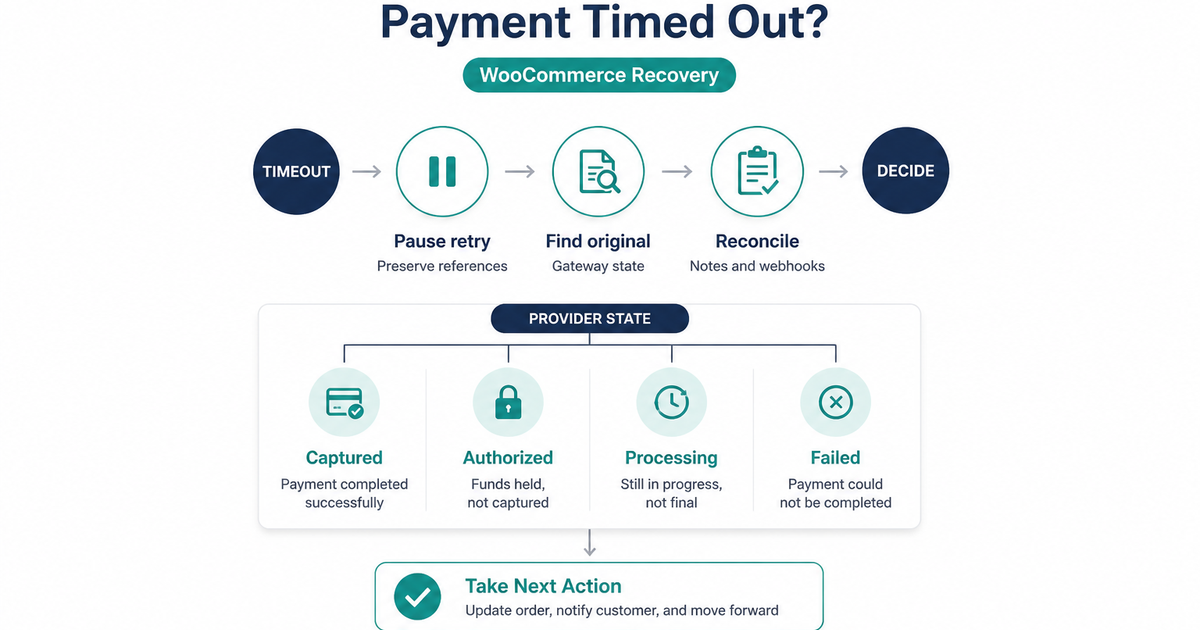
Use this order:
- Pause another checkout attempt for that order.
- Save the WooCommerce order ID, gateway reference, request ID, amount, currency, and timestamp.
- Find the original payment in the provider dashboard or API.
- Compare its state with WooCommerce order notes and webhook deliveries.
- Choose wait, fulfill, capture, void, or retry from confirmed provider state.
- If no definitive state is available, hold the order and escalate to the provider instead of guessing.
Do not mark an order paid merely to clear a support queue. Do not refund a transaction that has not been shown to be captured. Do not create a new payment as a way to test whether the first one exists.
A timeout is not a decline
An explicit decline is a result. A timeout is a missing or late result.
The uncertainty can occur at several boundaries:
| Where time ran out | What might still be true |
|---|---|
| Shopper’s browser | WooCommerce and the gateway may already have completed the request |
| WooCommerce server calling the gateway | The provider may have received the request while the response was lost |
| Redirect or 3-D Secure return | Authentication or authorization may have completed before the shopper returned |
| Gateway webhook delivery | The provider may show success while WooCommerce remains Pending payment |
| Slow asynchronous method | The payment may still be processing by design |
This is why “the spinner stopped” and “the card was declined” require different runbooks. PatSaTECH’s payment failure recovery guide covers confirmed failures, messaging, and dunning. This guide starts while the financial result is still unknown.
WooCommerce status is operational evidence, not final processor proof
WooCommerce’s Order Statuses documentation defines Pending payment as an order received with no payment made and Processing as paid with stock reduced. Those definitions describe the state WooCommerce currently knows.
After a lost response or delayed callback, the provider can temporarily know more than WooCommerce. A Pending or Failed label by itself is not permission to create a second charge. Confirm the provider-side object and event timeline.
Similarly, a browser success page is not proof that WooCommerce received the final server-to-server event. Use webhook monitoring to separate a payment problem from a callback problem.
Freeze the retry and preserve evidence
The first response should reduce uncertainty, not add another financial event.
1. Stop repeated attempts on the same order
Tell support and the shopper not to press Pay repeatedly, open another tab, or create a replacement order while the original is being checked. If the checkout UI is still active, keep a processing or “we are checking” state rather than silently restoring the button.
This pause should be brief and owned. Record who is reconciling the payment and when the next update is due. An indefinite hold with no customer communication is not a recovery process.
2. Record safe references
Capture:
- WooCommerce order ID and order key reference
- Gateway payment, order, intent, or transaction ID when available
- Gateway request ID or correlation ID
- Non-secret idempotency key reference if the integration logs one safely
- Attempt timestamp and timezone
- Amount and currency
- Payment method type
- WooCommerce status and exact order notes
- Browser-facing message
- Relevant gateway, PHP, and webhook log timestamps
Never copy full card numbers, security codes, API secrets, authentication payloads, or unredacted customer data into tickets or chat. The provider references and timestamps are normally enough to trace the request.
3. Preserve the original order
Do not delete the WooCommerce order or replace its transaction ID. It is the correlation point between checkout, provider requests, callbacks, stock, emails, and support.
If staff must stop fulfillment while investigating, use a documented operational hold that does not falsely represent a decline, capture, or refund.
Reconcile the original payment
Reconciliation asks one question: What happened to this exact attempt?
Step 1: Search the provider, not a new checkout
Use the provider dashboard or documented retrieval API to find the original object by its transaction reference. If that reference is missing, search with the narrowest permitted combination of timestamp, amount, currency, merchant account, and order metadata.
Do not search by submitting another payment.
Stripe’s PaymentIntent lifecycle illustrates why state matters. A PaymentIntent can require a payment method or customer action, be processing, require capture, succeed, or be canceled. Other processors use different names, so translate the provider’s exact state into your store’s action rather than copying Stripe labels blindly.
Step 2: Compare three timelines
Build a short timeline from:
- WooCommerce: order creation, payment call, order notes, status changes.
- Provider: request receipt, authorization, capture, failure, cancellation, or processing state.
- Webhook delivery: event creation, delivery attempts, response codes, signature result, and successful processing.
Use UTC or include the timezone on every timestamp. A one-hour timezone mismatch can make a callback look earlier than the payment.
If the provider shows a completed event that WooCommerce never applied, fix or replay the callback through the provider’s supported tool when available. Do not manufacture an event or edit raw payment metadata to force a match.
Step 3: Distinguish authorization from capture
An authorization can reserve funds without completing capture. A capture moves money according to the provider’s settlement process. The next action depends on the store’s configured payment action.
Use the distinctions in PatSaTECH’s authorization versus capture guide before telling a customer they were charged or before issuing a refund.
Step 4: Treat webhook delay separately
For Stripe specifically, the webhook documentation says live-mode event delivery is retried for up to three days with exponential backoff, and the current API resource can be retrieved to obtain its latest state. That retry behavior is Stripe-specific; check the actual gateway’s schedule.
If the gateway is paid but WooCommerce is Pending:
- Verify the webhook endpoint, signature, and response code.
- Confirm the event maps to the correct order.
- Use a supported replay or reconciliation command if the provider or extension offers one.
- Ensure fulfillment triggers only once.
Do not invite another payment merely because the webhook is late.
Choose the next action from confirmed state
Provider wording varies, but this decision table gives a safe operational translation.
| Confirmed provider state | WooCommerce action | Retry decision |
|---|---|---|
| Captured, completed, or succeeded | Reconcile the order, apply the supported paid transition, and fulfill once | Do not retry |
| Authorized but not captured | Follow the store’s capture policy or void the authorization | Do not create another payment |
| Processing or pending | Hold fulfillment unless the method’s policy permits otherwise; monitor the original object | Wait; do not retry yet |
| Customer action still required | Resume the original authentication flow only if the extension supports it | Do not start a parallel payment |
| Failed, declined, or canceled with no capture | Record the terminal result and offer the provider-supported recovery path | A new attempt may be appropriate |
| No object found, but request delivery is uncertain | Check request logs, idempotency behavior, and provider support | Still unknown |
| Provider unavailable | Keep the order in a non-fulfilling review state and open an incident | Wait and reconcile |
Captured or succeeded
Confirm amount, currency, merchant account, and order reference. Then let the extension’s supported reconciliation or webhook path update WooCommerce. If manual intervention is unavoidable, document the provider transaction ID, evidence, operator, and timestamp.
Verify that stock, emails, downloads, and fulfillment automation fire once—not once for the manual update and again when a delayed webhook arrives.
Authorized but not captured
Do not create another authorization. Decide whether to capture or void the original according to the order, inventory, fraud, and fulfillment policy. A pending bank authorization can look like a charge to the shopper, so use precise language.
Processing or pending
Some payment methods are asynchronous. Stripe’s lifecycle documentation notes that methods such as bank debits can remain processing for days. Use the provider’s stated processing window and event model; do not impose a universal card-style timeout on every rail.
Set a named follow-up time. “Wait” must include monitoring and ownership.
Failed or canceled
A confirmed terminal failure is different from a timeout. Before offering retry, confirm:
- No authorization or capture remains.
- No late success event is queued.
- The extension will create or resume the correct provider object.
- The customer will not submit both the old and new paths.
Then use a neutral recovery message and preserve the original evidence.
When a retry is actually safe
Idempotency can make a technical retry safe, but only when the integration reuses the provider’s required key and parameters correctly.
Stripe’s idempotent-request documentation says a create or update request can be repeated with the same idempotency key after a connection error without performing the operation twice. Its advanced error-handling guide recommends retrying uncertain requests with the same key and parameters until a definitive server result is received.
PayPal’s idempotency documentation similarly describes the PayPal-Request-Id header for supported POST calls, including retries after network timeouts or unclear responses. PayPal also warns that not every API supports the header and retention varies by API.
These facts do not mean a shopper can safely click Pay again:
- The extension may generate a new provider object.
- It may generate a new idempotency key.
- A new WooCommerce order may be created.
- The first object may complete through a delayed callback.
Store operators should not invent or edit idempotency keys in production plugin data. Ask the gateway-extension vendor how it handles transport retries, then test that behavior in sandbox.
Use this retry gate:
- The original provider state is terminal and non-successful, or the provider’s documented idempotent retry is being used by the integration.
- No captured or authorized financial event remains unresolved.
- WooCommerce and webhook timelines have been checked.
- One owner controls the retry.
- The shopper receives one clear next step.
- Monitoring is in place for a late event from the original attempt.
If any condition is unknown, the payment is not ready for a blind retry.
Communicate without creating a second attempt
The customer needs clarity before technical detail.
During reconciliation
Use wording such as:
We are confirming whether your payment completed. Please do not submit it again yet. We will update you using order reference [order ID] by [time and timezone].
Do not say “your card failed” until the provider confirms failure. Do not ask for card details by email or chat.
If payment succeeded
Confirm that the order is paid, provide the order reference, and explain the next fulfillment step. If the shopper sees more than one bank entry, investigate whether those entries are authorizations or captures before promising a refund.
If payment failed
Offer one controlled payment path or an alternate method. Keep the original order reference. The payment failure recovery guide covers retry copy and follow-up after the result is known.
If a duplicate capture occurred
Compare transaction IDs and amounts, then refund or void only the confirmed duplicate according to policy. PatSaTECH’s duplicate payments guide explains the distinction between two captures and an authorization plus capture.
Never guarantee when a bank will release a pending authorization. Issuer display and release timing are outside WooCommerce.
Prevent the next unknown outcome
Prevention has several layers:
Checkout
- Disable or guard the payment button after submission.
- Show a persistent processing state with accessible text.
- Prevent parallel payment requests from multiple tabs or components where the integration supports it.
- Preserve the order and original provider reference across a return flow.
Integration
- Use provider idempotency according to the exact API.
- Reuse the same logical payment object when resuming authentication.
- Store non-sensitive provider request and transaction IDs in order notes or structured logs.
- Retrieve current provider state before deciding to create another payment.
Webhooks
- Verify signatures.
- Return the provider’s required success response promptly.
- Deduplicate repeated events.
- Alert on failed deliveries and paid-provider/Pending-WooCommerce mismatches.
Operations
- Define who can reconcile, capture, void, refund, and manually change order state.
- Keep a response template for “payment outcome being checked.”
- Alert on timeout spikes by gateway, country, device, and extension version.
- Subscribe to provider status notices.
The goal is not to eliminate every timeout. Networks fail. The goal is to preserve enough identity and state that a timeout remains one traceable payment—not two guesses.
Test the recovery path
Use staging and the provider sandbox. Never create timeout scenarios with invented card numbers on live payment rails.
Test:
- Response lost after the provider receives a create-payment request.
- Browser closed during redirect or authentication.
- Webhook delayed or temporarily rejected.
- Payment left processing.
- Explicit terminal decline.
- Shopper double-click or refresh.
- Delayed success arriving after staff begin reconciliation.
For each scenario, verify:
- One WooCommerce order remains the correlation point.
- The original provider object can be found.
- The UI does not encourage a second attempt while state is unknown.
- Webhook replay does not fulfill twice.
- Support can identify the correct action from documented evidence.
- Logs contain references but no payment secrets or raw card data.
Record the gateway extension, WooCommerce version, checkout type, provider test object, expected state, actual state, and recovery time. Re-run this matrix after payment-extension, checkout, hosting, or webhook changes.
FAQ
Why does WooCommerce show Failed when the gateway shows paid?
The browser or server request may have timed out while the provider completed the payment, or the success webhook may not have reached WooCommerce. Verify the provider object and webhook timeline before changing the order.
Can I safely ask the customer to retry after a timeout?
Only after the original attempt has a confirmed non-successful terminal state or the integration is performing a documented idempotent retry of that same request. A fresh shopper submission can create a second payment.
Should I change Pending payment to Processing manually?
Not from the WooCommerce label alone. First confirm the provider payment, amount, currency, account, and order reference. Prefer the extension’s supported reconciliation or webhook replay so audit data stays aligned.
What if the provider shows an authorization but WooCommerce shows Failed?
Do not charge again. Decide whether to capture or void the existing authorization according to policy and the gateway’s supported workflow.
What if no payment object appears in the dashboard?
Check the account, environment, timestamp, request logs, and order metadata. If request delivery remains uncertain, use the provider’s idempotency and support guidance; absence from one dashboard search is not proof that no object exists.
How long should I wait on a processing payment?
Use the payment method’s current provider documentation. Cards, bank debits, wallets, and redirect methods have different state transitions and timelines. Assign an owner and next review time rather than waiting indefinitely.
Is the customer’s bank app the source of truth?
No. A bank app may display pending authorizations and settled captures differently. Reconcile the merchant’s provider object and WooCommerce record, then explain what is confirmed without guaranteeing issuer timing.
Sources
Primary sources accessed September 20, 2026:
- WooCommerce — Order Statuses
- Stripe Docs — How PaymentIntents and SetupIntents work
- Stripe API Reference — Idempotent requests
- Stripe Docs — Advanced error handling
- Stripe Docs — Receive events in your webhook endpoint
- PayPal Developer — Idempotency
This article provides general operational guidance. Payment states, retries, idempotency, settlement, and order transitions are provider- and extension-specific; follow the current instructions for your gateway and merchant account.
If the store uses a maintained PatSaTECH gateway, confirm webhook URLs in that processor’s runbook—for NMI WooCommerce see the NMI credential guide and the NMI Collect.js product. A missing processor still needs custom integration.