

1. Overview
Revolut Gateway for Gravity Forms by PatSaTECH turns any Gravity Forms form into a Revolut Business checkout. When the form is submitted, the add-on creates a Revolut Merchant API order for the form total and sends the visitor to the secure Revolut Hosted Checkout Page, where they pay by card, Apple Pay, Google Pay or Revolut Pay (whichever Revolut enables on your account). Card data never touches your site.
It is built on the official Gravity Forms Payment Add-On Framework, so each entry gets its native payment status, transaction ID, notes and Sales report data. You paste one Secret API key; the webhook is registered for you. Notifications, post creation and other add-on feeds can wait until the payment is confirmed, and refunds are made from the entry screen.
2. Features
- Revolut Hosted Checkout Page
- Cards, Apple Pay, Google Pay, Revolut Pay
- Payment Add-On Framework
- Sandbox & Live keys
- Key checked on save
- Webhook registered automatically
- Signed webhooks (Revolut-Signature v1)
- Return-URL check with the API
- Amount & currency verification
- Per-entry lock: never paid twice
- Full & partial refunds from the entry
- Refund completion tracked
- Clear decline messages
- Unpaid entries marked Failed on a timer
- Delayed notifications & posts
- Post Payment Actions for other feeds
- Optional forced 3D Secure
- Phone numbers in E.164
- Debug log (no secrets logged)
- Translation-ready (.pot)
3. Requirements
| Component | Minimum |
|---|---|
| WordPress | 6.0 (tested up to 7.1.3) |
| Gravity Forms | 2.5 (tested up to 2.10.3) |
| PHP | 7.4 |
| SSL / HTTPS | Required (return URLs and webhooks) |
| Revolut account | A Revolut Business account with an approved Merchant account (live), or a free Revolut Business sandbox (testing), and its Secret API key (sk_…) |
| Country | Your business must be in a country where Revolut offers Merchant accounts: see Eligibility |
Tested on: WordPress 7.1.3, Gravity Forms 2.10.3, Revolut Business sandbox, PHP 8.1.34 (LiteSpeed). Requires PHP 7.4 or later.
4. Installation
- In WordPress admin go to Plugins → Add New → Upload Plugin.
- Choose
gravityforms-revolut-1.0.0.zipand click Install Now. - Activate Revolut Gateway for Gravity Forms. Gravity Forms must be active.
FTP: upload the gravityforms-revolut folder to /wp-content/plugins/ and activate it.
Step-by-step setup with screenshots
- Card payment, entry marked Paid with the Revolut transaction ID (entry 9613)
- Webhook registered automatically; signed webhooks verified (a bad signature is rejected with 401)
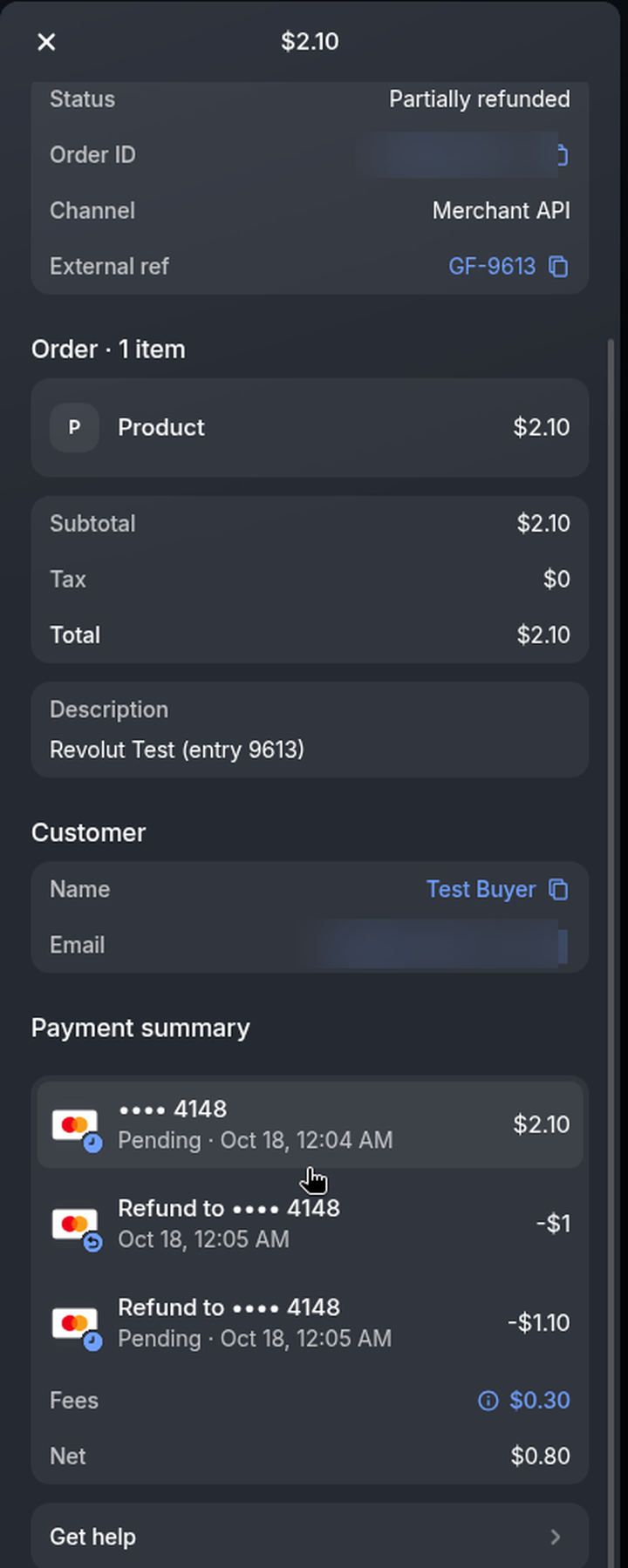
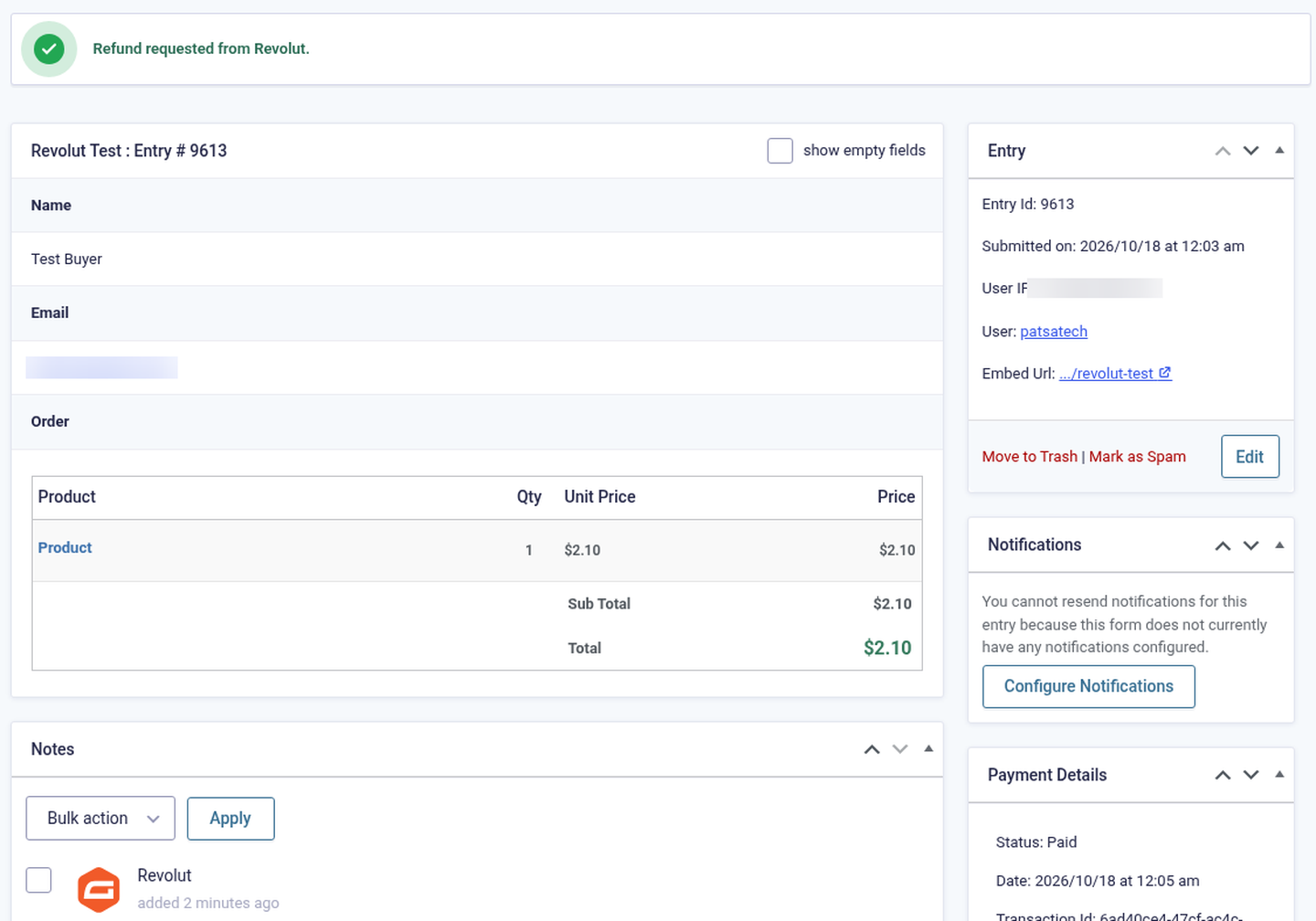
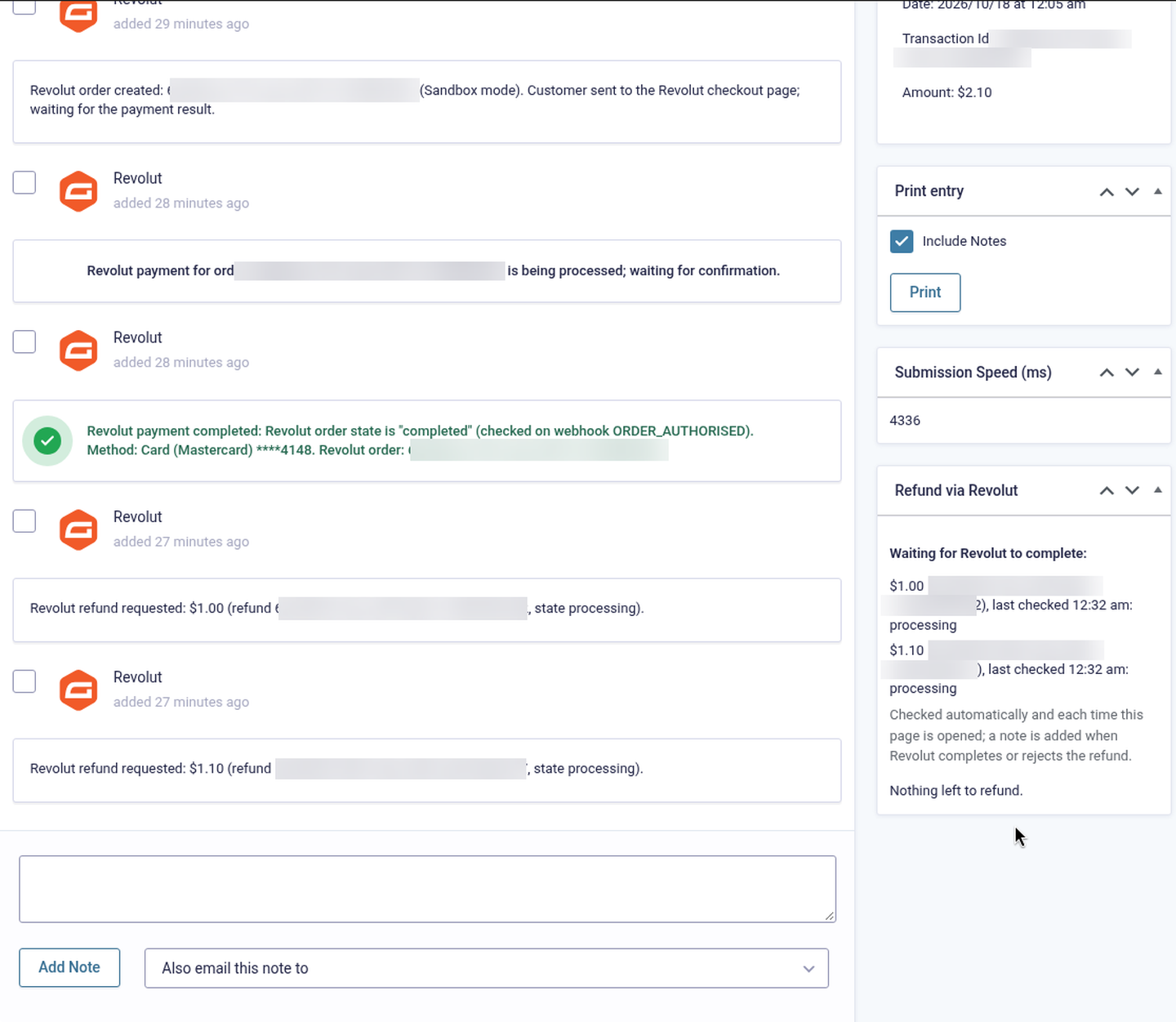
- Two partial refunds requested from the entry, with refund tracking (entry 9613; Revolut had not completed them yet when the screenshots were taken)
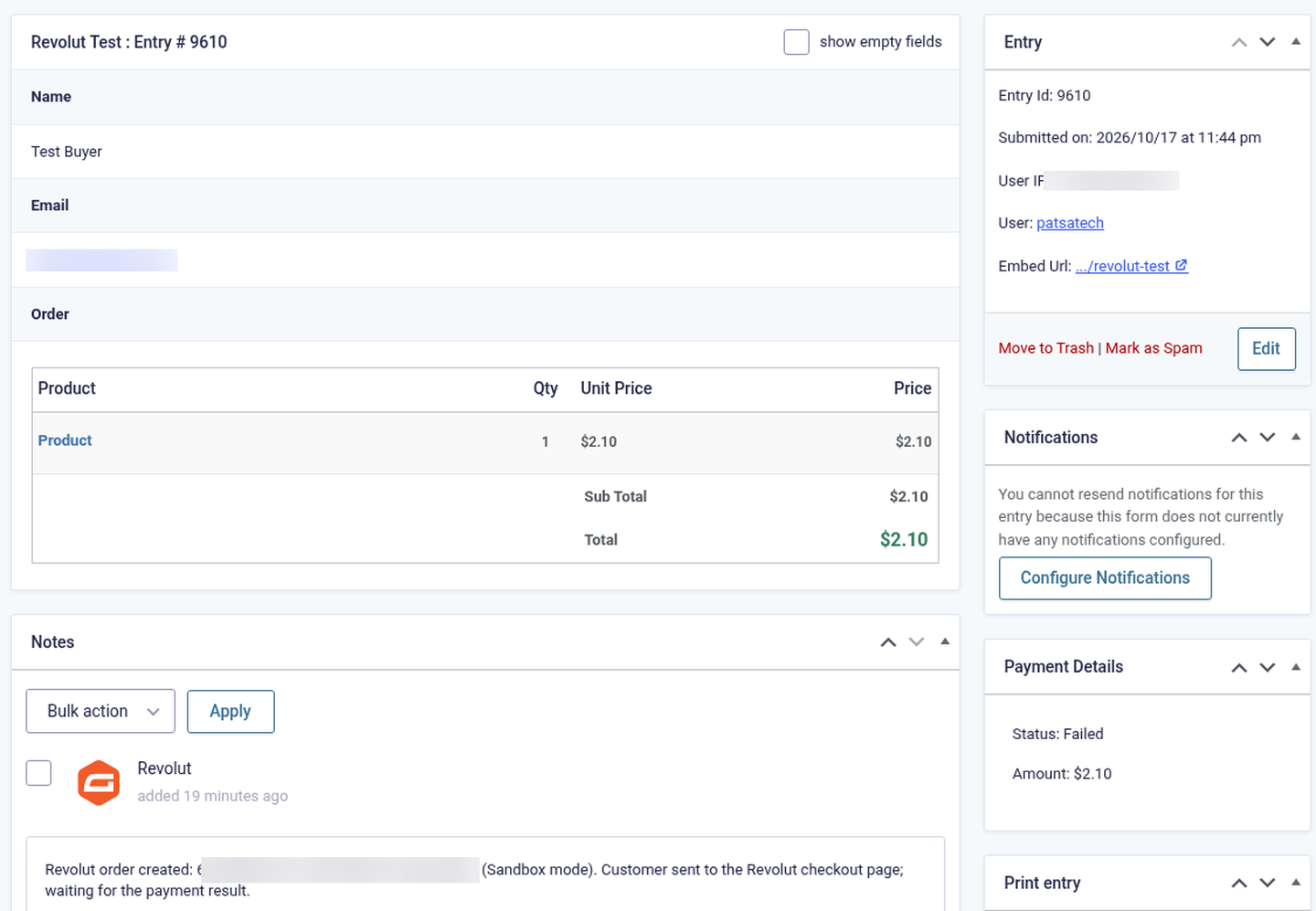
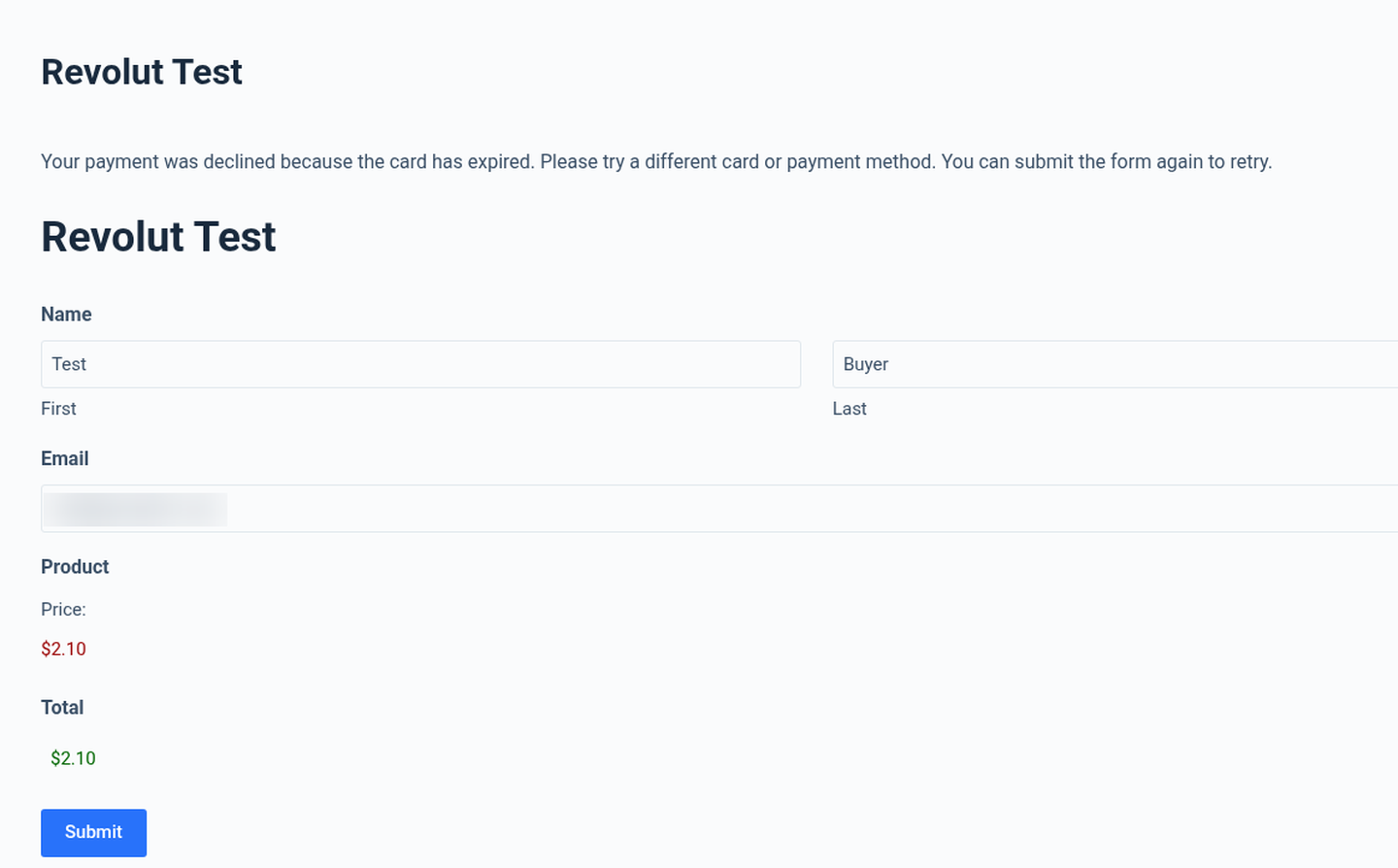
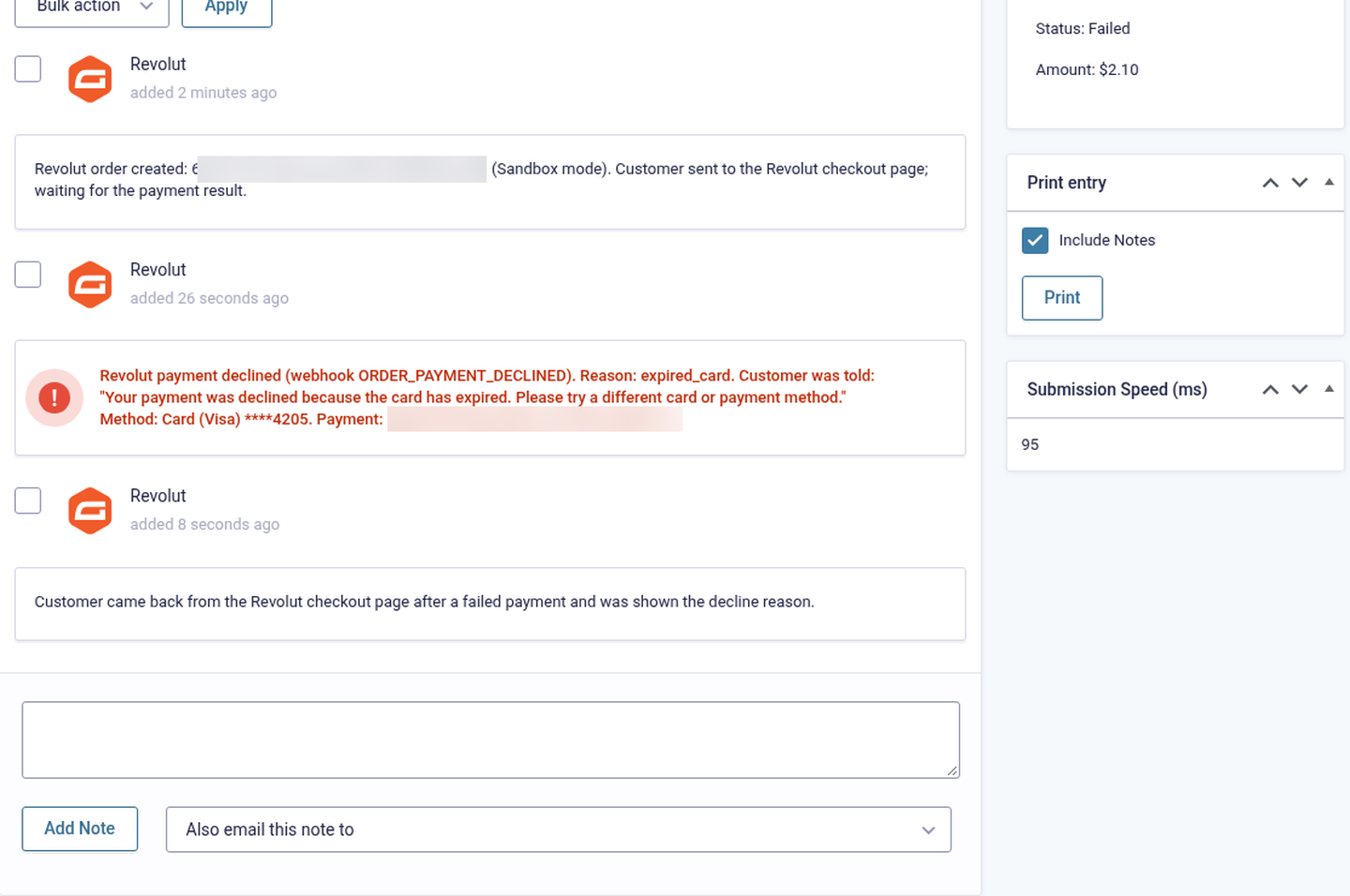
- Declined card (expired card): decline message above the form and entry marked Failed with the reason (entry 9619)
- Unpaid entries marked Failed after the time limit (entries 9608–9612)
Click any screenshot to open it full size. Keys, Revolut order, payment and refund IDs, email addresses, phone numbers and IP addresses are blurred.
Part A: Revolut Business
Copy your Secret API key
In Revolut Business click your avatar → Settings → APIs → Merchant API tab and copy the API secret key (
sk_…). For testing use the sandbox atsandbox-business.revolut.com. Full details: Getting your Revolut Secret API key.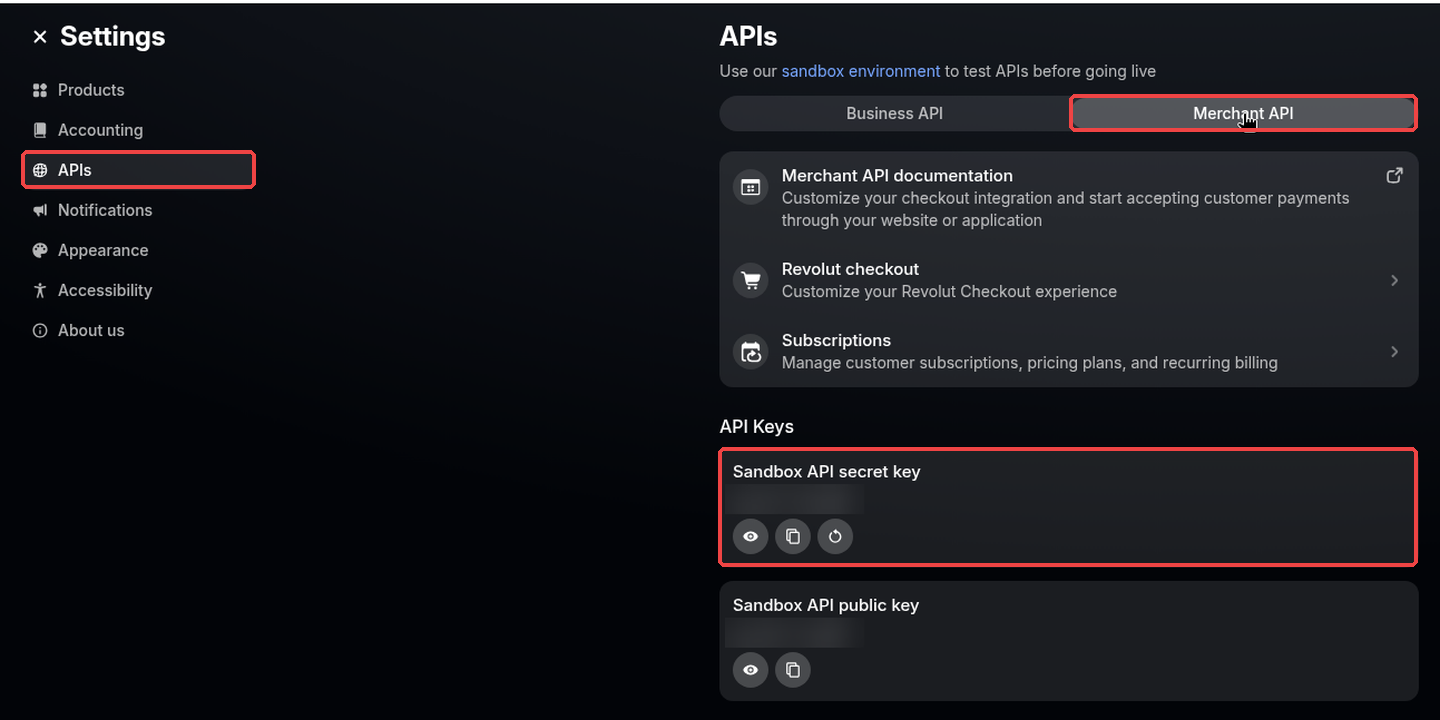
Settings → APIs → Merchant API (keys blurred).
Part B: WordPress / Gravity Forms
Activate the add-on
Upload
gravityforms-revolut-1.0.0.zipunder Plugins → Add New → Upload Plugin and activate it.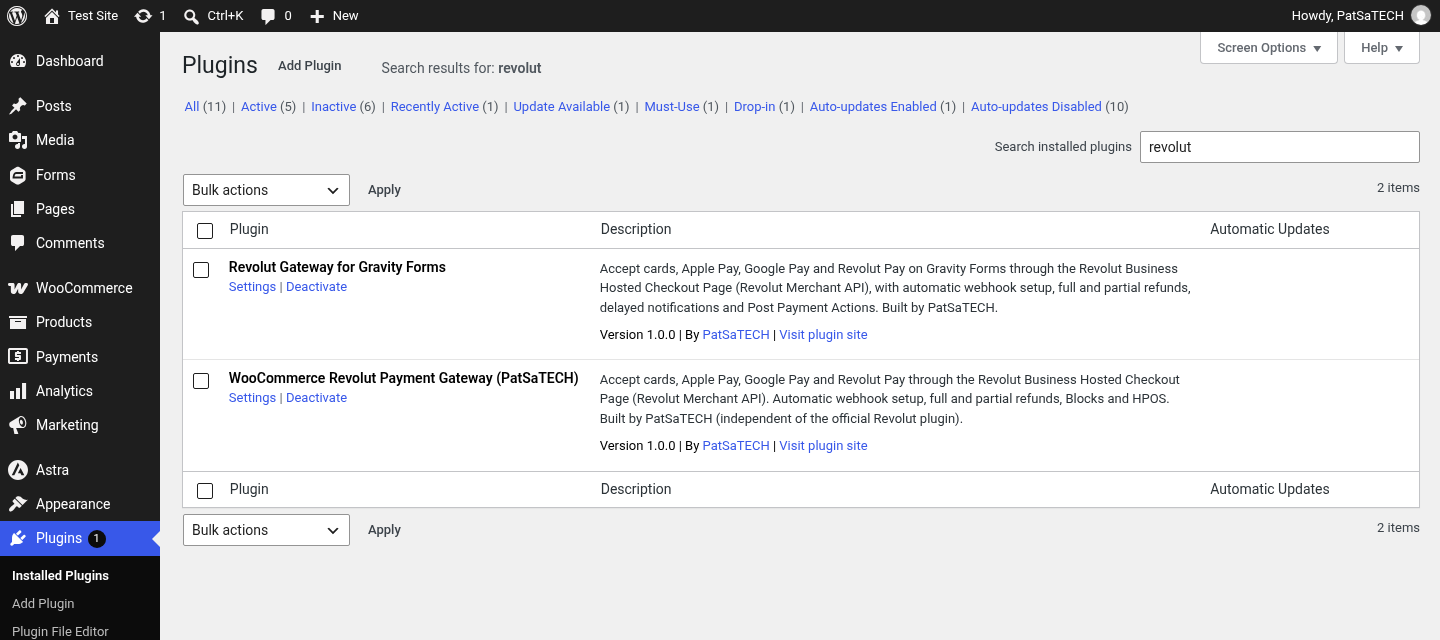
Revolut Gateway for Gravity Forms 1.0.0 active. Paste your sandbox key and save
Go to Forms → Settings → Revolut, choose Mode: Sandbox, paste the Sandbox secret API key and click Save Settings. Leave the signing secret empty: the add-on checks the key, registers the webhook (
https://your-site.com/?callback=gravityforms-revolut) and fills in the signing secret.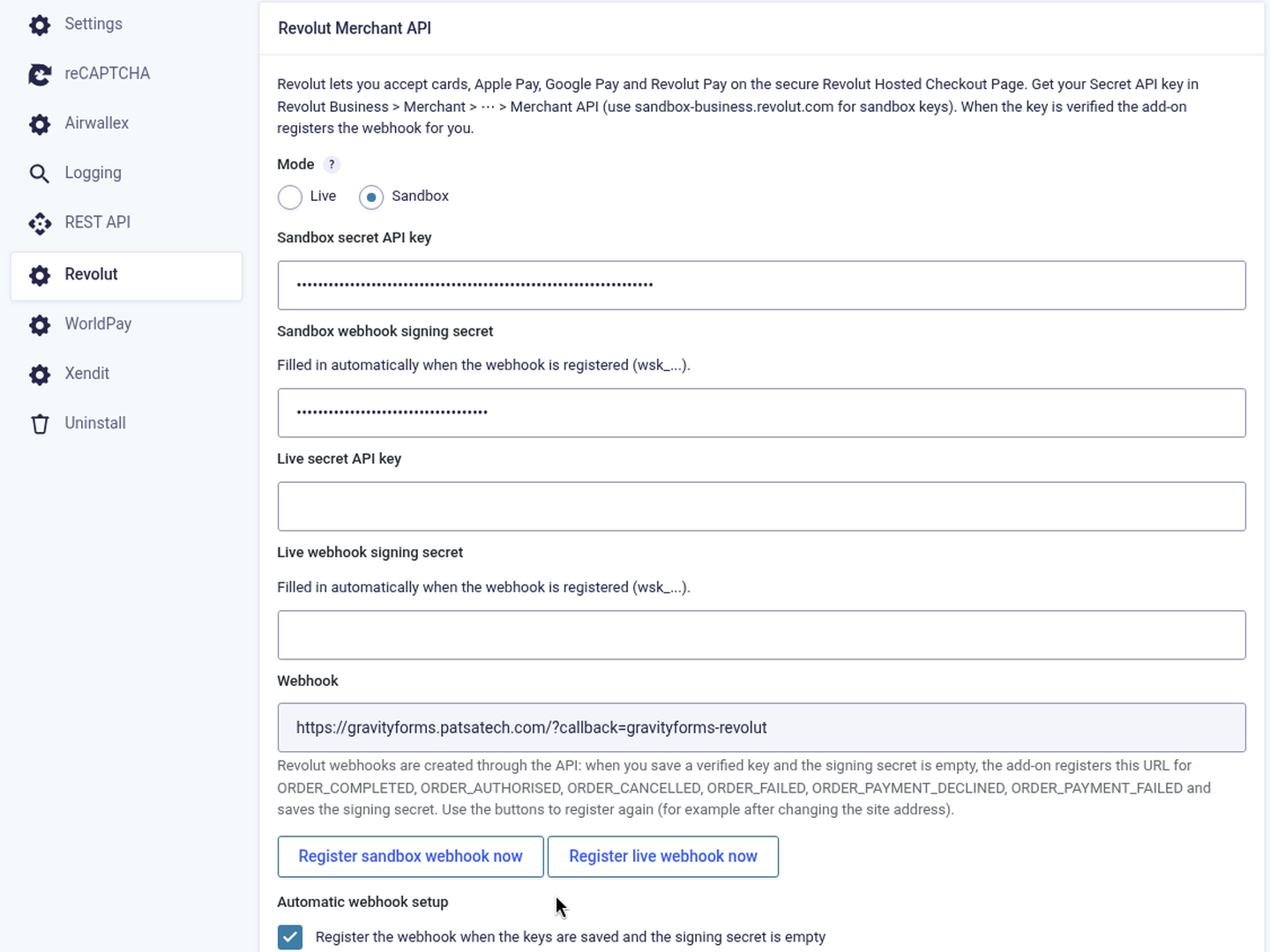
Mode, sandbox and live keys (masked), webhook URL with the “Register webhook now” buttons. 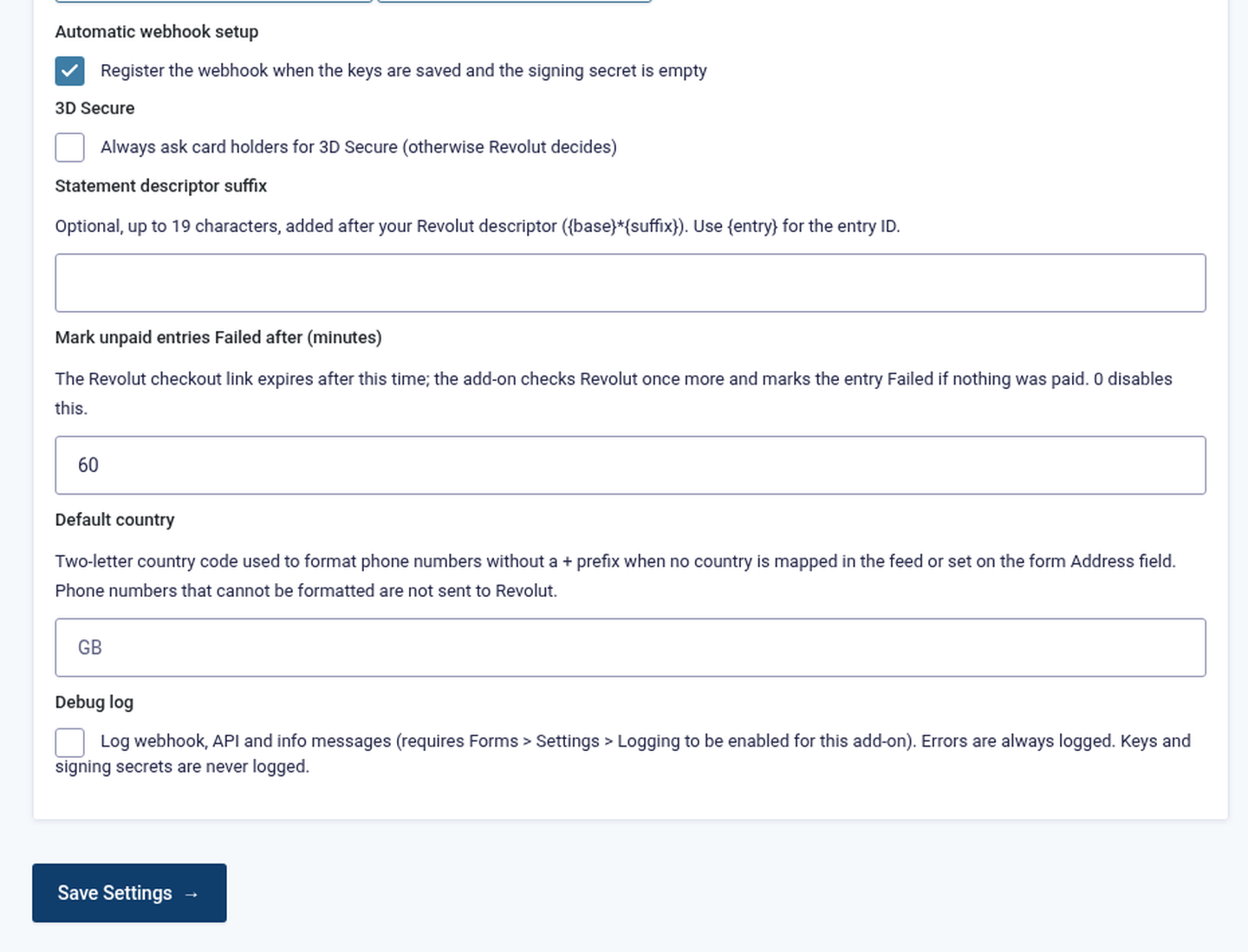
Automatic webhook setup, 3D Secure, statement descriptor suffix, the unpaid-entry time limit, default phone country and debug log. Create a Revolut feed
Open your form, go to Settings → Revolut → Add New, set Transaction Type: Products and Services, choose the payment amount and map the billing fields (Email is required). See Creating a Revolut feed.
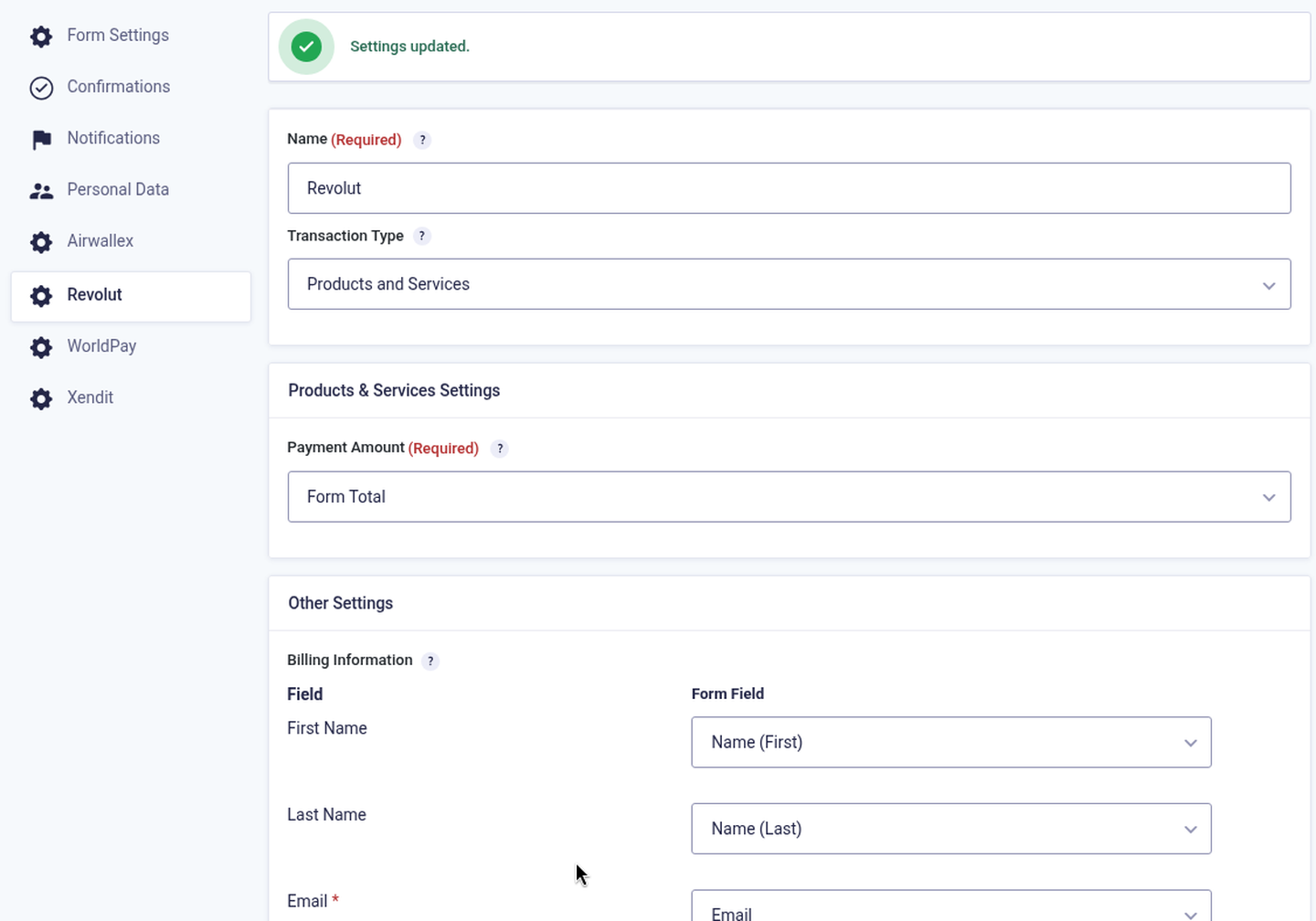
Revolut feed: name, transaction type, payment amount and billing information.
Part C: Test payment
Submit the form
Fill in and submit the form on the front end.
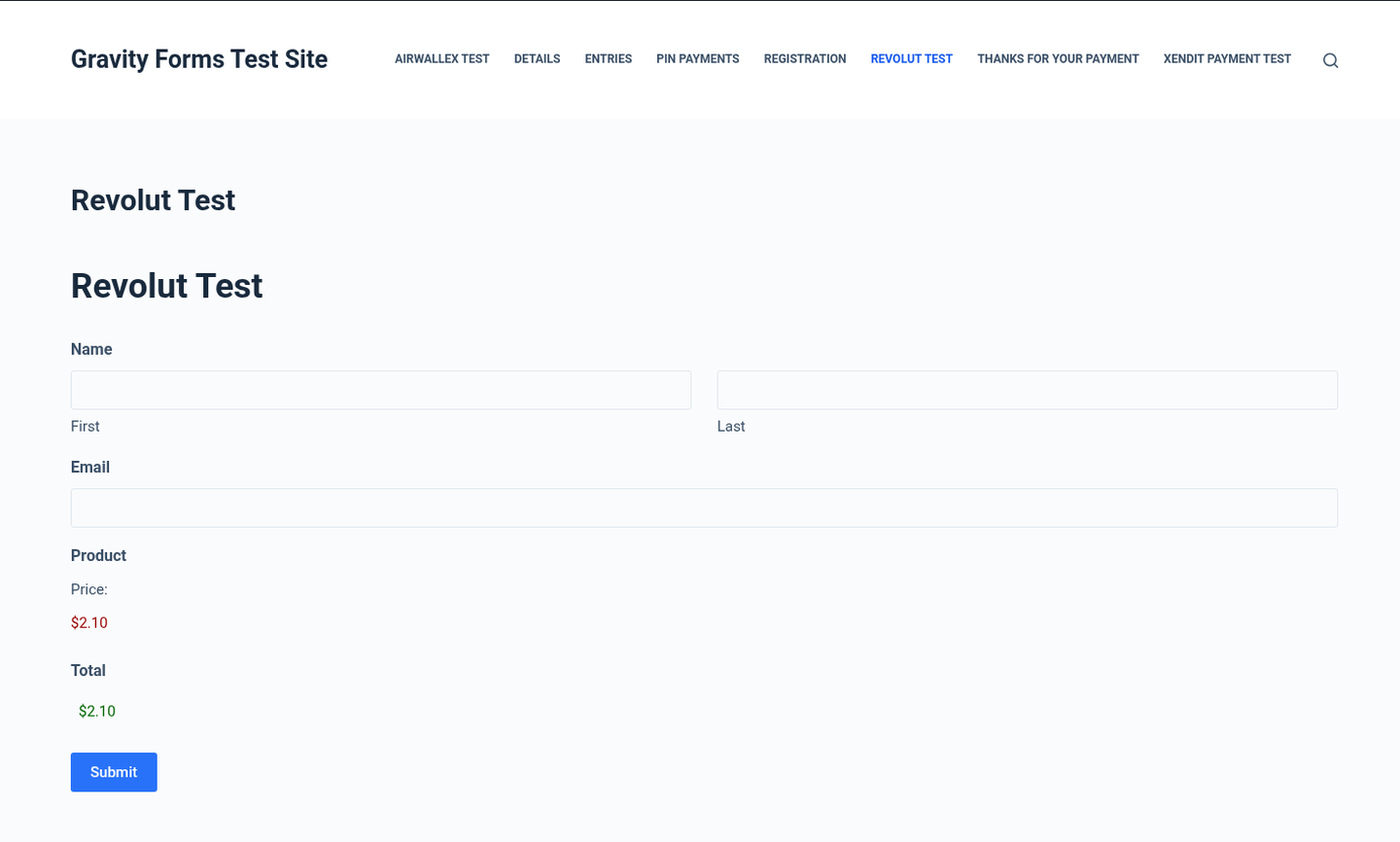
A Gravity Forms form with a product and total (email blurred). Pay on the Revolut Hosted Checkout Page
The visitor is sent to Revolut’s page, which shows the amount and the methods enabled on your account. In the sandbox pay by card with
4929 4205 7359 5709, any future expiry and any CVC.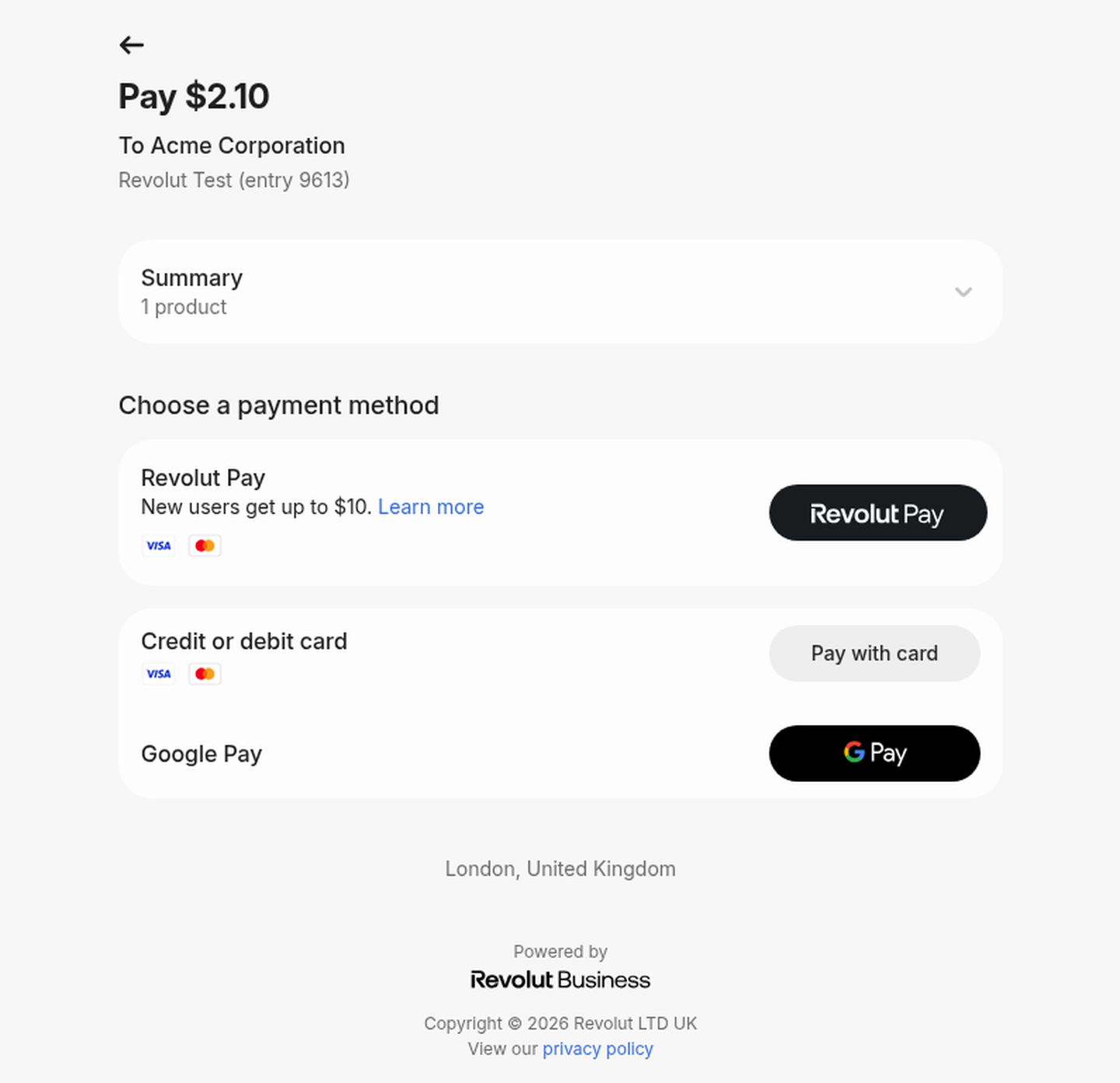
Revolut Hosted Checkout Page for entry 9613 ($2.10). 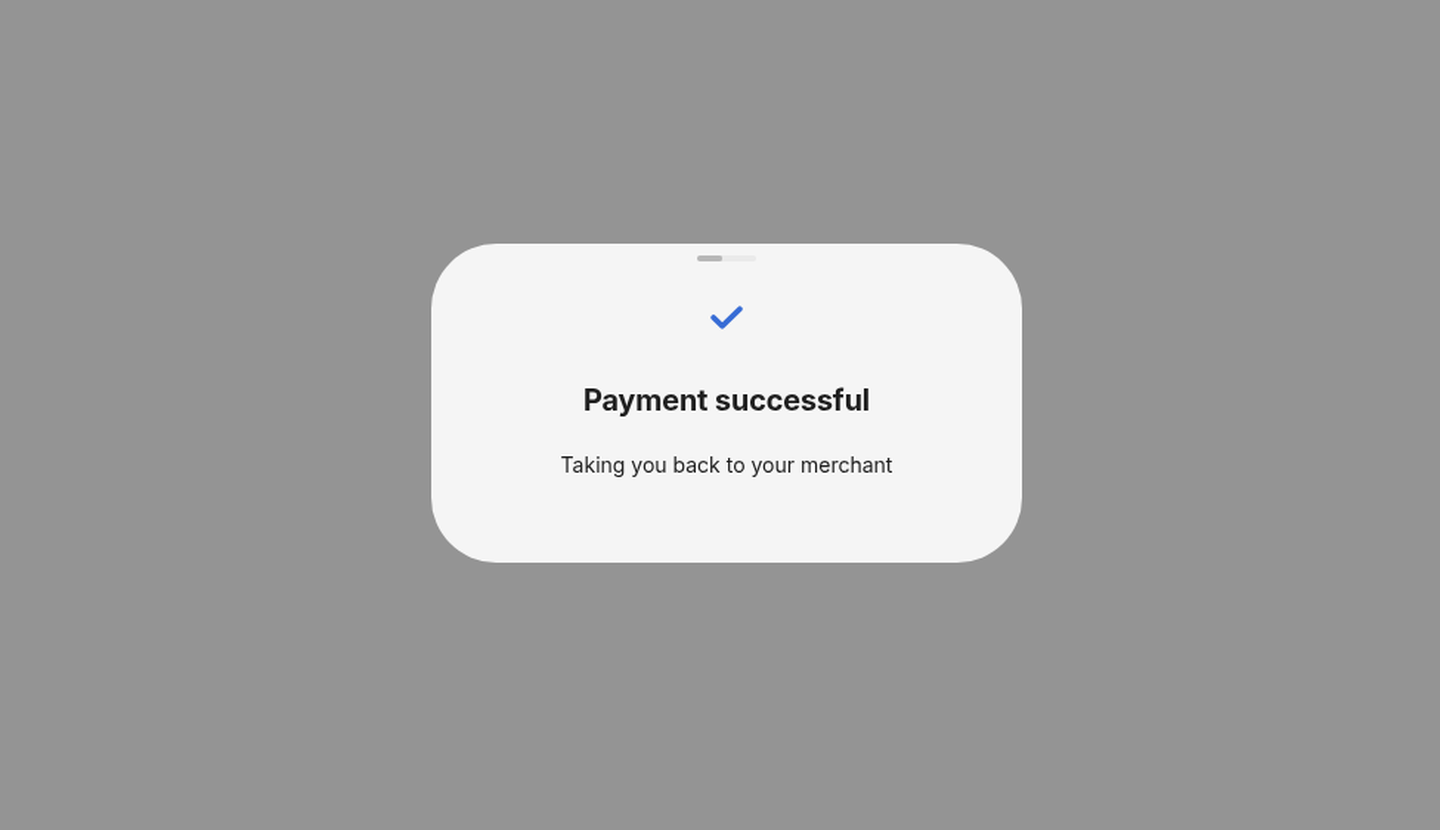
Confirmation
The visitor returns to your form’s confirmation. If Revolut is still confirming the payment, they see “Your payment is being confirmed by Revolut” instead.
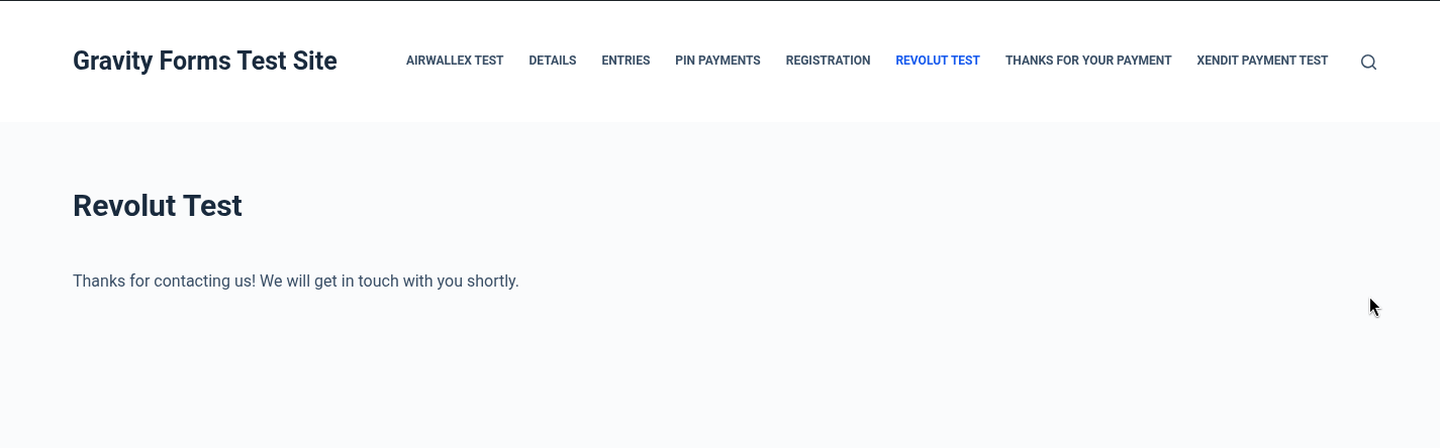
Form confirmation after payment. 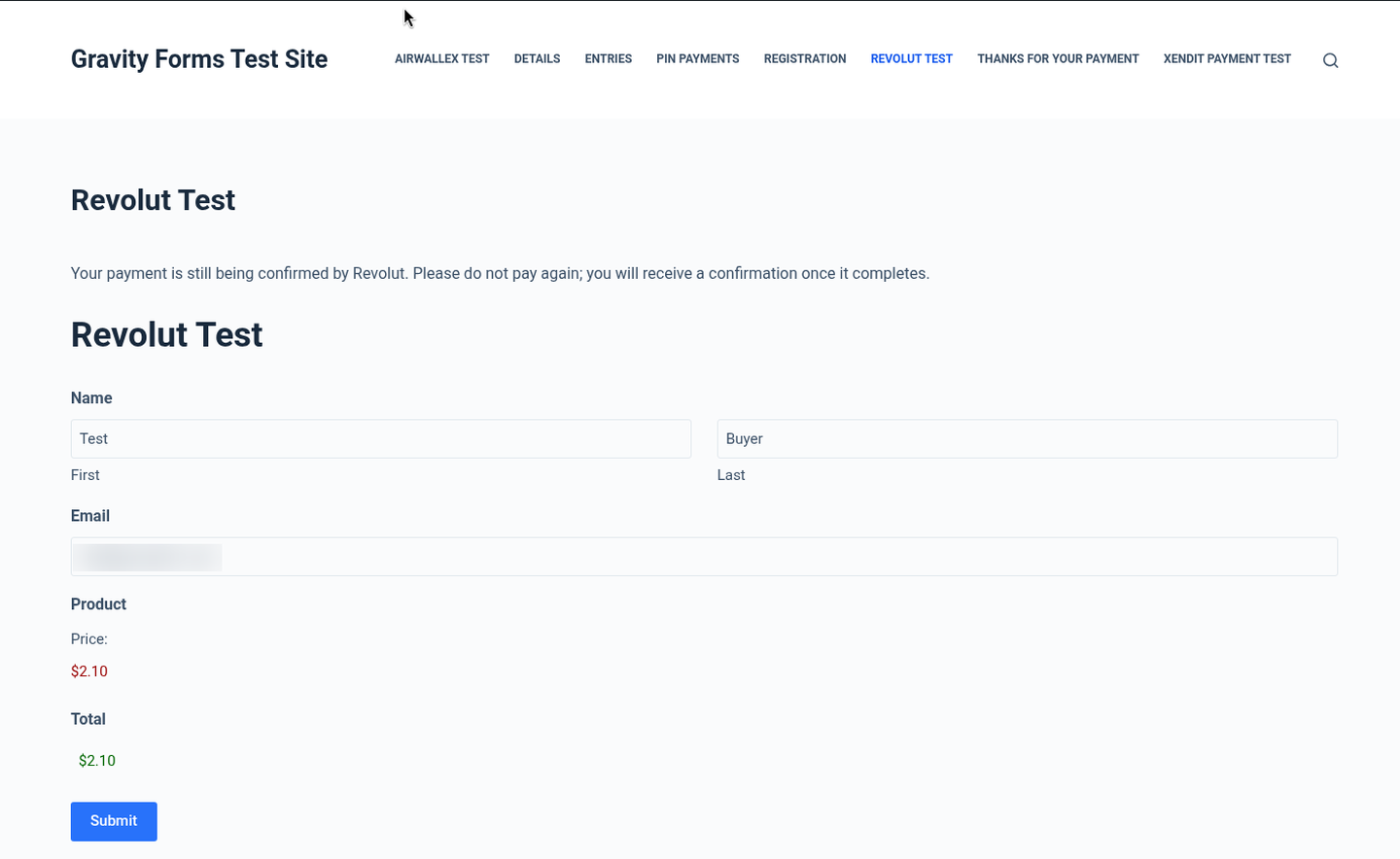
Shown while Revolut is still confirming: the visitor is asked not to pay again. Entry is marked Paid
The entry’s Payment Status becomes Paid, the Revolut order ID is the Transaction ID, and a note records the amount and method. Delayed notifications and feeds run now.
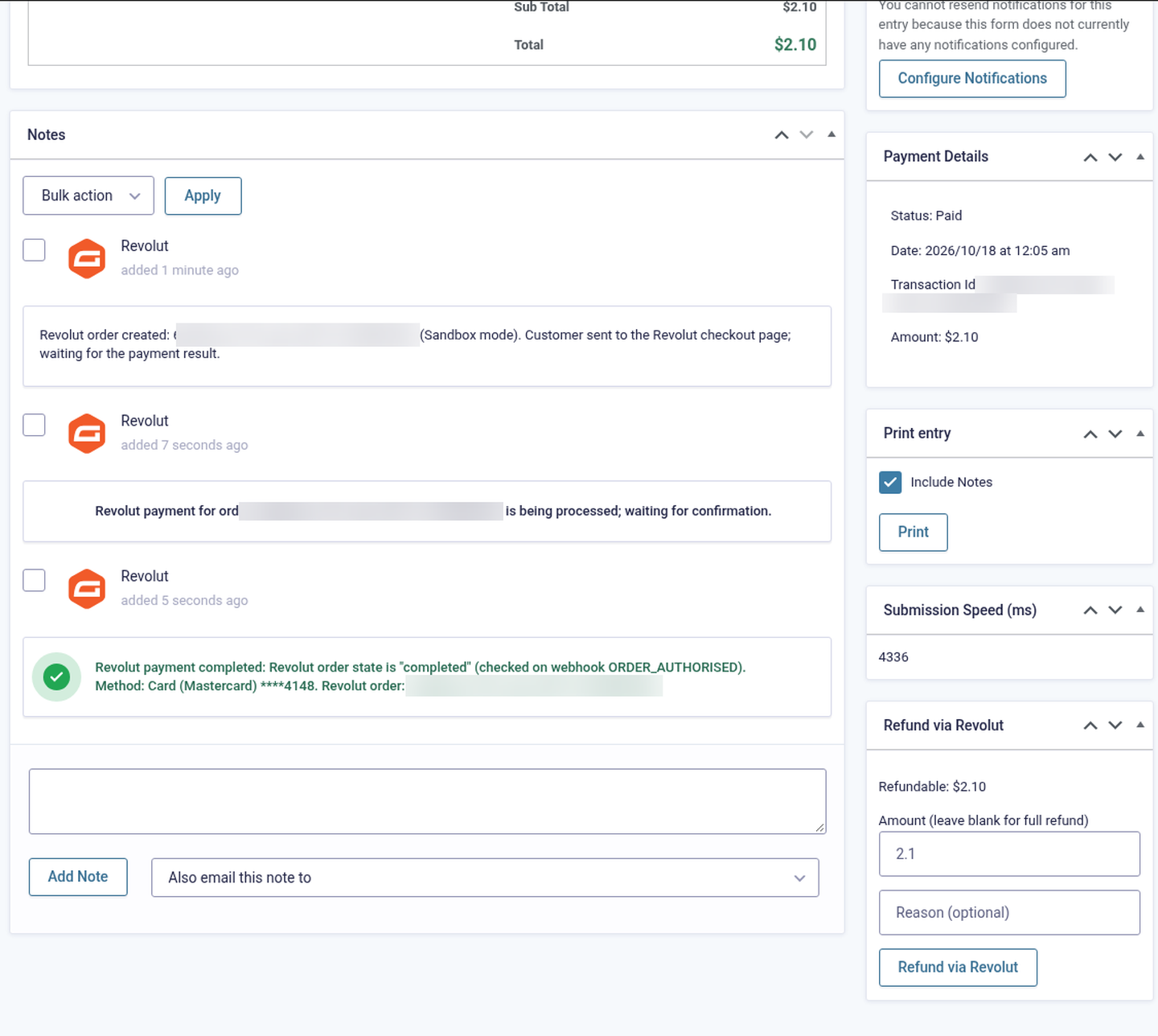
Entry 9613 Paid, with the Revolut notes (IDs and email blurred).
5. Getting your Revolut Secret API key
- Sandbox (for testing): sign up for free at sandbox-business.revolut.com. The sandbox needs no real business verification and moves no real money (if it shows a “We need to confirm a few details” prompt, you do not need to complete it to get the sandbox API keys). Live: sign in to business.revolut.com; your Merchant account must be approved by Revolut first (see eligibility).
- Click your avatar (profile picture) at the top right and choose Settings.
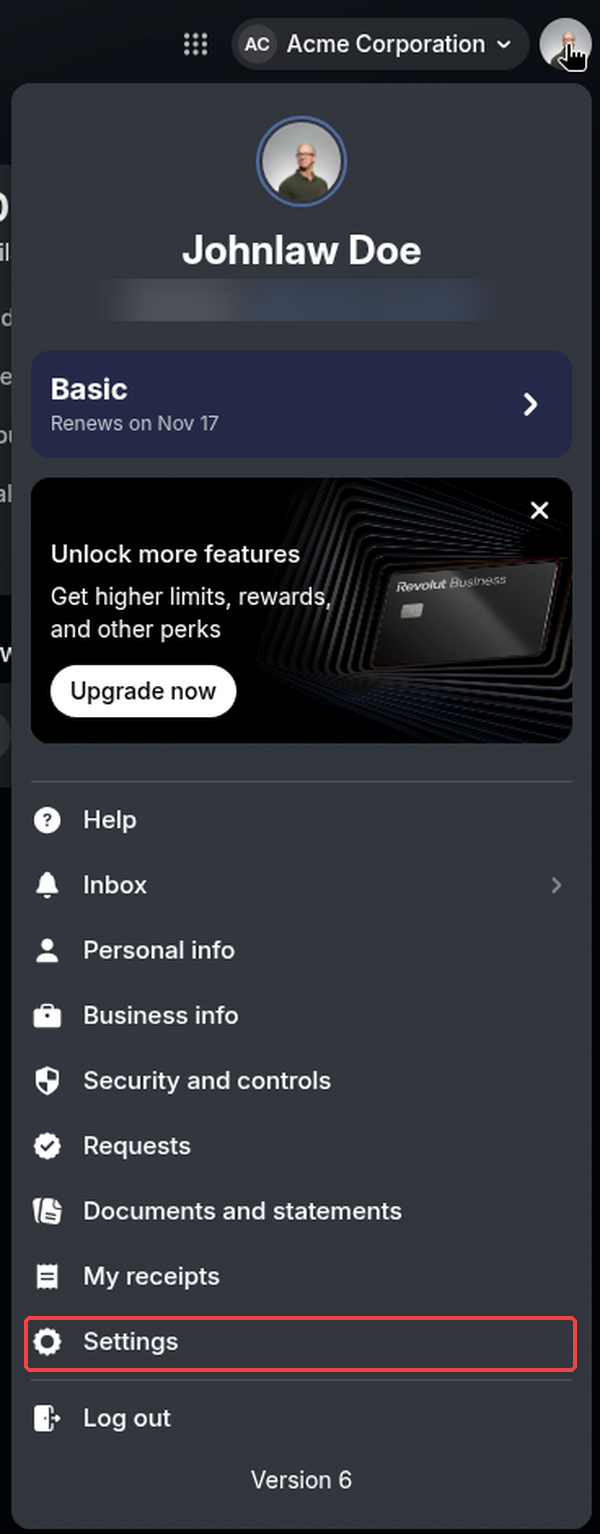
Revolut Business (sandbox): avatar menu → Settings (handle blurred). - In Settings open APIs and select the Merchant API tab. Under API Keys you see the API secret key (it starts with
sk_) and the API public key. Use the eye button to show the secret key or the copy button to copy it. You do not need the public key for this plugin.Settings → APIs → Merchant API: the Sandbox API secret key (blurred) with its show and copy buttons. - Paste the key into the plugin’s Sandbox secret API key (or Live secret API key) field and save.
- No webhook to create. Revolut Business has no webhook screen: the plugin registers the webhook through the Merchant API as soon as you save the key (see Webhooks). You can see it worked in the plugin: the message “Revolut Sandbox webhook registered for … and its signing secret saved.” (or “… already existed; its signing secret was saved.”), the webhook signing secret field filled in, and a line “Sandbox webhook … created for …” in the debug log.
- Repeat in your live account at business.revolut.com when Revolut has approved your Merchant account (same Settings → APIs → Merchant API path; only the sandbox screens were captured for this guide). Sandbox and live keys are different and only work in their own environment.
6. Plugin settings
Forms → Settings → Revolut
| Setting | Description |
|---|---|
| Mode | Live or Sandbox (default Sandbox). Entries keep the mode they were created in. |
| Sandbox / Live secret API key | From Revolut Business → avatar → Settings → APIs → Merchant API → API secret key. Checked with Revolut when you save. |
| Sandbox / Live webhook signing secret | Filled in automatically (wsk_…) when the add-on registers the webhook. |
| Webhook | Your webhook URL (https://your-site.com/?callback=gravityforms-revolut) with Register sandbox webhook now / Register live webhook now buttons. |
| Automatic webhook setup | On by default: registers the webhook when a key is saved and the signing secret is empty. |
| 3D Secure | “Always ask card holders for 3D Secure”. Off by default (Revolut decides). |
| Statement descriptor suffix | Optional, up to 19 characters. {entry} is replaced with the entry ID. |
| Mark unpaid entries Failed after (minutes) | Default 60. The Revolut checkout link expires and the entry is marked Failed if it is still unpaid. |
| Default country | Used to format phone numbers in E.164 when the form has no country (default GB). |
| Debug log | Logs webhooks, API calls and info messages (needs Forms → Settings → Logging enabled for this add-on). Errors are always logged; keys and signing secrets never are. |
7. Webhooks (registered automatically, 6 events)
You do not need to create the webhook by hand (Revolut Business has no webhook screen). When you save a valid Secret key and the signing secret is empty, the add-on registers https://your-site.com/?callback=gravityforms-revolut in your Revolut Merchant account (or reuses a webhook that already points there, adding missing events) and saves the signing secret. Use the Register webhook now buttons to run it again.
| # | Event (registered automatically) | What the plugin does |
|---|---|---|
| 1 | ORDER_COMPLETED | The plugin re-reads the Revolut order from the API; if it is completed and the amount and currency match, the order / entry is marked paid. |
| 2 | ORDER_AUTHORISED | Triggers the same API check (orders use automatic capture, so Revolut completes them on its own). |
| 3 | ORDER_CANCELLED | Records that the Revolut order was cancelled before it was paid. |
| 4 | ORDER_FAILED | Records that the payment failed and ends the attempt. |
| 5 | ORDER_PAYMENT_DECLINED | Card declined: adds a note with the Revolut decline reason and the message the customer was shown. |
| 6 | ORDER_PAYMENT_FAILED | Payment failed (for example a 3D Secure challenge that was abandoned): adds a note with the reason. |
Revolut-Signature header must match v1= + HMAC-SHA256 of v1.<timestamp>.<raw body> with your signing secret, within 5 minutes; otherwise the add-on answers 401. The add-on then re-reads the Revolut order from the API before it changes the entry, so a forged or replayed event cannot mark an entry paid./?callback=gravityforms-revolut through any firewall. Revolut’s documented webhook IPs: 35.242.130.242 and 35.242.162.241 (sandbox), 35.246.21.235 and 34.89.70.170 (live).8. Creating a Revolut feed
- Edit the form → Settings → Revolut → Add New.
- Name the feed and set Transaction Type to Products and Services (one-time payments; subscriptions are not supported).
- Payment Amount: Form Total or a product field.
- Billing Information: map First Name, Last Name, Email (required), Phone and Country (used to format the phone number).
- Optional: Conditional Logic, and the delay options under Notifications & Post Payment Actions.
- Save the feed.
9. Payment flow & entry statuses
| Situation | Entry payment status |
|---|---|
| Visitor sent to Revolut, not paid yet | Processing |
| Revolut still confirming | Processing; “being confirmed” message; re-checked automatically |
| Revolut order completed (amount and currency match) | Paid; transaction ID = Revolut order ID |
| Payment declined or failed, or the Revolut order cancelled | Failed, with a note (reason and the message the visitor saw). If the visitor then pays on the same Revolut page, the entry becomes Paid. |
| Time limit reached | Failed; the Revolut checkout link is cancelled |
| Fully refunded | Refunded |
The add-on checks each payment on return (waiting up to 8 seconds), on every webhook, 25 minutes after the redirect, and with an hourly clean-up (WP-Cron) for entries left Processing.
10. Transaction ID
The Revolut order ID is saved as the entry’s Transaction ID. Payment and refund IDs are in the entry notes. Search for them in Revolut Business under Merchant → Payments.
Finding the payment in Revolut Business
In Revolut Business open Merchant in the left menu. The orders list shows every Revolut order the plugin created, with its status (Paid, Failed, Canceled, Partially refunded…), customer, channel Merchant API, card and amount. Gravity Forms entries appear as GF-<entry ID> (for example GF-9613); the Revolut order ID is also the entry’s transaction ID.
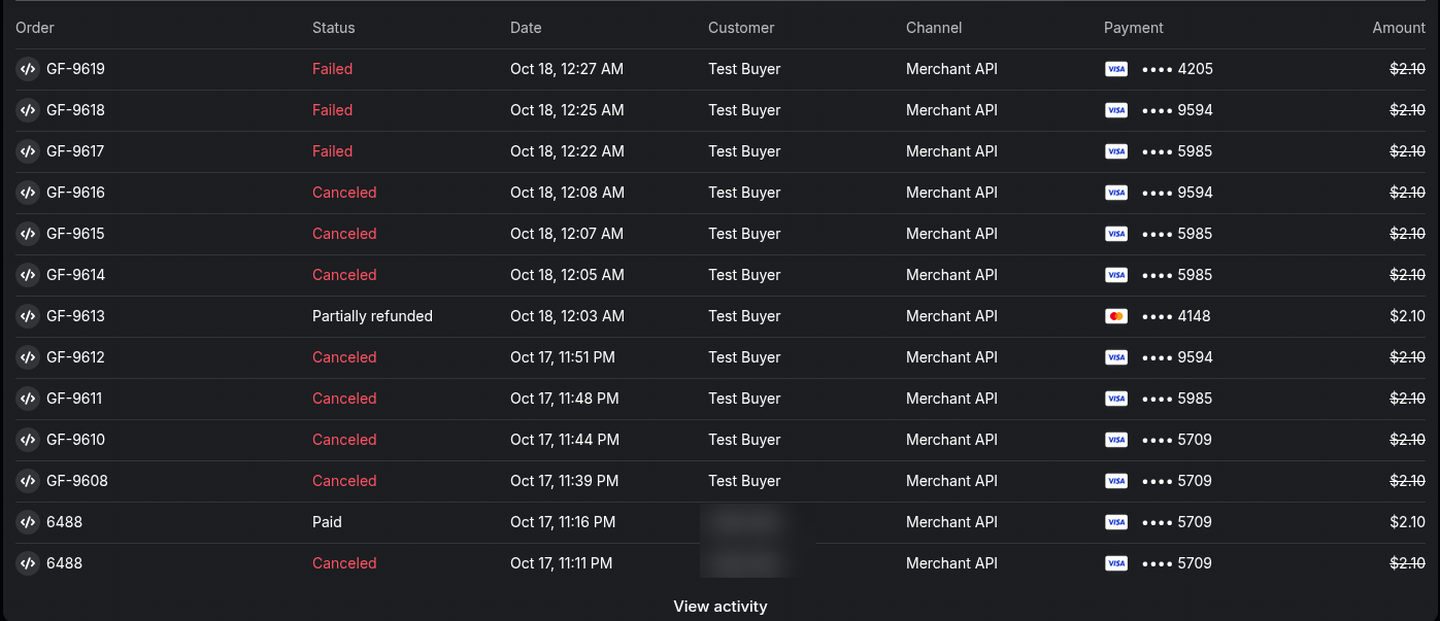
Click an order to see its details, line items, customer and the Payment summary with every refund.
11. Refunds
- Open a Paid entry. The Refund via Revolut box shows the refundable balance.
- Enter an amount (leave it blank for a full refund), an optional reason, and click Refund via Revolut.
- A note records the refund request. Revolut completes refunds in the background and sends no refund webhook, so the add-on checks each refund after 1, 1, 1, 2, 3, 5, 10, 30, 60, 360 and 1440 minutes and whenever you open the entry, then adds a “completed” (or failed) note.
Refunds still waiting on Revolut are listed in the box, with the time of the last check, and count against the balance, so you cannot refund more than was paid. When completed refunds reach the paid amount, the entry becomes Refunded.
12. Pending, declined & expired payments
The Revolut page has no cancel button. A visitor whose card is declined can try another card on the Revolut page. If they come back to your form with the browser’s Back button, the add-on re-checks the payment and shows the reason above a fresh copy of the form: “… You can submit the form again to retry.”
13. Decline messages customers see
| Revolut decline reason | Table key | Message the customer sees |
|---|---|---|
| Card declined by the issuer (do not honour, invalid PIN…) | issuer | Your payment was declined by the card issuer. Please try a different card or payment method. |
| Insufficient funds | funds | Your payment was declined because the card has insufficient funds. Please try a different card or payment method. |
| Expired card / wrong expiry | expired | Your payment was declined because the card has expired. Please try a different card or payment method. |
| Wrong security code | cvc | Your payment was declined because the security code (CVC) is incorrect. Please check the card details or try a different card. |
| Invalid or unknown card number | number | Your payment was declined because the card number is not valid. Please check the card details or try a different card. |
| Card limit exceeded | limit | Your payment was declined because it exceeds the limit on your card. Please try a different card or payment method. |
| 3D Secure / customer challenge failed or abandoned | auth | Your bank could not verify this payment (3D Secure authentication failed). Please try again or use a different card. |
| Revolut risk check (high risk, suspected fraud…) | risk | Your payment was declined for security reasons. Please try a different card or payment method. |
| Processing error | process | Your payment could not be processed. Please try again in a few minutes or use a different payment method. |
| Cancelled or rejected in the banking app | customer | The payment was cancelled or rejected in your banking app. Please try again or use a different payment method. |
| Card can’t pay in this currency | currency | This card cannot be used to pay in this currency. Please try a different card or payment method. |
| Anything else | generic | Your payment was not successful. Please try a different card or payment method. |
Change any message with the gf_revolut_decline_message filter (message, Revolut payment, table key).
14. Testing with the Revolut sandbox (test cards)
Use any future expiry date (for example 12/30) and any 3-digit CVC. Card numbers are from Revolut’s sandbox test-card list.
| Scenario | Card | Notes |
|---|---|---|
| Success | Visa 4929 4205 7359 5709 · Mastercard 5281 4388 0180 4148 | Used for the successful test payments. |
| Declined: insufficient funds | 4929 5736 3812 5985 | Shows the insufficient-funds message. |
| Declined: expired card | 4532 3367 4387 4205 | Shows the expired-card message. |
| Declined: do not honour | 2720 9988 3777 9594 | Shows the “declined by the card issuer” message. |
| 3D Secure failed | 5215 6741 1512 7070 | Revolut reason customer_challenge_failed. |
- 3D Secure: Revolut has no dedicated 3D Secure success card. Tick Always ask card holders for 3D Secure in the settings to see the challenge.
- Revolut Pay (sandbox): the one-time codes 1001–1005 choose the scenario; the sandbox passcode is 124455 (from Revolut’s test-flow docs).
- Apple Pay is not available in the Revolut sandbox. Google Pay results in the sandbox depend on the amount (see Revolut’s test-flow docs).
15. Notifications & Post Payment Actions
- Notifications: tick Send notifications only when payment is received and choose which notifications wait. You can also use the Payment Completed, Payment Failed and Payment Refunded notification events.
- Post Payment Actions: Process [add-on] feed only when payment is received for other add-ons such as Mailchimp or User Registration.
- Posts: Create post only when payment is received.
16. Eligibility, currencies & payment methods
Who can get a Revolut Merchant account. According to Revolut’s help centre (checked October 2026), Merchant accounts are available only to Revolut Business accounts opened in: Australia, Austria, Belgium, Bulgaria, Croatia, Cyprus, Czech Republic, Denmark, Estonia, Finland, France, Germany, Greece, Hungary, Iceland, Ireland, Italy, Latvia, Lithuania, Luxembourg, Malta, Netherlands, Norway, Poland, Portugal, Romania, Slovakia, Slovenia, Singapore, Spain, Sweden and the United Kingdom. Revolut Business customers in Switzerland, the United States and Liechtenstein cannot open a Merchant account, and businesses in other countries (for example India) are not eligible. To accept payments through the API or a plugin, Revolut also requires a fully working website. Revolut’s limit is £50,000 (or equivalent) per transaction.
Currencies. Cards, Apple Pay and Google Pay: AUD CAD CHF CZK DKK EUR GBP HKD HUF ILS JPY MXN NOK NZD PLN RON SEK SGD TRY USD ZAR (21 currencies). Revolut Pay additionally accepts AED CLP COP INR ISK KRW PHP QAR RSD SAR THB. The plugin sends amounts in each currency’s minor units (JPY, ISK, CLP and KRW have no decimals).
Payment methods. The Revolut Hosted Checkout Page shows the methods Revolut enables on your Merchant account: cards (Visa, Mastercard and others), Apple Pay, Google Pay and Revolut Pay. The plugin cannot turn individual methods on or off; that is done by Revolut.
Set the form currency under Forms → Settings → Currency; it must be one Revolut accepts.
17. Debug logs
Enable Forms → Settings → Logging, turn on logging for Revolut Gateway for Gravity Forms, and tick Debug log in the Revolut settings. View the log from Forms → Settings → Logging. Errors and webhook receipts are always logged; keys and signing secrets are never logged.
18. Troubleshooting & FAQ
The key was rejected
Check the Mode matches the key (sandbox key with Sandbox), and that you copied the Secret key (sk_…), not the Public key.
The webhook could not be registered
The site must be reachable over HTTPS from the internet, and the account must have fewer than 10 webhooks. Revolut Business has no webhook screen; registration is confirmed by the success message in the settings, the filled-in signing secret and the add-on log.
Paid in Revolut but the entry is still Processing
Check the signing secret is filled in (or click Register webhook now), that a firewall is not blocking /?callback=gravityforms-revolut, and that WP-Cron runs. Open the entry to trigger a check; see the log.
A refund has no “completed” note
Revolut has not completed it yet. The box shows the last check; open the entry later.
Subscriptions?
No. One-time payments (Products and Services) only.
Can I hide the “Get $10 by joining Revolut” box?
No. It is Revolut’s promotion on its hosted page.
19. Tested on
- WordPress 7.1.3
- Gravity Forms 2.10.3
- PHP 8.1.34 (LiteSpeed server); PHP 7.4 or later required
- Revolut Business sandbox Merchant account, USD entries. Live payments and Apple Pay not yet tested.
- Scenarios: card payment, automatic webhook registration, signed webhooks, declined card with decline message, partial refunds with refund tracking, unpaid entries marked Failed
20. Changelog
1.0.0 — 2026-10-18
- Initial release on the Gravity Forms Payment Add-On Framework.
- Revolut Merchant API order + Hosted Checkout Page (cards, Apple Pay, Google Pay, Revolut Pay).
- Sandbox and live keys checked on save; webhook registered automatically (6 events).
- Signed webhooks; every change re-checked with the API under a per-entry lock.
- Clear decline messages; unpaid entries marked Failed on a timer; hourly clean-up.
- Full and partial refunds from the entry with completion tracking.
- Delayed notifications, posts and Post Payment Actions; E.164 phone numbers; debug logging (no secrets).
21. Support
PatSaTECH · [email protected] · www.patsatech.com
Please include your WordPress, Gravity Forms and PHP versions, the mode (sandbox or live) and the relevant log lines (never send your Secret key).








