

1. Overview
WooCommerce Revolut Payment Gateway by PatSaTECH connects your store to the Revolut Business Merchant API. At checkout the plugin creates a Revolut order for the WooCommerce order and sends the customer to the secure Revolut Hosted Checkout Page, where they pay by card, Apple Pay, Google Pay or Revolut Pay (whichever Revolut enables on your account). Card data never touches your server.
When the customer returns, and again when Revolut sends a signed webhook, the plugin re-reads the Revolut order from the API and checks the amount and currency before it marks the WooCommerce order paid. You only paste one Secret API key: the webhook is registered for you. Refunds are made from the WooCommerce order screen.
patsatech_revolut), classes, options and endpoints, so it does not clash with the official “Revolut Gateway for WooCommerce” plugin. Do not enable both at the same checkout.2. Features
- Revolut Hosted Checkout Page
- Cards, Apple Pay, Google Pay, Revolut Pay
- Sandbox & Live keys
- Key checked when you save
- Webhook registered automatically
- Signed webhooks (Revolut-Signature v1)
- Return-URL check with the API
- Amount & currency verification
- Per-order lock: never paid twice
- Full & partial refunds
- Refund completion tracked
- Clear decline messages
- Cart kept after a decline
- Duplicate payments auto-refunded
- Unpaid orders cancelled on a timer
- Line items that add up exactly
- Optional forced 3D Secure
- Statement descriptor suffix
- HPOS compatible
- WooCommerce Blocks + classic
- Debug log (no secrets logged)
- Translation-ready (.pot)
3. Requirements
| Component | Minimum |
|---|---|
| WordPress | 6.0 (tested up to 7.1.3) |
| WooCommerce | 8.0 (tested up to 11.2.1) |
| PHP | 7.4 |
| SSL / HTTPS | Required (return URLs and webhooks) |
| Revolut account | A Revolut Business account with an approved Merchant account (live), or a free Revolut Business sandbox (testing), and its Secret API key (sk_…) |
| Country | Your business must be in a country where Revolut offers Merchant accounts: see Eligibility |
Tested on: WordPress 7.1.3, WooCommerce 11.2.1 (classic and Blocks checkout, HPOS), Revolut Business sandbox, PHP 8.1.34 (LiteSpeed). Requires PHP 7.4 or later.
4. Installation
Upload ZIP (recommended)
- In WordPress admin go to Plugins → Add New → Upload Plugin.
- Choose
woorevolut-1.0.0.zipand click Install Now. - Activate WooCommerce Revolut Payment Gateway (PatSaTECH).
FTP / SFTP
- Unzip the package.
- Upload the
woorevolutfolder to/wp-content/plugins/. - Activate from the Plugins screen.
Step-by-step setup with screenshots
- Card payments on the classic checkout (order #6488) and the Checkout block (order #6487), and order #6472
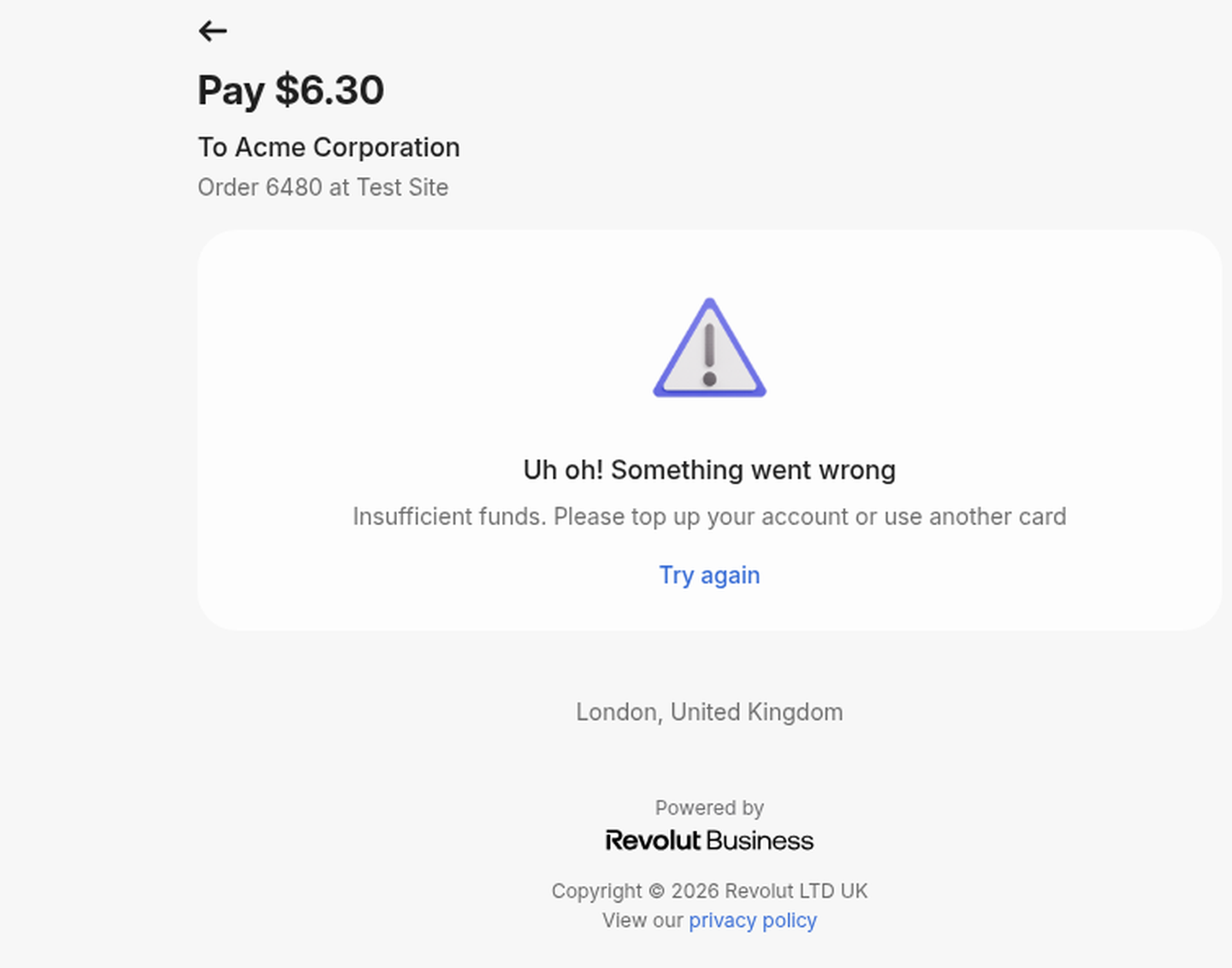
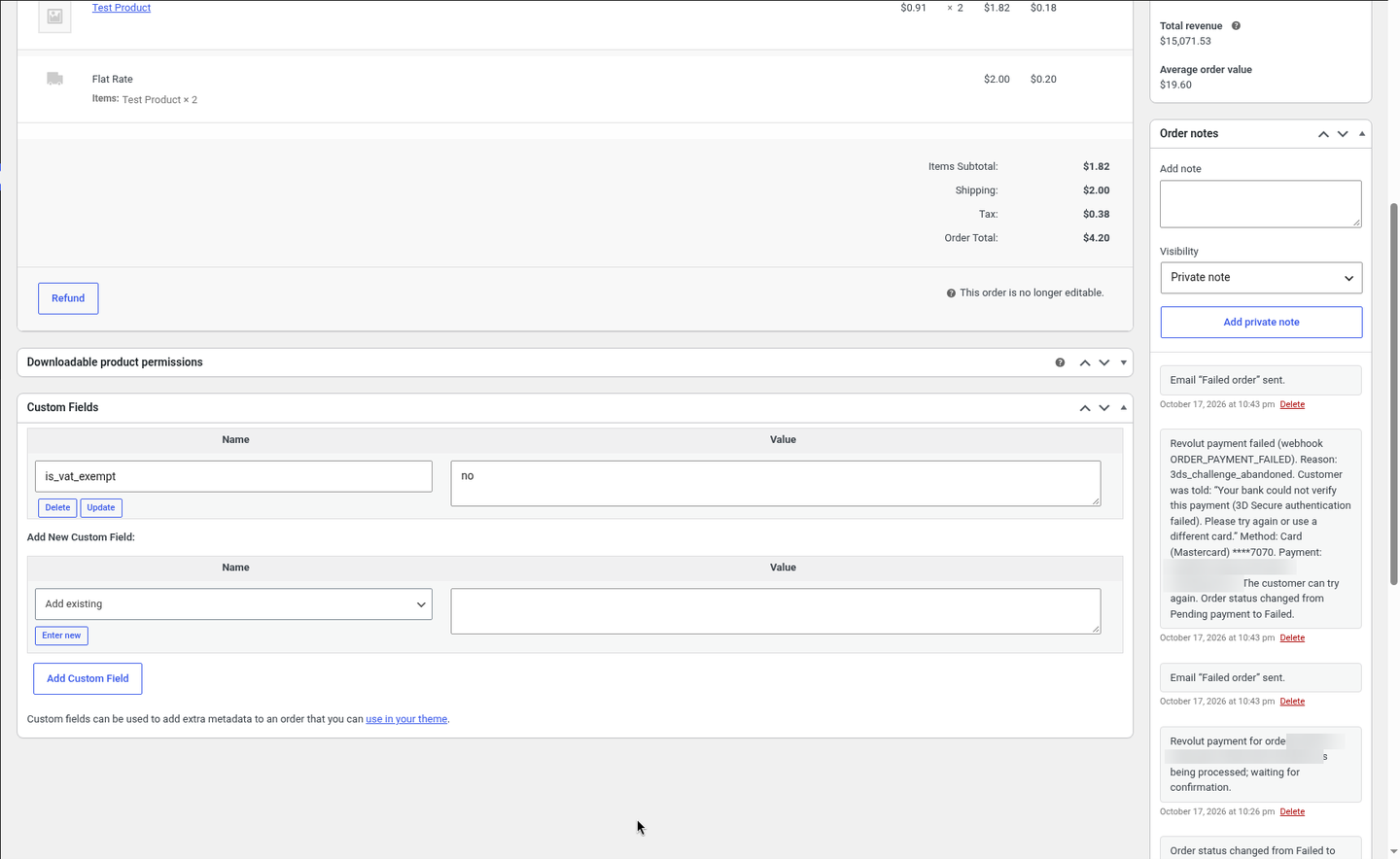
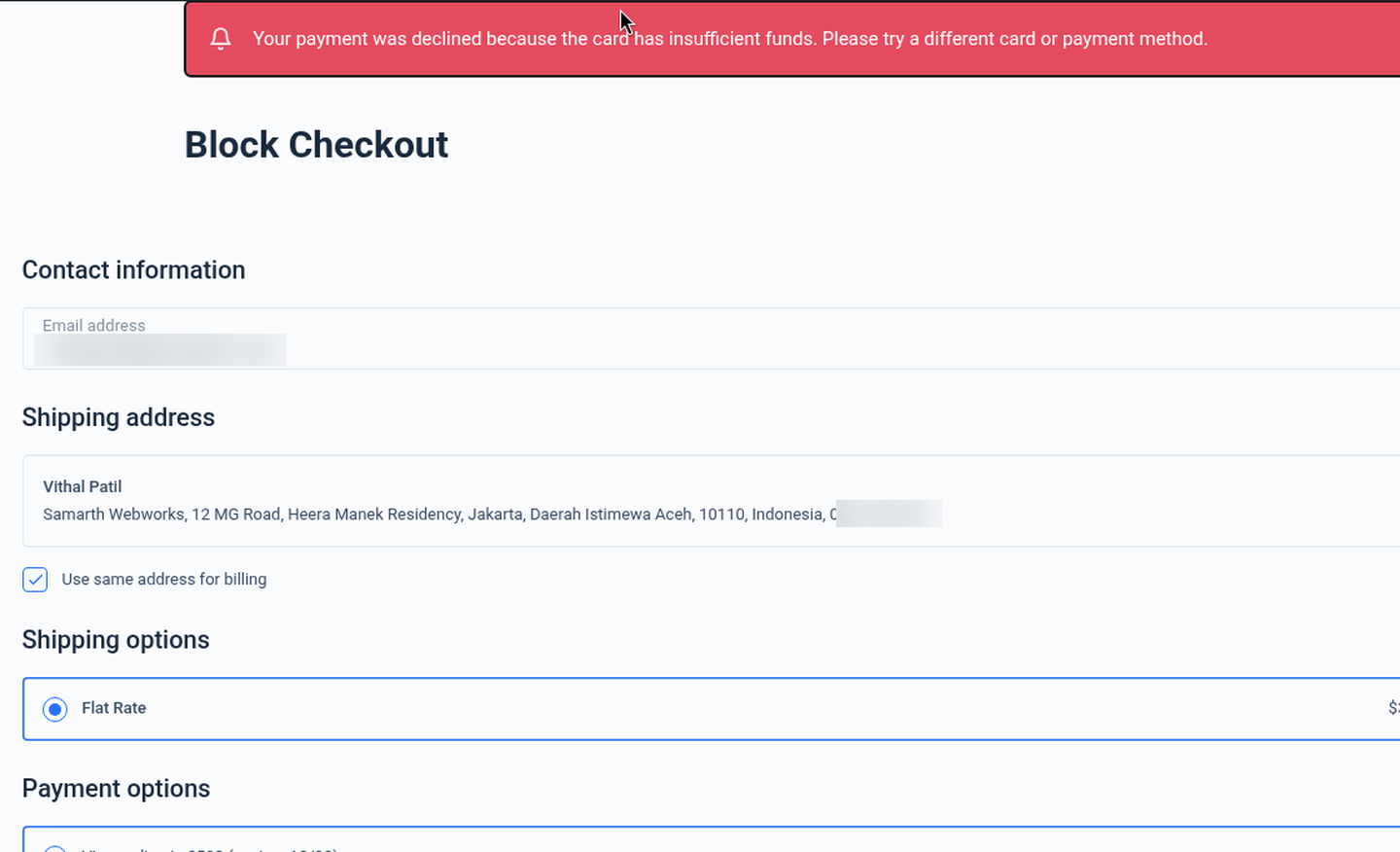
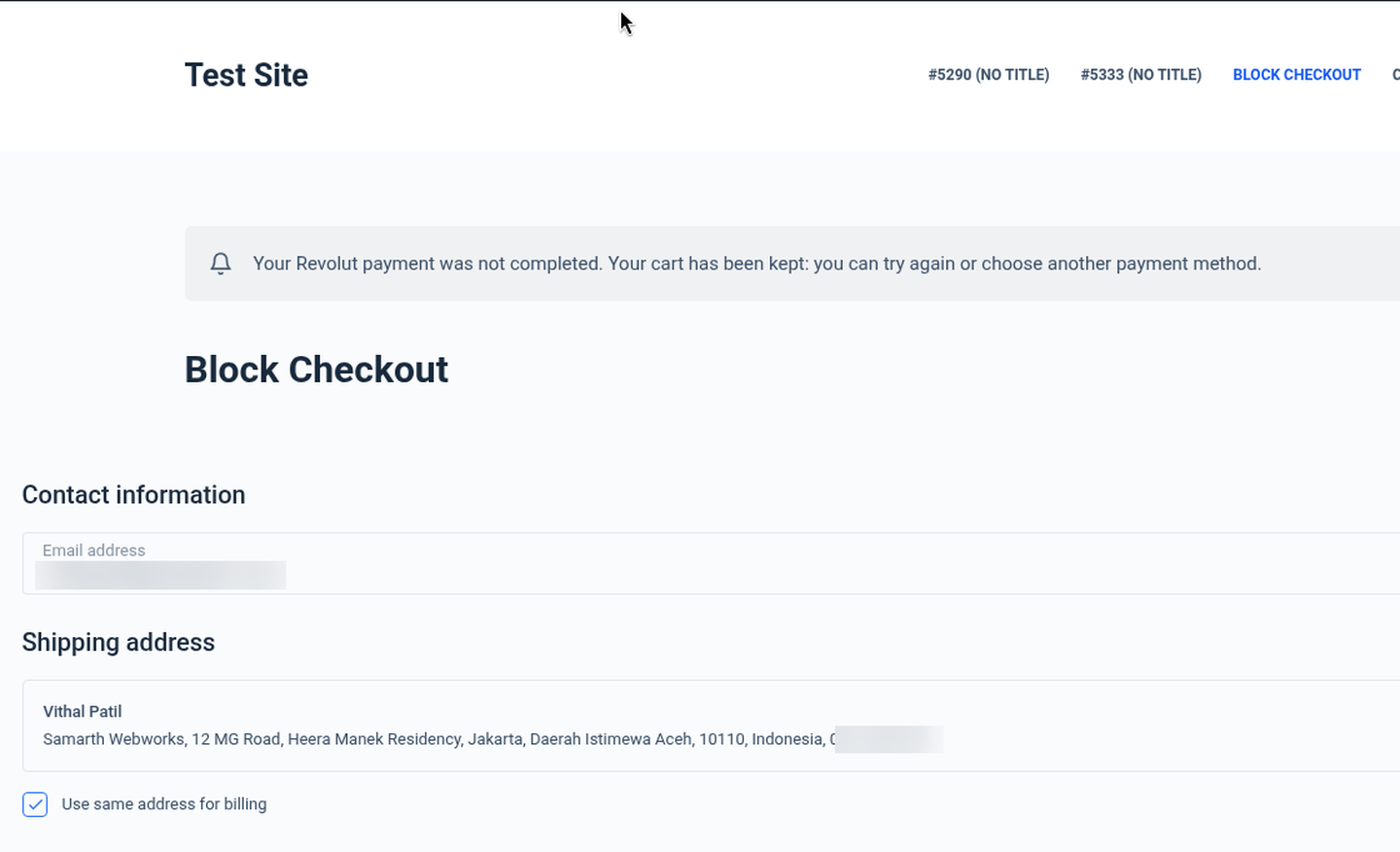
- Declined cards with the customer message: insufficient funds (order #6480) and an abandoned 3D Secure challenge (order #6479)
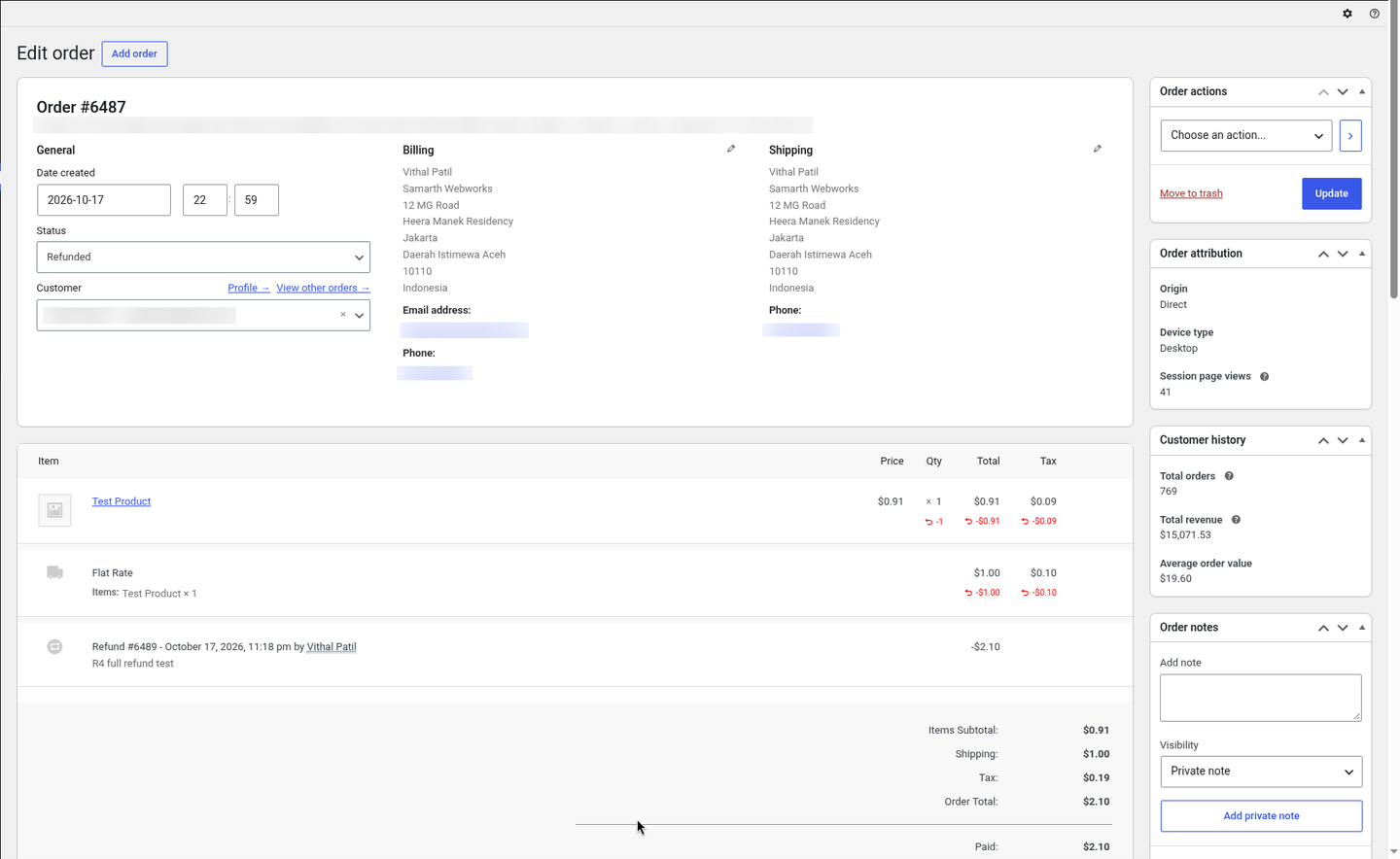
- Partial refund, then a full refund of the rest (order #6472), and a full refund (order #6487 → Refunded)
- Webhook registered automatically when the key was saved; signed webhooks received and verified
This walkthrough shows a complete setup, from the Revolut key to a refunded order. Click any screenshot to open it full size. Keys, Revolut order, payment and refund IDs, email addresses, phone numbers and IP addresses are blurred.
Part A: Revolut Business
Copy your Secret API key
In Revolut Business click your avatar → Settings → APIs → Merchant API tab and copy the API secret key (
sk_…). For testing use the sandbox atsandbox-business.revolut.com. Full details: Getting your Revolut Secret API key.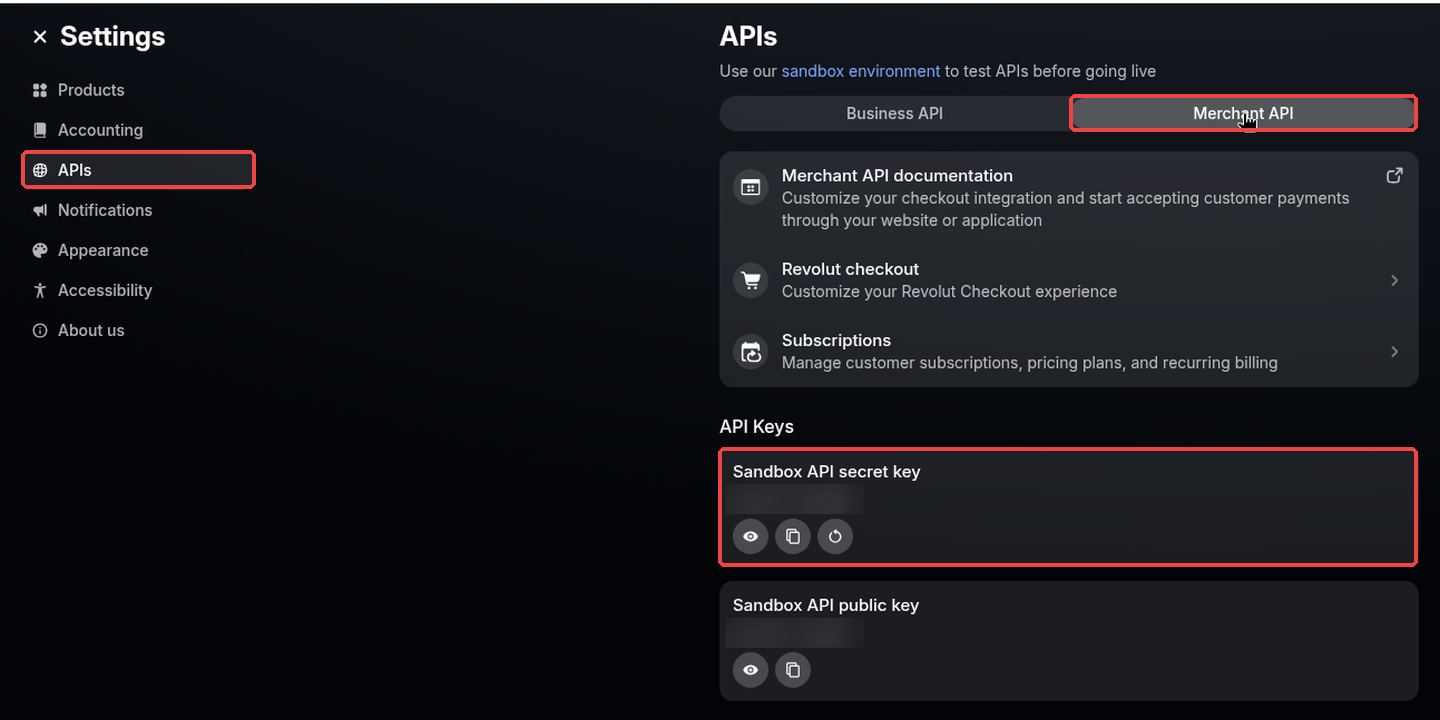
Settings → APIs → Merchant API (keys blurred).
Part B: WordPress / WooCommerce
Upload the plugin
Plugins → Add New → Upload Plugin, choose
woorevolut-1.0.0.zip, then click Install Now.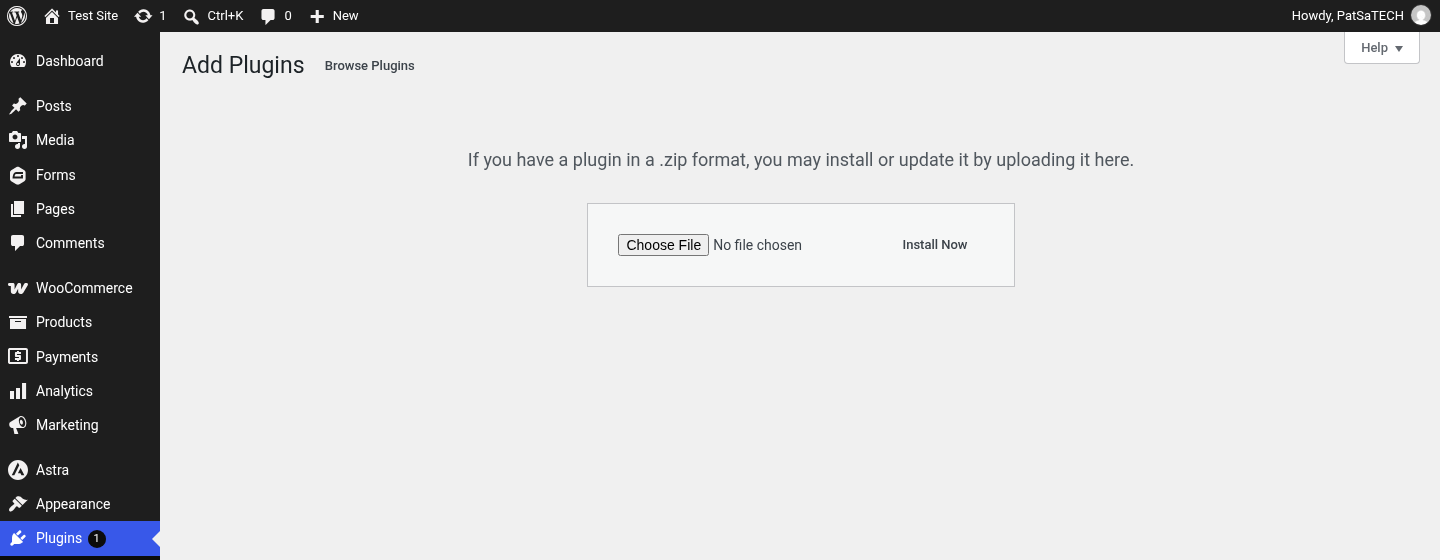
Activate
Click Activate Plugin. A Settings link appears in the plugin row.
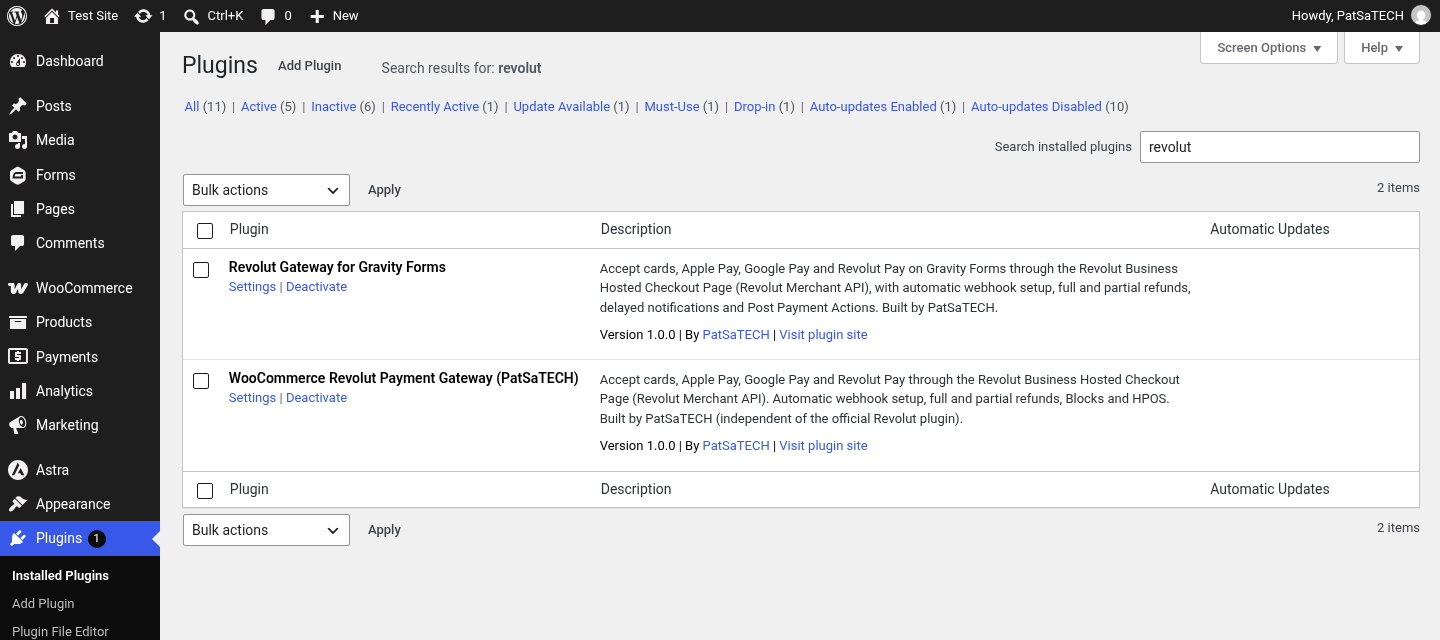
WooCommerce Revolut Payment Gateway (PatSaTECH) 1.0.0 active. Paste your sandbox key and save
Go to WooCommerce → Settings → Payments → Revolut (PatSaTECH). Tick Enable Revolut, keep Sandbox ticked, paste the Sandbox secret API key and click Save changes. Leave Sandbox webhook signing secret empty: the plugin checks the key with Revolut, registers the webhook and fills the signing secret in for you.
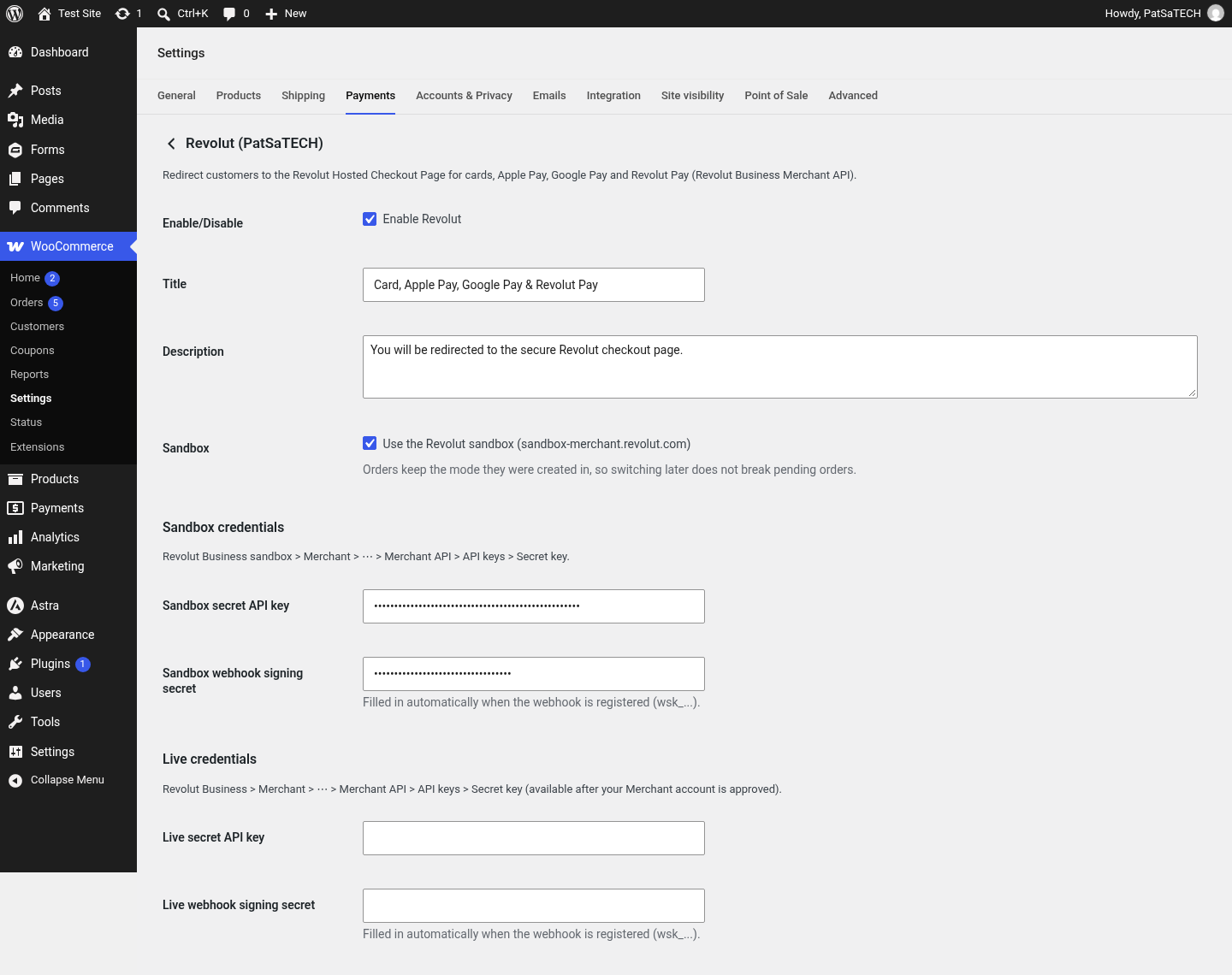
Top of the Revolut settings: enable, title, description, sandbox mode and the sandbox / live keys (masked). 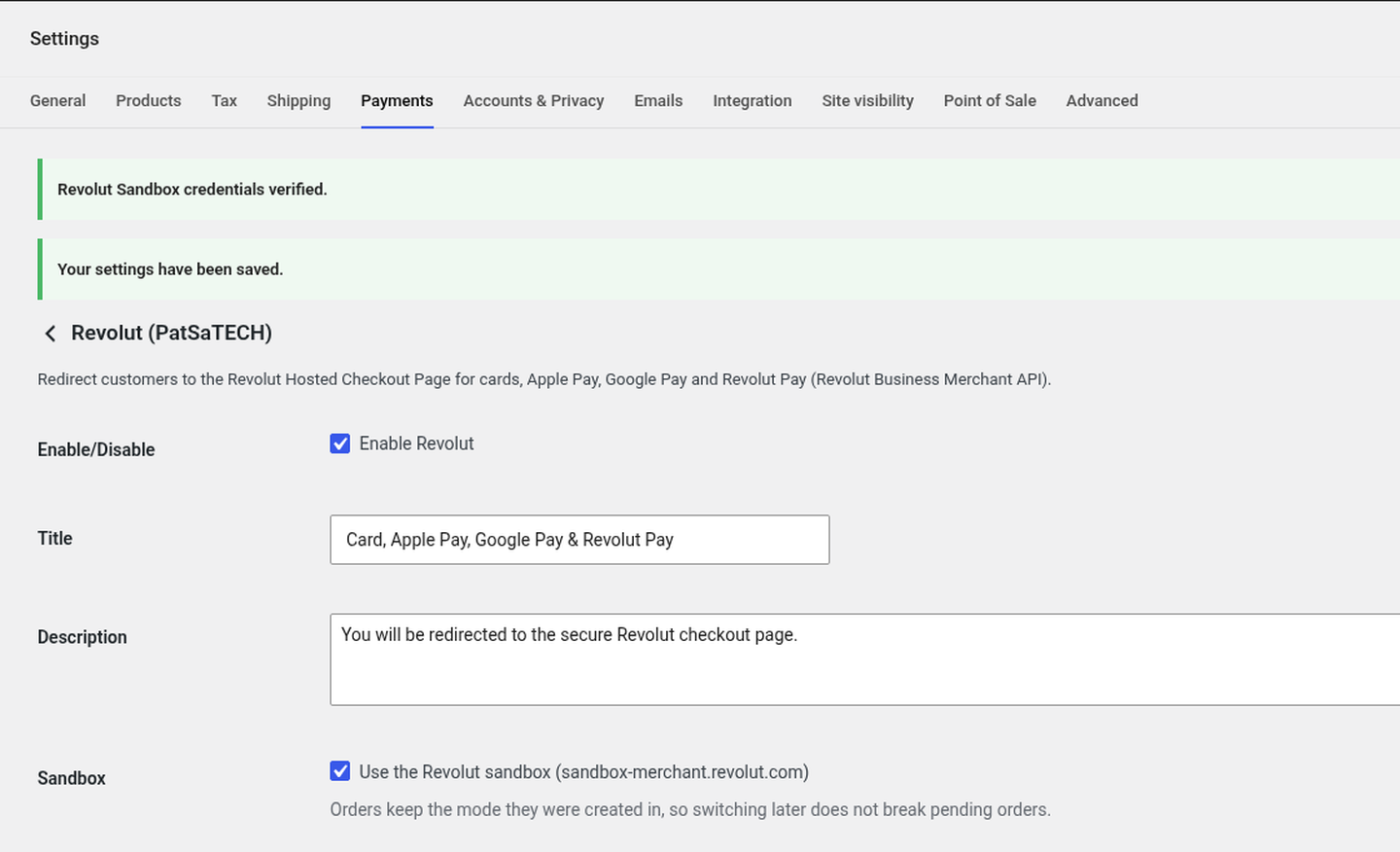
After saving: “Revolut Sandbox credentials verified.” The webhook is registered in the same save and its signing secret (wsk_…) is filled into the field. 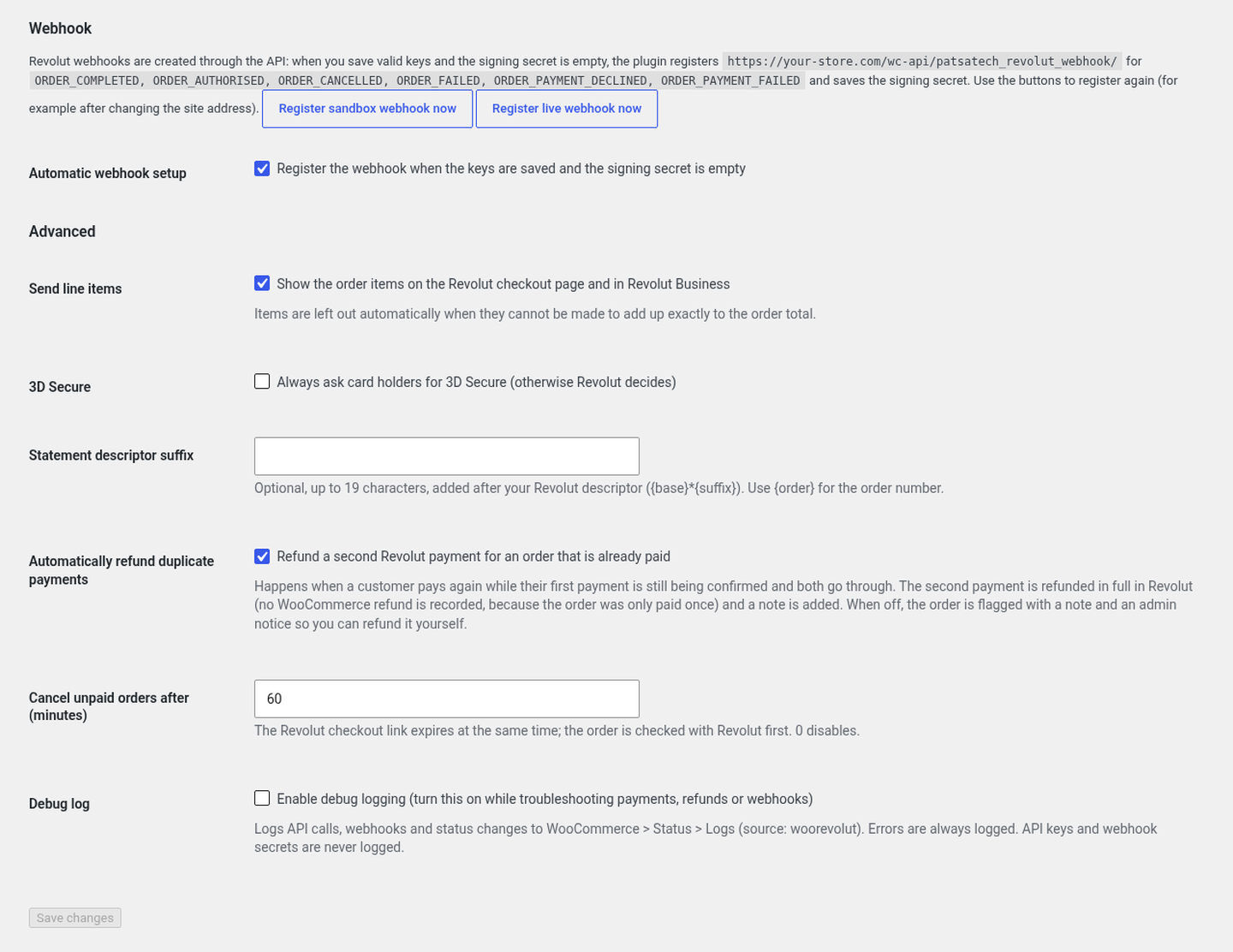
Bottom of the settings: the webhook URL with the “Register webhook now” buttons, automatic webhook setup, line items, 3D Secure, statement descriptor suffix, duplicate refunds, the unpaid-order timer and the debug log.
Part C: Test order
Choose Revolut at checkout
Add a product to the cart, fill in the billing details, select Card, Apple Pay, Google Pay & Revolut Pay and click Place order. The same option appears in the Checkout block.
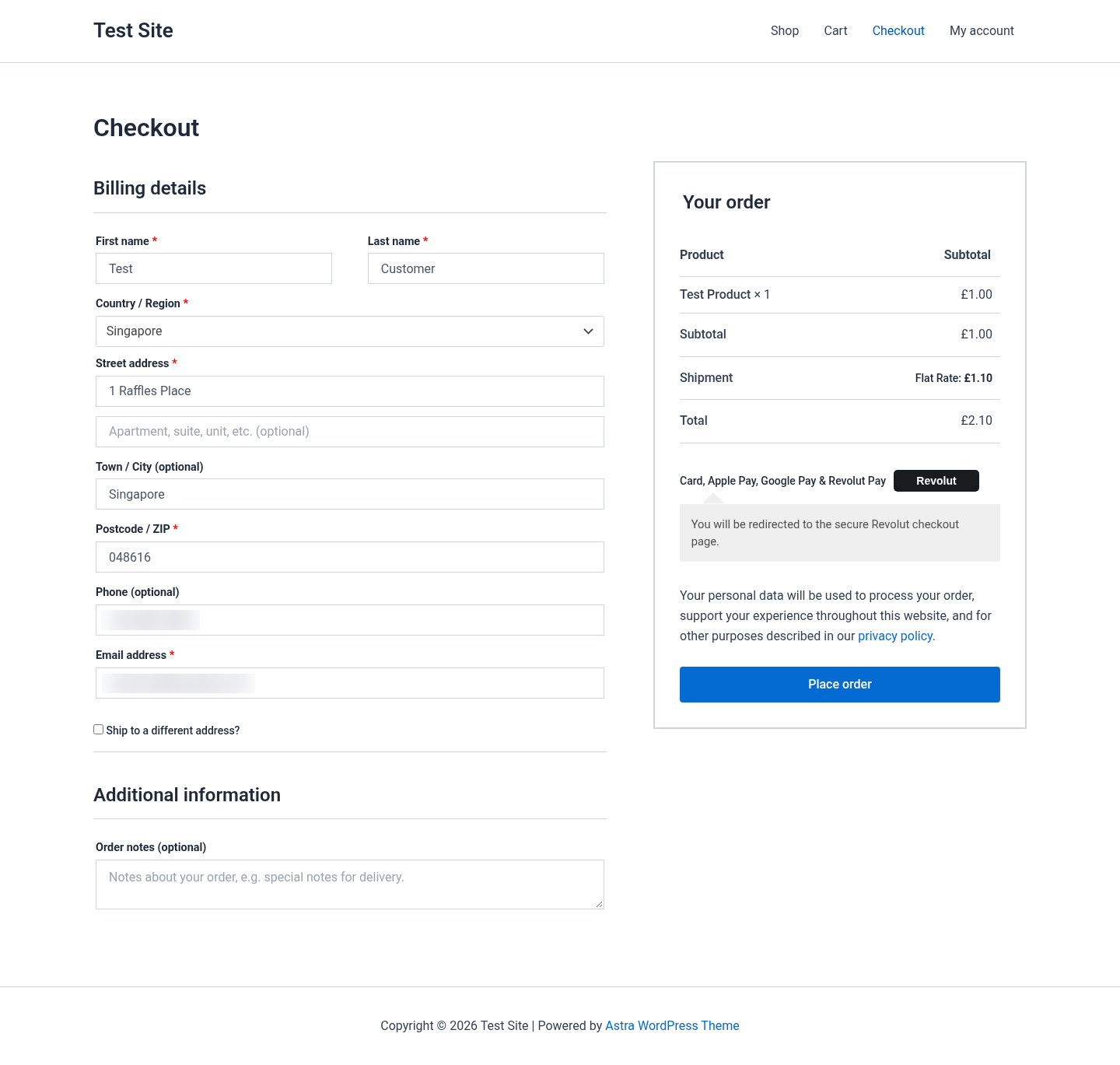
Classic checkout with the Revolut option selected. Pay on the Revolut Hosted Checkout Page
The customer is sent to Revolut’s secure page, which shows the amount, the order summary and the methods enabled on your account (here Revolut Pay, card and Google Pay). In the sandbox pay by card with
4929 4205 7359 5709, any future expiry and any CVC (see test cards).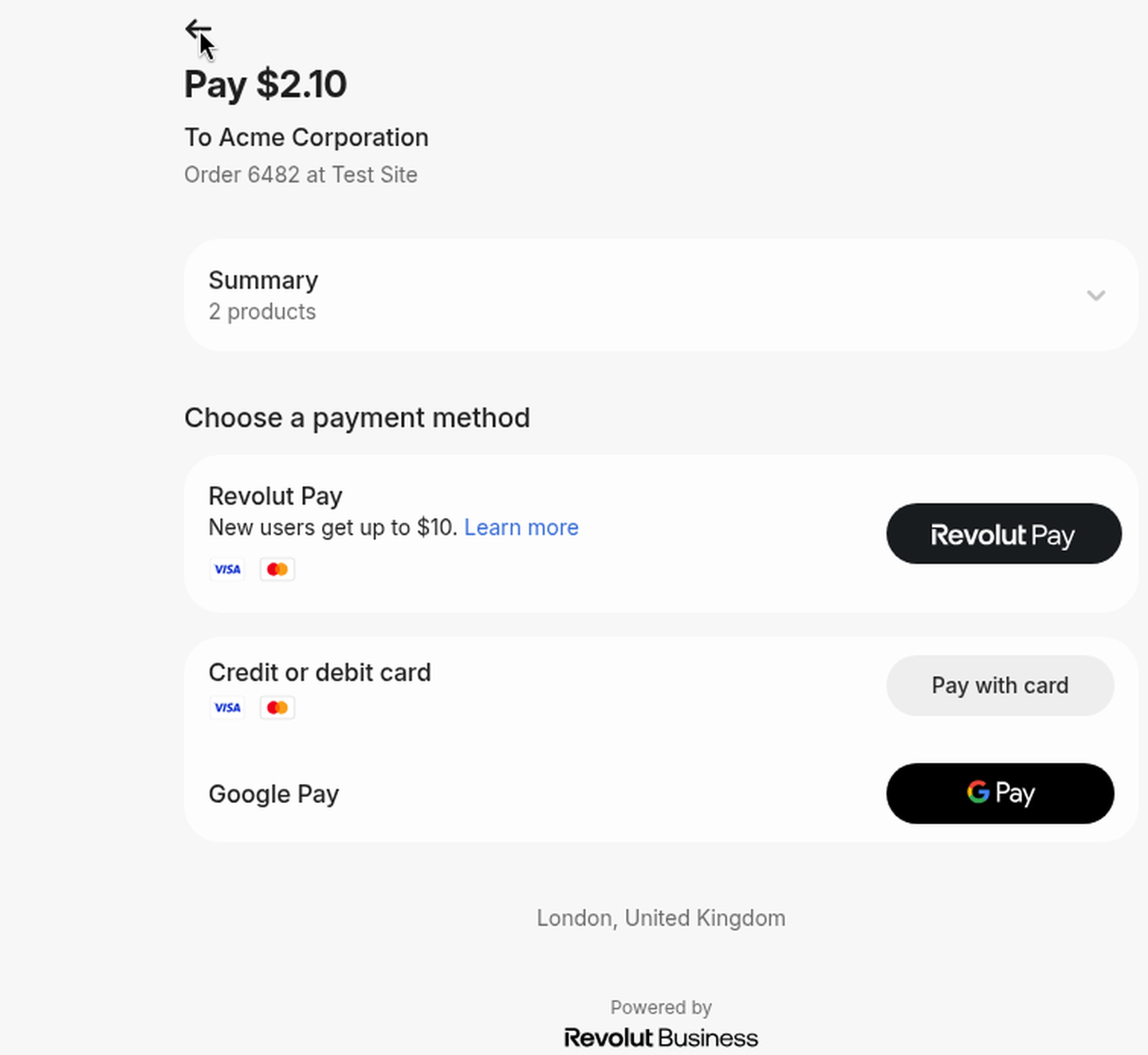
Revolut Hosted Checkout Page for a $2.10 test order (sandbox merchant name “Acme Corporation”). 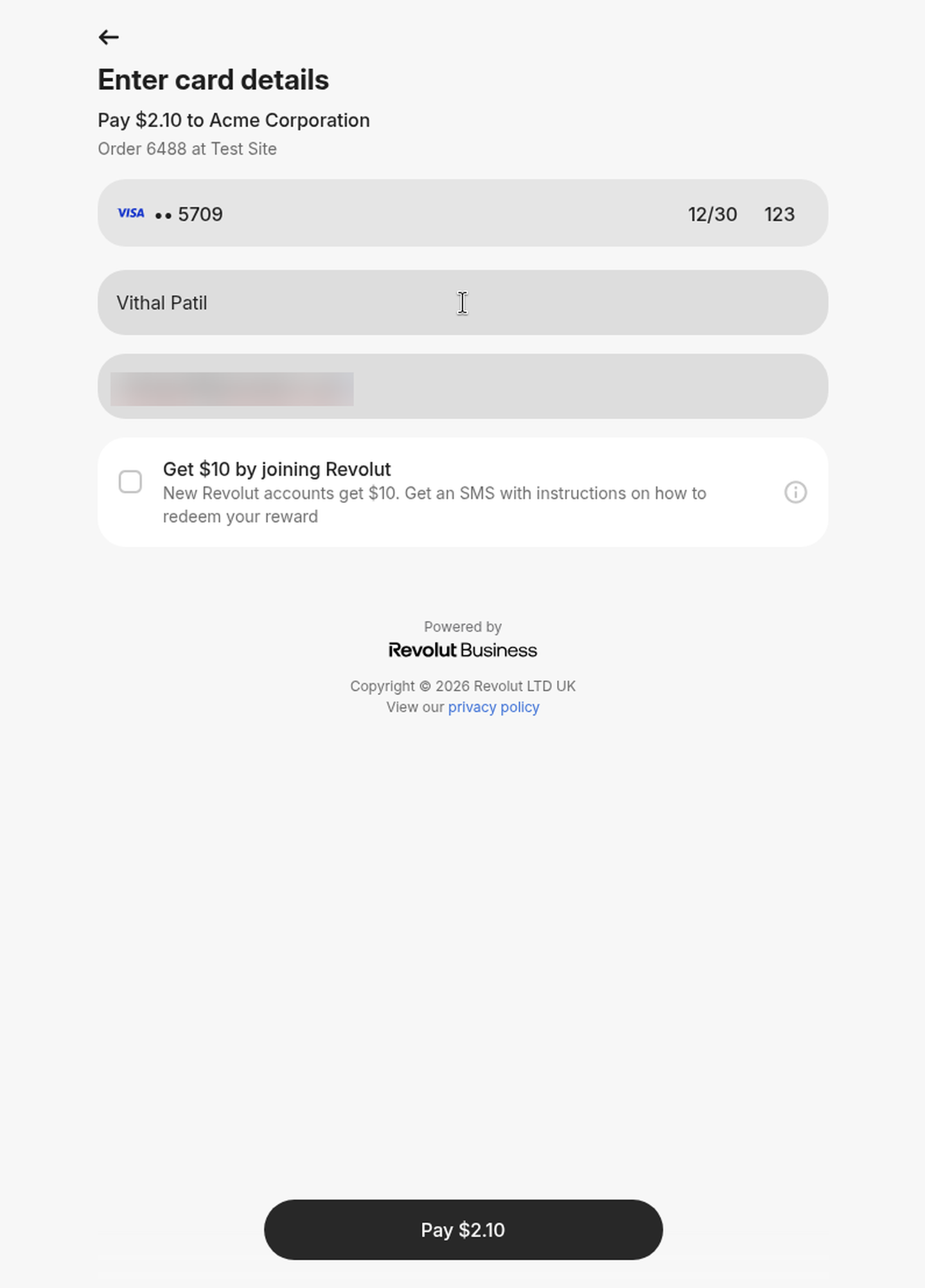
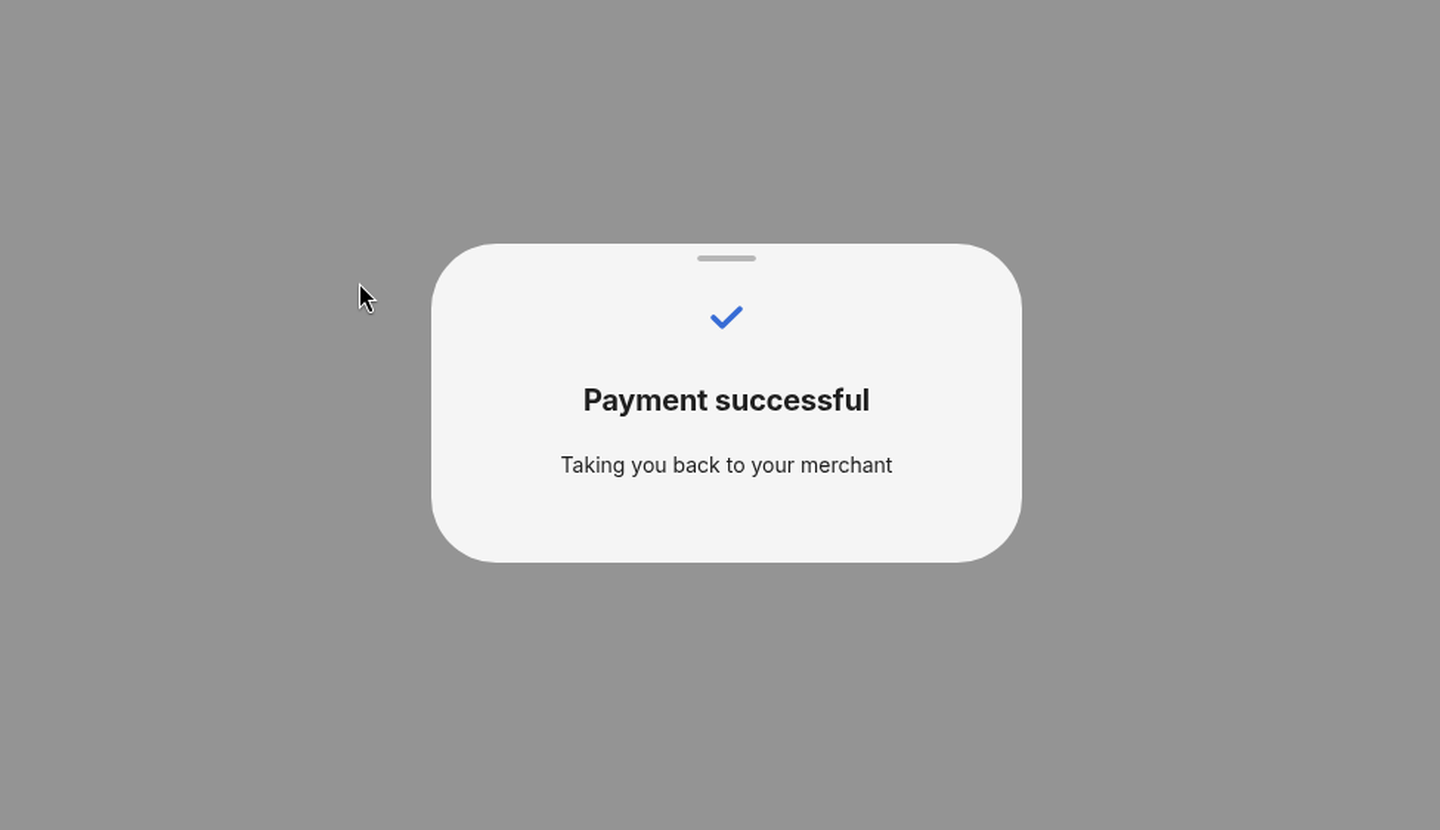
Card form on the Revolut page (card number blurred). The “Get $10 by joining Revolut” box is Revolut’s own promotion; the plugin cannot remove it. Payment successful
Revolut confirms the payment and sends the customer back to your store.
Thank-you page
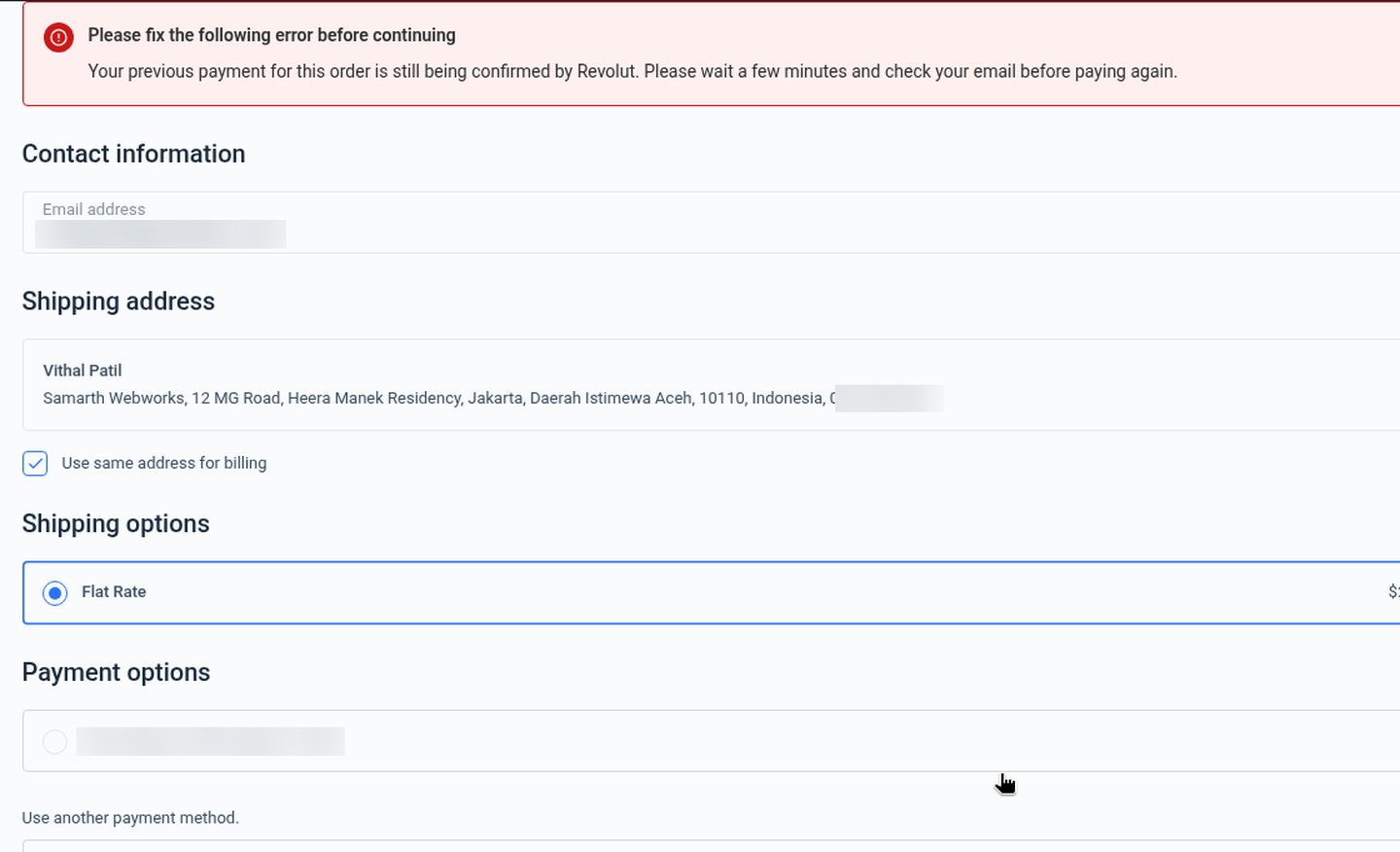
The customer lands on the WooCommerce order-received page. If Revolut is still confirming the payment, the plugin waits a few seconds and shows a “being confirmed” notice instead of Pay / Cancel buttons (see Pending payments).
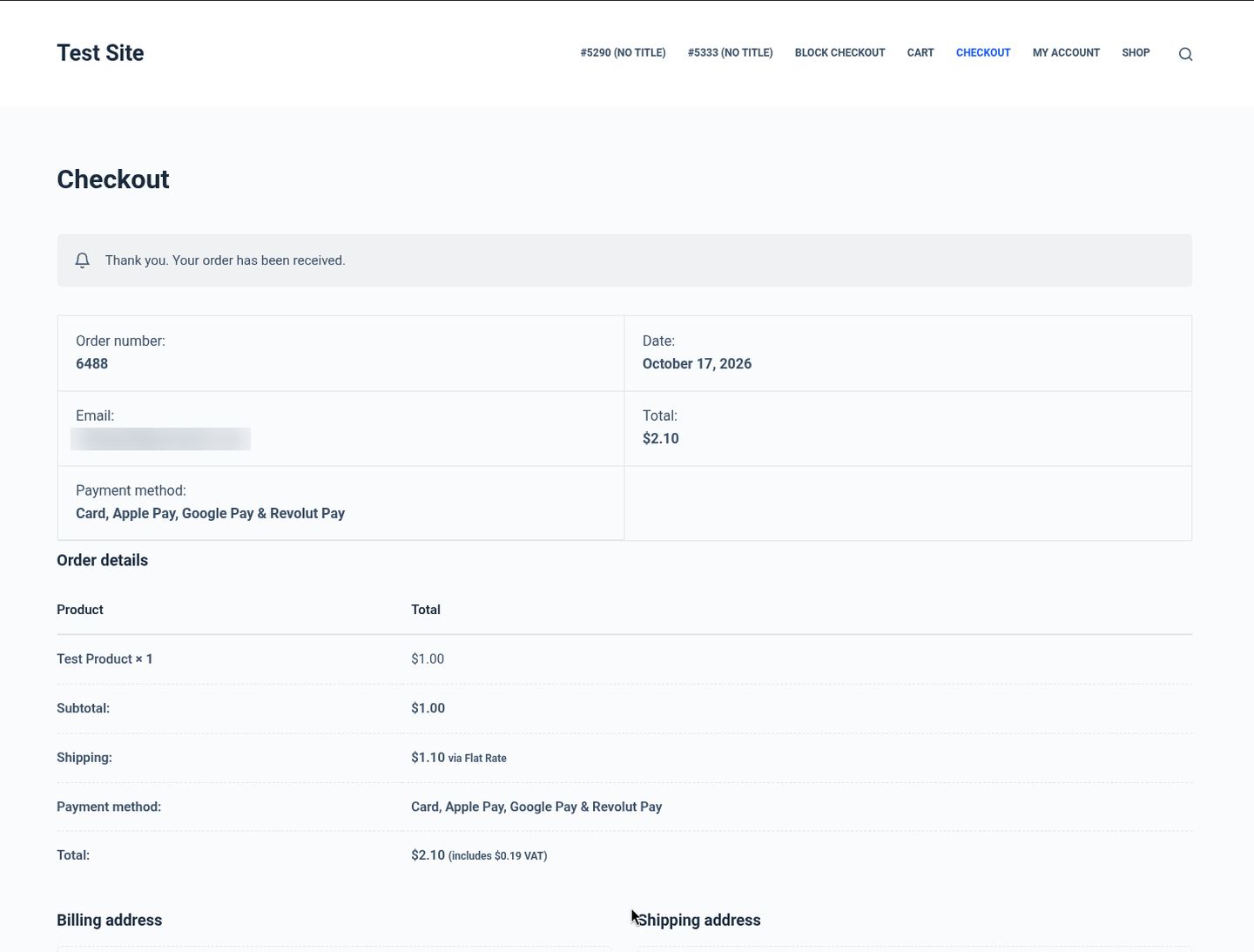
Order #6488 received (email blurred). Order is marked paid
The order moves to Processing with a note such as “Revolut payment of $2.10 completed: Revolut order state is “completed” (checked on return).”. Whichever arrives first (the return or the webhook) completes the payment under a per-order lock; the other is ignored, so nothing is processed twice.
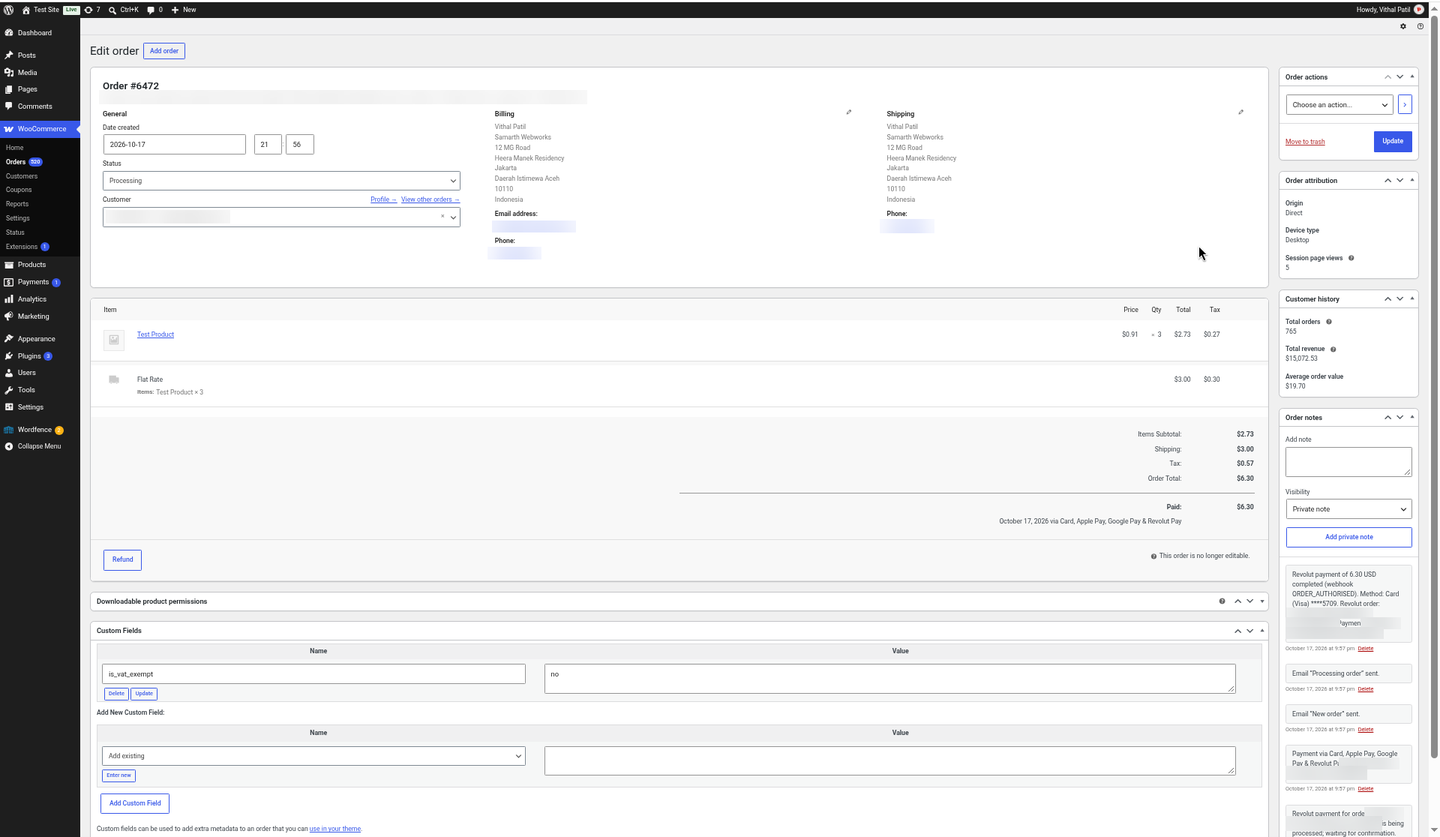
Order #6472 in Processing (Revolut IDs, IP address, email and phone blurred).
5. Getting your Revolut Secret API key
- Sandbox (for testing): sign up for free at sandbox-business.revolut.com. The sandbox needs no real business verification and moves no real money (if it shows a “We need to confirm a few details” prompt, you do not need to complete it to get the sandbox API keys). Live: sign in to business.revolut.com; your Merchant account must be approved by Revolut first (see eligibility).
- Click your avatar (profile picture) at the top right and choose Settings.
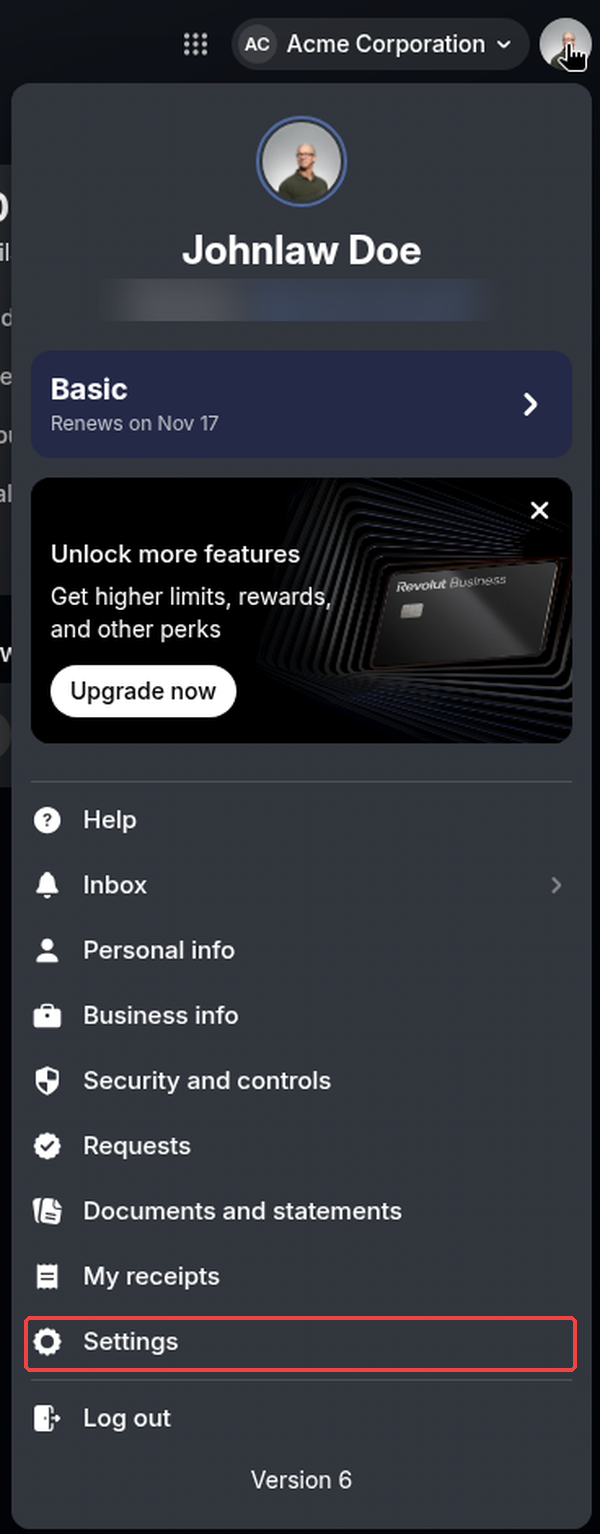
Revolut Business (sandbox): avatar menu → Settings (handle blurred). - In Settings open APIs and select the Merchant API tab. Under API Keys you see the API secret key (it starts with
sk_) and the API public key. Use the eye button to show the secret key or the copy button to copy it. You do not need the public key for this plugin.Settings → APIs → Merchant API: the Sandbox API secret key (blurred) with its show and copy buttons. - Paste the key into the plugin’s Sandbox secret API key (or Live secret API key) field and save.
- No webhook to create. Revolut Business has no webhook screen: the plugin registers the webhook through the Merchant API as soon as you save the key (see Webhooks). You can see it worked in the plugin: the message “Revolut Sandbox webhook registered for … and its signing secret saved.” (or “… already existed; its signing secret was saved.”), the webhook signing secret field filled in, and a line “Sandbox webhook … created for …” in the debug log.
- Repeat in your live account at business.revolut.com when Revolut has approved your Merchant account (same Settings → APIs → Merchant API path; only the sandbox screens were captured for this guide). Sandbox and live keys are different and only work in their own environment.
6. Configuration
Go to WooCommerce → Settings → Payments → Revolut (PatSaTECH).
| Setting | Description |
|---|---|
| Enable/Disable | Shows the Revolut option at checkout. |
| Title / Description | Customer-facing labels. Defaults: “Card, Apple Pay, Google Pay & Revolut Pay” and “You will be redirected to the secure Revolut checkout page.” |
| Sandbox | Ticked by default. Uses sandbox-merchant.revolut.com and the sandbox key. Each order keeps the mode it was created in, so switching later does not break open orders. |
| Sandbox / Live secret API key | From Revolut Business → avatar → Settings → APIs → Merchant API → API secret key. Checked with Revolut when you save. |
| Sandbox / Live webhook signing secret | Filled in automatically (wsk_…) when the plugin registers the webhook. You can also paste it yourself. |
| Webhook | Shows your webhook URL (https://your-store.com/wc-api/patsatech_revolut_webhook/) with Register sandbox webhook now / Register live webhook now buttons. |
| Automatic webhook setup | On by default: registers the webhook when a key is saved and the signing secret is empty. |
| Send line items | On by default: shows the order items on the Revolut checkout page and in Revolut Business. Lines are only sent when they add up exactly to the order total; if Revolut rejects them, the order is created again without them. |
| 3D Secure | “Always ask card holders for 3D Secure”. Off by default (Revolut decides). |
| Statement descriptor suffix | Optional, up to 19 characters, shown on the customer’s card statement. {order} is replaced with the order number. |
| Automatically refund duplicate payments | On by default. See Duplicate payments. |
| Cancel unpaid orders after (minutes) | Default 60. The Revolut checkout link expires after this time and the plugin cancels the unpaid order (or marks it Failed if payment attempts failed). |
| Debug log | Logs API calls, webhooks and status changes to WooCommerce → Status → Logs (source woorevolut). Errors and webhook receipts are always logged. Keys and signing secrets are never logged. |
7. Webhooks (registered automatically, 6 events)
You do not need to create the webhook by hand, and you can’t: Revolut Business has no webhook screen. When you save a valid Secret key and the signing secret field is empty, the plugin calls the Revolut Merchant API, reuses a webhook that already points at your URL (adding any missing events) or creates a new one, and saves the signing secret. You can run it again at any time with Register sandbox webhook now / Register live webhook now. If you change the Secret key, the old signing secret is cleared and the webhook is registered for the new key.
Webhook URL: https://your-store.com/wc-api/patsatech_revolut_webhook/ (the plugin shows the exact URL for your site).
| # | Event (registered automatically) | What the plugin does |
|---|---|---|
| 1 | ORDER_COMPLETED | The plugin re-reads the Revolut order from the API; if it is completed and the amount and currency match, the order / entry is marked paid. |
| 2 | ORDER_AUTHORISED | Triggers the same API check (orders use automatic capture, so Revolut completes them on its own). |
| 3 | ORDER_CANCELLED | Records that the Revolut order was cancelled before it was paid. |
| 4 | ORDER_FAILED | Records that the payment failed and ends the attempt. |
| 5 | ORDER_PAYMENT_DECLINED | Card declined: adds a note with the Revolut decline reason and the message the customer was shown. |
| 6 | ORDER_PAYMENT_FAILED | Payment failed (for example a 3D Secure challenge that was abandoned): adds a note with the reason. |
Revolut-Signature header is v1= + HMAC-SHA256 of v1.<Revolut-Request-Timestamp>.<raw body>, made with the signing secret. The plugin rejects anything that doesn’t match or is more than 5 minutes old (HTTP 401). The webhook only says which order changed: the plugin always re-reads the order from the Revolut API before it changes anything, so retries and out-of-order events are safe.DELETE /api/webhooks/{id}), because Revolut Business has no webhook screen; PatSaTECH support can help. Each site needs its own webhook, and the sandbox and live accounts are separate. Revolut does not send webhooks for refunds, so the plugin checks refunds itself (see Refunds)./wc-api/patsatech_revolut_webhook/. Revolut’s documented webhook IPs are 35.242.130.242 and 35.242.162.241 (sandbox) and 35.246.21.235 and 34.89.70.170 (live).8. Eligibility, currencies & payment methods
Who can get a Revolut Merchant account. According to Revolut’s help centre (checked October 2026), Merchant accounts are available only to Revolut Business accounts opened in: Australia, Austria, Belgium, Bulgaria, Croatia, Cyprus, Czech Republic, Denmark, Estonia, Finland, France, Germany, Greece, Hungary, Iceland, Ireland, Italy, Latvia, Lithuania, Luxembourg, Malta, Netherlands, Norway, Poland, Portugal, Romania, Slovakia, Slovenia, Singapore, Spain, Sweden and the United Kingdom. Revolut Business customers in Switzerland, the United States and Liechtenstein cannot open a Merchant account, and businesses in other countries (for example India) are not eligible. To accept payments through the API or a plugin, Revolut also requires a fully working website. Revolut’s limit is £50,000 (or equivalent) per transaction.
Currencies. Cards, Apple Pay and Google Pay: AUD CAD CHF CZK DKK EUR GBP HKD HUF ILS JPY MXN NOK NZD PLN RON SEK SGD TRY USD ZAR (21 currencies). Revolut Pay additionally accepts AED CLP COP INR ISK KRW PHP QAR RSD SAR THB. The plugin sends amounts in each currency’s minor units (JPY, ISK, CLP and KRW have no decimals).
Payment methods. The Revolut Hosted Checkout Page shows the methods Revolut enables on your Merchant account: cards (Visa, Mastercard and others), Apple Pay, Google Pay and Revolut Pay. The plugin cannot turn individual methods on or off; that is done by Revolut.
9. Testing with the Revolut sandbox (test cards)
- Tick Sandbox, paste your sandbox Secret key and save (the webhook registers itself).
- Place a test order. You are sent to the Revolut sandbox checkout page.
- Pay with a test card from the table below.
- Check that the order moves to Processing with a Revolut note.
Use any future expiry date (for example 12/30) and any 3-digit CVC. Card numbers are from Revolut’s sandbox test-card list.
| Scenario | Card | Notes |
|---|---|---|
| Success | Visa 4929 4205 7359 5709 · Mastercard 5281 4388 0180 4148 | Used for the successful test payments. |
| Declined: insufficient funds | 4929 5736 3812 5985 | Shows the insufficient-funds message. |
| Declined: expired card | 4532 3367 4387 4205 | Shows the expired-card message. |
| Declined: do not honour | 2720 9988 3777 9594 | Shows the “declined by the card issuer” message. |
| 3D Secure failed | 5215 6741 1512 7070 | Revolut reason customer_challenge_failed. |
- 3D Secure: Revolut has no dedicated 3D Secure success card. Tick Always ask card holders for 3D Secure in the settings to see the challenge.
- Revolut Pay (sandbox): the one-time codes 1001–1005 choose the scenario; the sandbox passcode is 124455 (from Revolut’s test-flow docs).
- Apple Pay is not available in the Revolut sandbox. Google Pay results in the sandbox depend on the amount (see Revolut’s test-flow docs).
10. Order status flow
| Revolut | When | WooCommerce |
|---|---|---|
| pending | Customer is on the Revolut page | Pending payment |
| processing / authorised | Revolut is still confirming the payment | Pending payment; the thank-you page says the payment is being confirmed; re-checked after 1, 3, 10, 30 and 120 minutes |
| completed | Paid | Processing (or Completed for virtual/downloadable orders, as WooCommerce decides); the Revolut order ID is the transaction ID |
| completed, but amount or currency differs | Should never happen | On hold with a note, for you to check |
| Payment declined / failed | Card declined, 3D Secure failed or abandoned | Failed, with a note (reason, customer message, method); the customer can pay again |
| Time limit reached | Unpaid after “Cancel unpaid orders after” | Cancelled (or stays/moves to Failed if attempts failed); the open Revolut order is cancelled |
When a customer pays again for a Failed or Pending order, the plugin creates a new Revolut order (and cancels the old one if Revolut allows it), unless the old one is still fresh, unpaid and for the same amount.
11. Blocks vs classic checkout
Both are supported and were tested. Classic checkout uses the standard payment list; the Checkout block uses assets/js/blocks.js registered through the WooCommerce Blocks registry. HPOS (High-Performance Order Storage) is declared compatible.
12. Transaction ID
When a payment completes, the plugin saves the Revolut order ID as the WooCommerce Transaction ID (shown after “Payment via …” at the top of the order). The payment ID and card or wallet details are in the order note. Search for either in Revolut Business under Merchant → Payments.
Finding the payment in Revolut Business
In Revolut Business open Merchant in the left menu. The orders list shows every Revolut order the plugin created, with its status (Paid, Failed, Canceled, Partially refunded…), customer, channel Merchant API, card and amount. WooCommerce orders appear under their order number (for example 6488); the Revolut order ID is also the WooCommerce transaction ID.
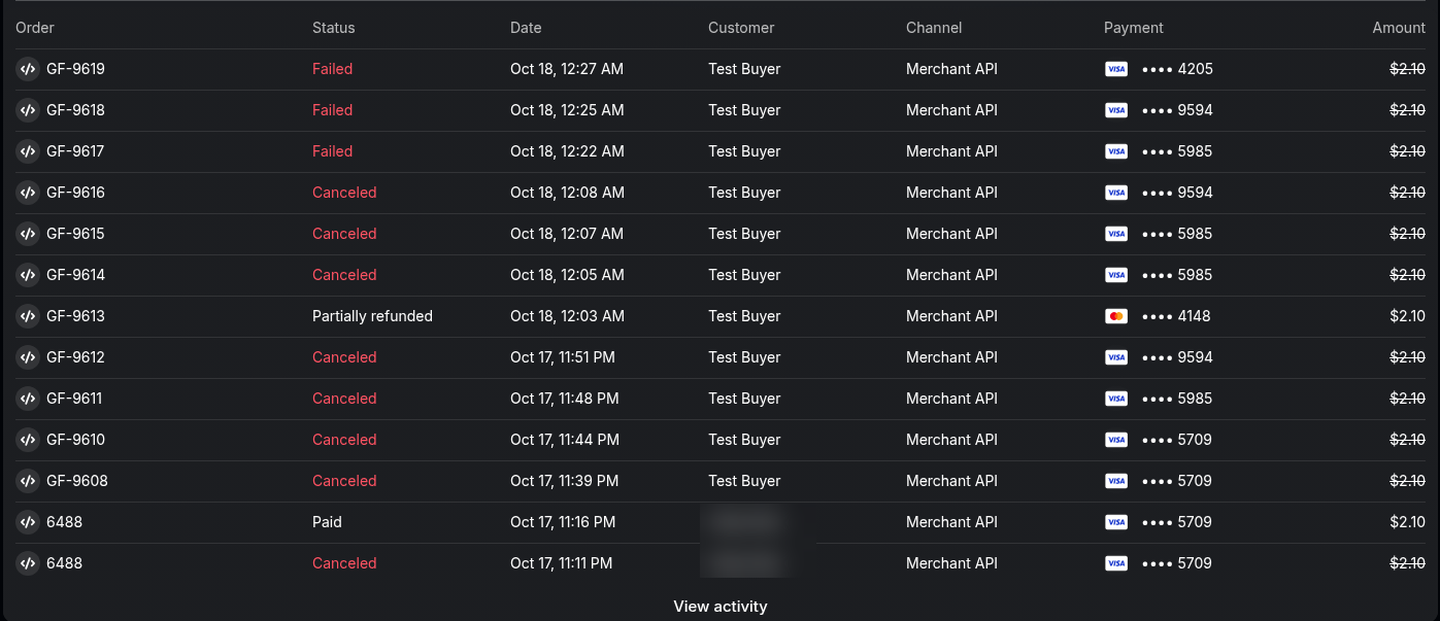
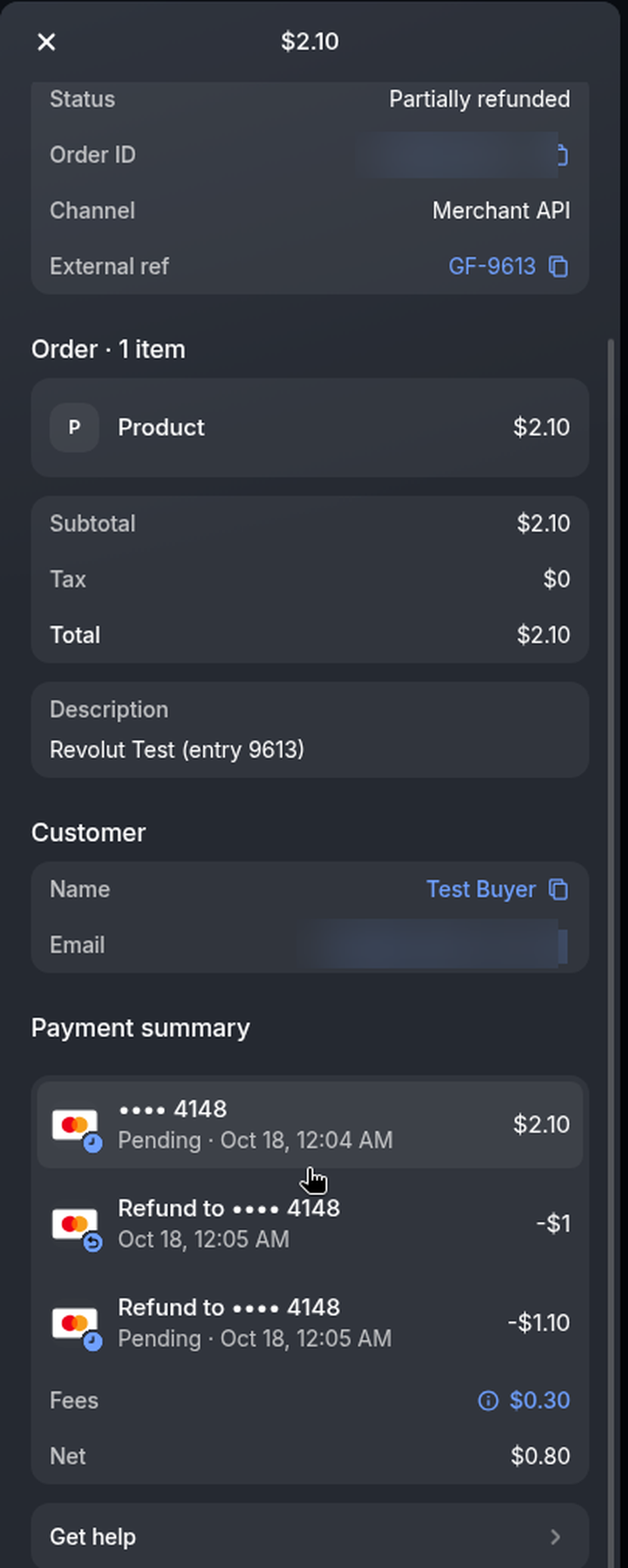
Click an order to see its details, line items, customer and the Payment summary with every refund.
13. Partial and full refunds
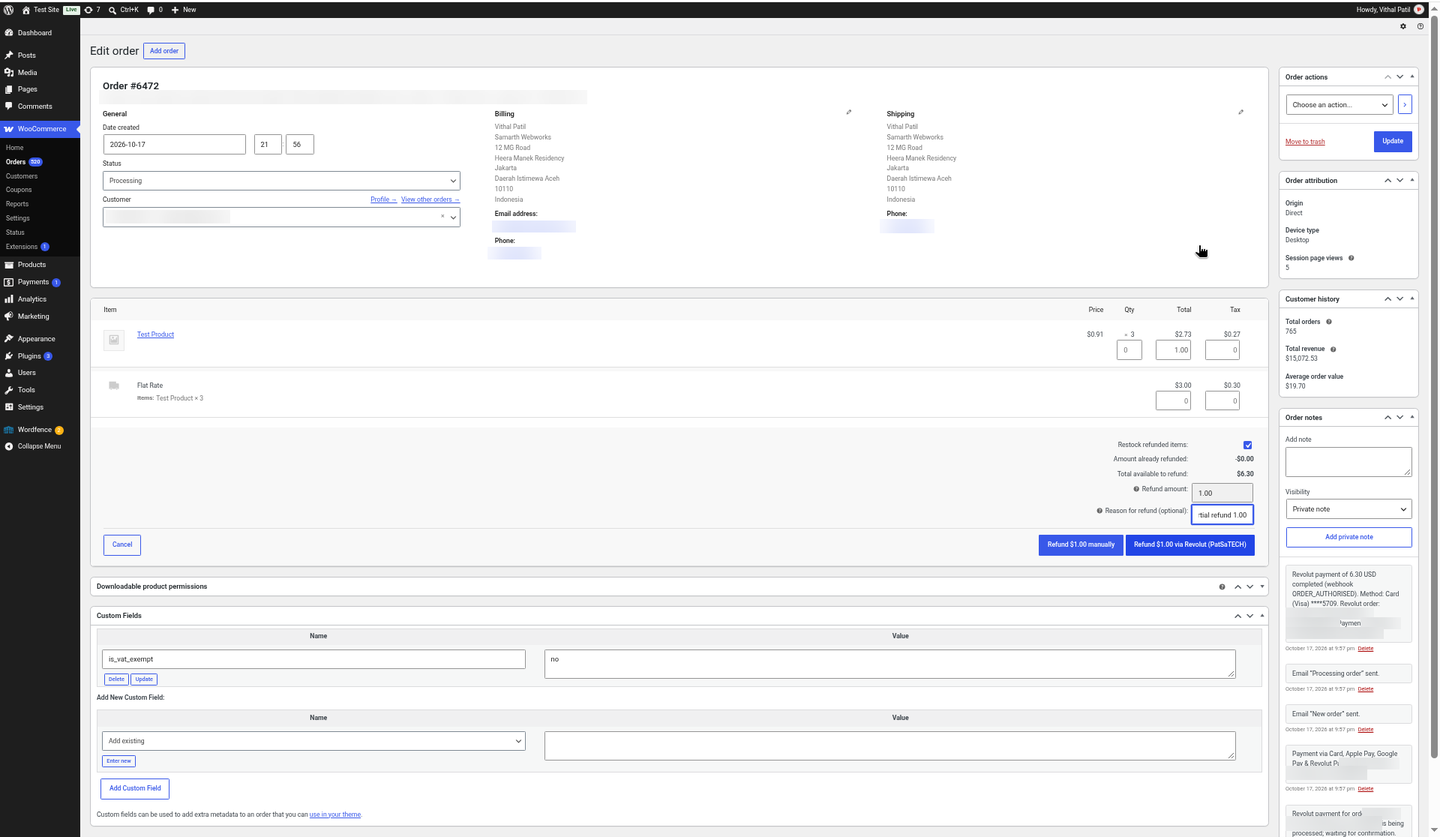
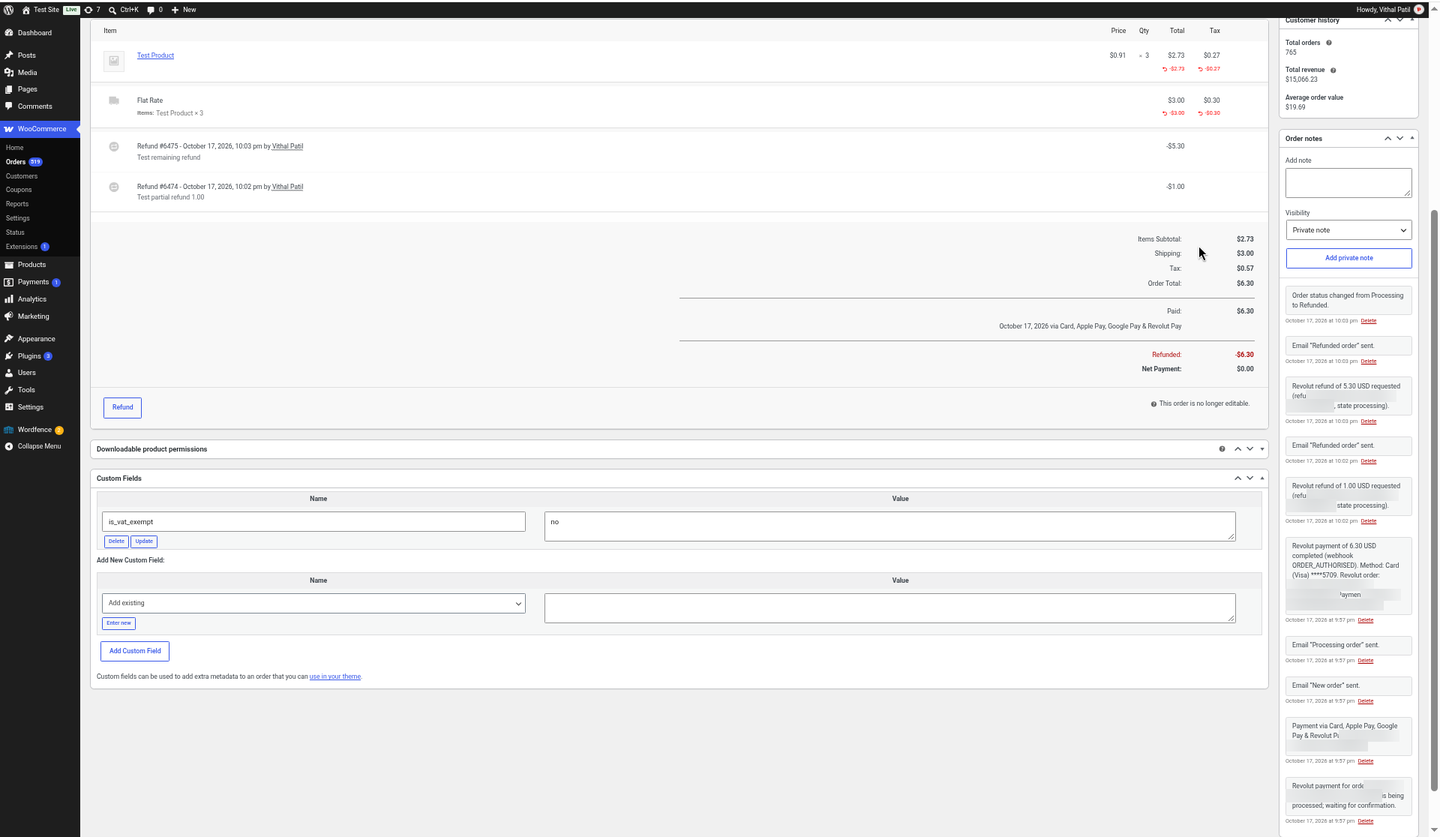
- Open the order and click Refund.
- Enter quantities or amounts in the line-item refund fields (product, shipping, tax), or type the amount if taxes are off.
- Click Refund $X via Revolut (PatSaTECH). The plugin calls the Revolut refund API and adds the note “Revolut refund of $1.00 requested (refund …, state processing).”
Revolut processes refunds asynchronously and sends no refund webhook, so the plugin checks each refund after 1, 1, 1, 2, 3, 5, 10, 30, 60, 360 and 1440 minutes, and again whenever you open the order. When Revolut finishes, it adds “Revolut refund of … completed” (or a prominent FAILED note). You can make several partial refunds; when the whole amount is refunded, WooCommerce sets the order to Refunded.
14. Pending, declined and expired payments
The Revolut page has no “cancel” button that returns to your store. If a card is declined, the customer can try another card on the Revolut page straight away. If they go back to your store with the browser’s Back button, the plugin re-checks the Revolut order and shows the reason on the checkout page, with the cart kept.
15. Decline messages customers see
Instead of a vague “payment failed”, the customer sees the reason, on the checkout page with their cart kept:
| Revolut decline reason | Table key | Message the customer sees |
|---|---|---|
| Card declined by the issuer (do not honour, invalid PIN…) | issuer | Your payment was declined by the card issuer. Please try a different card or payment method. |
| Insufficient funds | funds | Your payment was declined because the card has insufficient funds. Please try a different card or payment method. |
| Expired card / wrong expiry | expired | Your payment was declined because the card has expired. Please try a different card or payment method. |
| Wrong security code | cvc | Your payment was declined because the security code (CVC) is incorrect. Please check the card details or try a different card. |
| Invalid or unknown card number | number | Your payment was declined because the card number is not valid. Please check the card details or try a different card. |
| Card limit exceeded | limit | Your payment was declined because it exceeds the limit on your card. Please try a different card or payment method. |
| 3D Secure / customer challenge failed or abandoned | auth | Your bank could not verify this payment (3D Secure authentication failed). Please try again or use a different card. |
| Revolut risk check (high risk, suspected fraud…) | risk | Your payment was declined for security reasons. Please try a different card or payment method. |
| Processing error | process | Your payment could not be processed. Please try again in a few minutes or use a different payment method. |
| Cancelled or rejected in the banking app | customer | The payment was cancelled or rejected in your banking app. Please try again or use a different payment method. |
| Card can’t pay in this currency | currency | This card cannot be used to pay in this currency. Please try a different card or payment method. |
| Anything else | generic | Your payment was not successful. Please try a different card or payment method. |
Developers can change any message with the woorevolut_decline_message filter (arguments: message, Revolut payment, table key):
add_filter( 'woorevolut_decline_message', function ( $message, $payment, $key ) {
    return 'funds' === $key ? 'Your card has insufficient funds. Please use another card.' : $message;
}, 10, 3 );
16. Duplicate payments
Rarely, a customer can pay twice for the same order, for example by paying in a second tab while a first payment was still being confirmed by Revolut. With Automatically refund duplicate payments on (the default), the plugin refunds the second payment in full through the Revolut API and adds a note; it does not create a WooCommerce refund, because the order itself stays paid. If Revolut cannot refund it yet, the plugin tries again later and finally flags it for a manual refund. With the setting off, you get a note and an admin notice so you can refund it yourself. Developers can also use the woorevolut_auto_refund_duplicates filter.
17. Debug log
Tick Debug log in the Revolut settings, then open WooCommerce → Status → Logs and choose the file that starts with woorevolut-. It shows API calls and responses, webhook events (always logged) and status changes. Secret keys, signing secrets and authorisation headers are never logged. Errors are logged even with the setting off.
Turn the log on before reproducing a problem, send the relevant lines to support, then turn it off again.
18. Troubleshooting & FAQ
“The Revolut key was rejected”
- Sandbox keys only work with Sandbox ticked, and live keys only with it unticked.
- Copy the Secret key (
sk_…), not the Public key. - If you regenerated the key in Revolut Business, paste the new one.
The webhook could not be registered
- Your site must be reachable over HTTPS from the internet (Revolut blocks
localhost). - “Too many webhooks”: Revolut allows 10 per account. Old ones can only be removed through the Merchant API (Revolut Business has no webhook screen; ask support), then click Register webhook now.
Paid in Revolut but the order is still Pending
- Check the webhook signing secret is filled in, or click Register webhook now.
- Make sure a firewall or security plugin is not blocking
/wc-api/patsatech_revolut_webhook/. - The plugin re-checks open orders on a schedule (WooCommerce Action Scheduler), so it also catches up on its own.
- Look at WooCommerce → Status → Logs, source
woorevolut.
The customer sees a decline message
The card issuer or Revolut declined the payment. The customer can try another card. See Decline messages.
A refund still has no “completed” note
Revolut finishes refunds in the background (in the sandbox usually within a couple of minutes, sometimes much longer). Open the order to trigger a fresh check.
Can I hide the “Get $10 by joining Revolut” box on the Revolut page?
No. It is Revolut’s promotion on its hosted page and the Merchant API has no option to turn it off.
Can I show only some payment methods?
No. The Revolut Hosted Checkout Page shows the methods Revolut enables on your account.
Can I use it in India, Switzerland or the US?
Not for a live store: Revolut does not offer Merchant accounts there. See Eligibility.
Does it support subscriptions?
No. This plugin takes one-time payments.
19. API reference used
| Purpose | Call |
|---|---|
| Create payment | POST /api/orders (returns the hosted checkout_url) |
| Verify payment | GET /api/orders/{id} |
| Cancel | POST /api/orders/{id}/cancel |
| Refund | POST /api/orders/{id}/refund (with an Idempotency-Key) |
| Webhooks | GET/POST /api/webhooks, PATCH /api/webhooks/{id} |
| Authentication | Authorization: Bearer <Secret key>, Revolut-Api-Version: 2026-08-17 (filter woorevolut_api_version) |
| Webhook signature | Revolut-Signature: v1=HMAC-SHA256(signing secret, v1.timestamp.body) |
Hosts: sandbox https://sandbox-merchant.revolut.com, live https://merchant.revolut.com. Revolut docs: developer.revolut.com.
Developer filters: woorevolut_order_payload, woorevolut_line_items, woorevolut_decline_message, woorevolut_api_version, woorevolut_supported_currencies, woorevolut_icon, woorevolut_auto_refund_duplicates, woorevolut_return_wait_seconds (8), woorevolut_stuck_check_minutes (25), woorevolut_failed_cancel_minutes (10), woorevolut_confirming_wait_minutes, woorevolut_authorising_wait_minutes, woorevolut_processing_give_up_hours.
20. Tested on
- WordPress 7.1.3
- WooCommerce 11.2.1, classic checkout and Cart/Checkout Blocks, HPOS
- PHP 8.1.34 (LiteSpeed server); PHP 7.4 or later required
- Revolut Business sandbox Merchant account, USD orders. Live payments and Apple Pay not yet tested.
- Scenarios: card payment (Blocks and classic), automatic webhook registration, signed webhooks, declined cards with decline messages (insufficient funds, abandoned 3D Secure), partial and full refunds
21. Changelog
1.0.0 — 2026-10-18
- Initial release.
- Revolut Merchant API order + Hosted Checkout Page (cards, Apple Pay, Google Pay, Revolut Pay).
- HPOS compatible; WooCommerce Blocks and classic checkout.
- Sandbox and live keys, checked on save; webhook registered automatically (6 events) with manual “Register webhook now” buttons.
- Signed webhooks (Revolut-Signature v1, 5-minute tolerance); every change re-checked with the API under a per-order lock.
- Clear decline messages, cart kept, “being confirmed” notice; unpaid orders cancelled on a timer.
- Full and partial refunds with completion tracking; duplicate payments refunded automatically.
- Line items that add up exactly; optional forced 3D Secure; statement descriptor suffix; debug logging (no secrets).
22. Support
PatSaTECH
Email: [email protected]
Web: https://www.patsatech.com
Please include your WordPress, WooCommerce and PHP versions, whether you use the sandbox or live mode, and the relevant woorevolut log lines (never send your Secret key).








