Quick answer
- Quick answer
- Identify the result layer first
- Keep raw evidence separate from normalized meaning
- Build the normalization schema
- Map categories to safe actions
- Write shopper copy without leaking detail
- Give support a decision path
- Measure codes without corrupting analytics
- Test and maintain the reference
- FAQ
- Sources
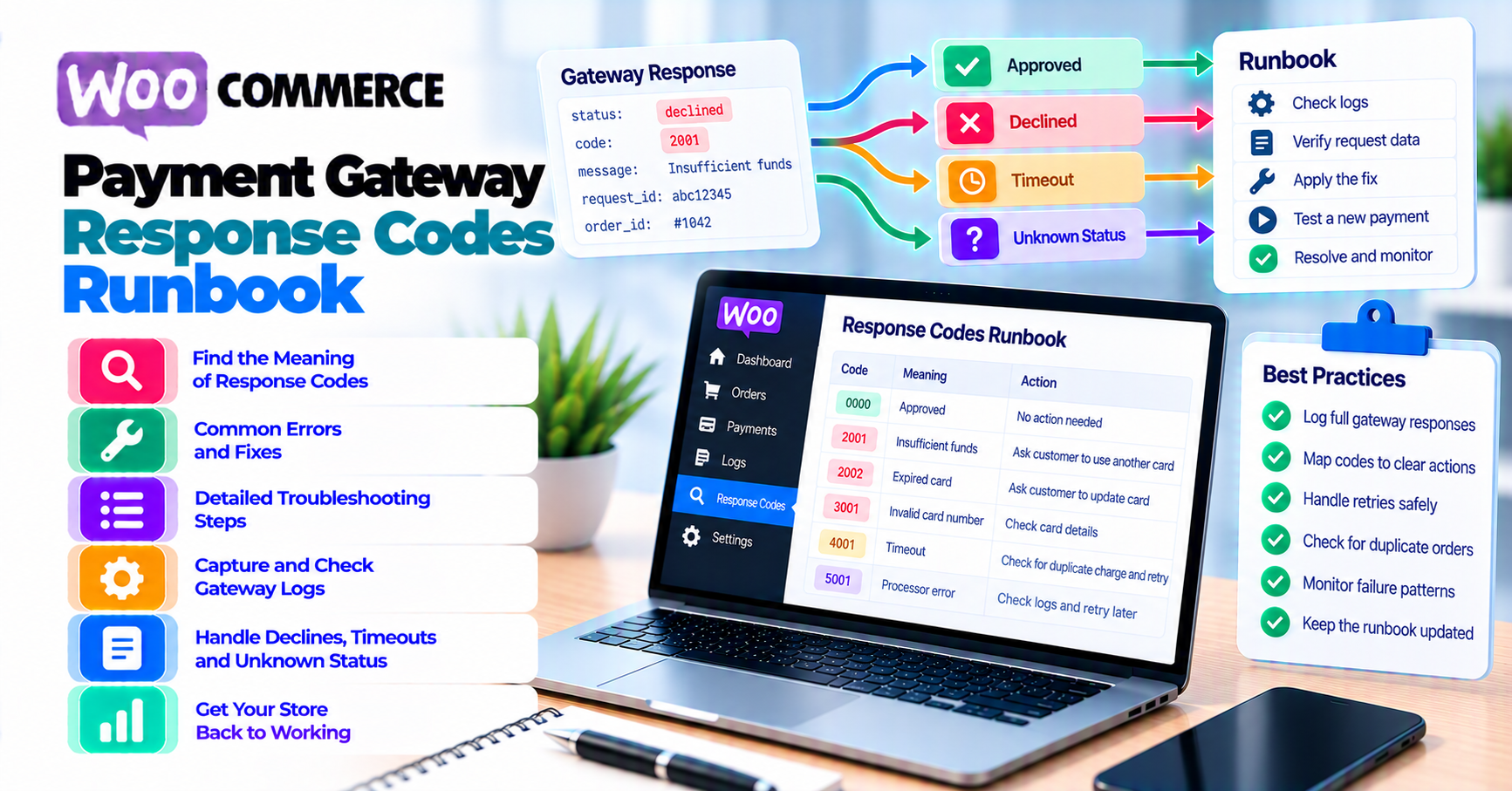
Do not show raw WooCommerce payment gateway response codes directly to shoppers and do not flatten every failure into “card declined.”
Build a versioned mapping:
- Capture the provider, operation, HTTP result, raw code, sanitized message, request ID, transaction ID, order ID, amount, currency, and environment.
- Identify the layer: transport, API/configuration, payment decline, authentication, risk, or asynchronous state.
- Map the result to a stable internal category.
- Record whether the outcome is terminal, retryable, unknown, or requires customer/provider action—according to current provider documentation.
- Assign shopper-safe copy.
- Assign a support action and escalation owner.
- Define what can be retried, when, and whether it is the same idempotent request or a new payment attempt.
- Track the raw code and normalized category separately in analytics.
- Review mappings after provider, gateway extension, API-version, 3-D Secure, or fraud-policy changes.
A good reference preserves diagnostic detail for authorized staff while giving the shopper only the action they need.
After classification, use PatSaTECH’s payment-failure recovery guide for checkout recovery, email, dunning, and support communication.
Identify the result layer first
The same numeric HTTP status or word such as “failed” can describe different stages.
| Layer | Example evidence | First question |
|---|---|---|
| Transport | DNS, TLS, timeout, connection reset | Did the provider receive the request? |
| HTTP/API | 4xx, 5xx, authentication, invalid parameter |
Was the request valid and authorized? |
| Payment decision | Issuer or processor decline/refusal code | Did the provider reach a payment decision? |
| Authentication | 3-D Secure action required or failed | Can the original flow resume safely? |
| Risk/fraud | Block, review, velocity, AVS/CVV policy | Which system made the decision and what may be disclosed? |
| Asynchronous state | Pending, processing, webhook delayed | Is the result still non-terminal? |
| WooCommerce state | Pending payment, Failed, On hold, Processing | What does WooCommerce know, and from which event? |
HTTP success does not always mean payment success
Adyen’s refusal-reason documentation explains that an unsuccessful authorization can return HTTP 200 with OK: the request was processed successfully at the API layer, but the payment itself was not successful.
Therefore:
- HTTP status describes request handling.
- Payment result describes the financial operation.
- WooCommerce status describes the store’s current state.
Store all three separately.
An API error is not necessarily an issuer decline
Stripe’s error-code documentation separates API errors from card-decline detail. A request can fail because of an expired key, invalid parameters, unsupported account capability, rate limit, or server issue before an issuer makes a payment decision.
Do not tell a shopper to “call your bank” when the store sent an invalid currency or the integration used an expired credential.
A timeout can leave the outcome unknown
If the response was lost, do not normalize it as a decline. Reconcile the original provider object before retrying. An unknown outcome has a different action from a confirmed failure.
WooCommerce order status is not the provider code
WooCommerce Order Statuses documentation describes Pending payment, Processing, On hold, and Failed operational states.
Those states do not replace:
- Provider request ID
- Provider payment or transaction ID
- Raw decline/refusal code
- Authentication state
- Webhook event
One WooCommerce status can result from many provider outcomes.
Keep raw evidence separate from normalized meaning
Use two linked records.
Raw provider evidence
Keep the exact result for authorized troubleshooting:
- Provider and account
- Sandbox or live environment
- Operation: create, authorize, capture, refund, void, verify, or webhook
- HTTP status
- Provider error type and code
- Decline/refusal reason and code
- Request or correlation ID
- Payment, order, authorization, or transaction ID
- WooCommerce order ID
- Timestamp and timezone
- Amount and currency
- Payment method type
- 3-D Secure or authentication state
- Webhook event ID, when relevant
- Gateway extension and API version
Normalized operational record
Give teams a stable vocabulary:
- Layer
- Category
- Terminality
- Financial outcome confidence
- Retry policy
- Shopper message key
- Support action
- Escalation owner
- Analytics bucket
- Mapping version and reviewed date
Do not overwrite the raw code with the normalized category. You need both when the provider changes semantics or support asks for the original value.
Log safely
WooCommerce’s logging documentation describes the WooCommerce logger, log sources, and operational uses for troubleshooting and audit context.
Do not log:
- Full PAN
- CVV/CVC
- Track data or PIN
- API or webhook secrets
- Full unredacted request/response bodies
- Customer passwords
- Sensitive fraud-model detail in customer-visible order notes
Order notes should contain support-safe references, not developer dumps.
Build the normalization schema
Use a table owned by payments operations, support, and engineering.
| Field | Purpose |
|---|---|
| Provider | Prevent code collisions between gateways |
| API/product/version | Preserve the code’s actual context |
| Operation | Authorization, capture, refund, recurring charge, and so on |
| Raw code | Exact provider value |
| Raw message | Sanitized provider text |
| HTTP/API class | Request success, client error, server error, transport unknown |
| Normalized layer | Transport, API, payment, authentication, risk, async |
| Normalized category | Stable business vocabulary |
| Financial outcome | None, authorized, captured, failed, pending, unknown |
| Terminality | Terminal, non-terminal, conditional, unknown |
| Retry class | Do not retry, resume original, retry later, new method, investigate |
| Shopper message key | Approved copy identifier |
| Support action | Concrete next step |
| Escalation | Engineering, fraud, finance, provider, issuer, customer |
| Metrics bucket | Stable reporting category |
| Source URL | Current provider documentation |
| Reviewed | Owner and date |
Suggested category set
Keep it small enough to operate:
customer_inputfunding_or_issuerauthentication_requiredauthentication_failedrisk_or_fraudmerchant_configurationintegration_requestprovider_temporaryduplicate_or_idempotencyprocessing_or_pendingterminal_not_supportedunknown_outcome
These are internal labels, not universal payment-industry codes.
Version the mapping
A code can change meaning between:
- Provider products
- Payment methods
- API versions
- Merchant account configurations
- Regions
- Gateway extension versions
Use a mapping version and effective date. Never let support rely on an unlabeled spreadsheet downloaded years ago.
Map categories to safe actions
The action must come from provider documentation and the exact operation.
| Normalized category | Shopper action | Support action | Retry posture |
|---|---|---|---|
| Customer input | Correct a specific safe field | Confirm field and format | New attempt after correction |
| Funding or issuer | Use another method or contact issuer | Verify provider code; do not guess issuer policy | Provider-specific |
| Authentication required | Complete authentication | Resume original flow where supported | Resume, not blind new charge |
| Authentication failed | Retry authentication or alternate method | Check return state and provider guidance | Conditional |
| Risk or fraud | Use neutral copy | Review risk system and manual-review policy | Do not disclose rules |
| Merchant configuration | No blame on shopper | Escalate to engineering/merchant admin | Fix system before retry |
| Integration request | Generic temporary message | Inspect request/code and deployment | Do not repeat unchanged request |
| Provider temporary | Try later or alternate method | Check status page and incident evidence | Backoff per provider |
| Duplicate/idempotency | Do not submit again | Reconcile original payment | Never create a second effect |
| Processing/pending | Wait for confirmation | Monitor object and webhook | Do not retry yet |
| Not supported | Offer supported alternative | Fix catalog/configuration claim | No retry on same path |
| Unknown outcome | Do not retry yet | Retrieve original provider object | Reconcile first |
Stripe examples are provider-specific
Stripe’s decline-code reference documents codes such as insufficient_funds, do_not_honor, and authentication-related results, with recommended actions.
Examples:
insufficient_fundscan map tofunding_or_issuerand an alternate-method action.do_not_honoris intentionally generic; support should not invent a more specific cause.- Authentication-required results belong to an authentication path, not a generic repeated card submission.
Do not apply Stripe’s action to an identically named code from another provider without verifying it.
Adyen examples include disclosure limits
Adyen documents refusalReason, resultCode, and refusalReasonCode. Its page warns not to expose refusal details to shoppers because doing so can be misused.
That means the internal support reference can be specific while the shopper message remains neutral.
PayPal separates configuration and payment-source errors
PayPal Orders v2 error documentation includes permission, authentication, validation, account-feature, and payment-source errors.
For example:
- Missing permission is
merchant_configurationorintegration_request, not a customer decline. - A payment source declined by the processor belongs to the payment-decision layer.
- Invalid request fields require integration correction before retry.
Do not collapse them into one “PayPal failed” category.
Write shopper copy without leaking detail
The shopper usually needs:
- What happened at a safe level
- Whether they should wait, correct data, authenticate, use another method, or contact support
- Whether another attempt can create a duplicate
- One next step
Copy principles
- Be neutral and concise.
- Do not accuse the shopper of fraud.
- Do not reveal fraud thresholds, velocity rules, risk scores, or issuer internals.
- Do not promise that funds were not reserved until provider state is known.
- Do not say “try again” for an unknown or pending outcome.
- Do not expose raw provider text that can aid abuse.
- Give the order reference, not sensitive payment data.
Message-key examples
| Message key | Shopper-safe copy |
|---|---|
check_details |
“Check the payment details and try again.” |
use_another_method |
“This payment method could not be completed. Try another available method.” |
complete_authentication |
“Complete the bank verification step to continue.” |
wait_for_result |
“We are confirming the payment result. Please do not submit it again yet.” |
temporary_issue |
“This payment option is temporarily unavailable. Try again later or choose another method.” |
contact_support |
“We could not complete the payment. Contact support with your order number.” |
These are templates. Legal, accessibility, regional, and provider requirements can change the final copy.
The planned accessible-payment-errors bundle will cover focus, announcements, and 3-D Secure interaction. This runbook supplies the semantic category and approved message key, not the interface implementation.
Give support a decision path
Support should not interpret raw codes from memory.
Step 1: Confirm the order and attempt
Collect:
- Order ID
- Timestamp and timezone
- Payment method
- Amount and currency
- Provider request and transaction references
- WooCommerce order status and notes
- Raw code from an authorized dashboard or sanitized log
Never ask for a card photo, full number, or security code.
Step 2: Identify the layer
Ask:
- Did the request reach the provider?
- Is this an API/configuration error or payment decision?
- Is authentication incomplete?
- Is the payment pending or outcome unknown?
- Is the gateway or one region degraded?
Step 3: Apply the mapping
Use:
- Provider
- Operation
- API/product version
- Raw code
- Current mapping version
Retrieve:
- Normalized category
- Shopper message key
- Retry posture
- Support action
- Escalation owner
Step 4: Check for an incident pattern
One code can be customer-specific. A sudden concentration can signal:
- Provider outage
- Expired credentials
- Currency/configuration regression
- 3-D Secure return failure
- Fraud-rule change
- Issuer or region incident
- Deployment bug
Use payment-gateway analytics and outage resilience before telling hundreds of shoppers to call their banks.
Step 5: Escalate with useful evidence
Provider ticket:
- Request/transaction ID
- Time and timezone
- Operation
- Sanitized code and message
- Amount/currency
- Environment
- Affected-count summary
Engineering ticket:
- Deployment and extension versions
- HTTP/API layer
- Reproduction
- Relevant logs
- Before/after rate
Fraud review:
- Aggregated code, country, method, and customer segment
- Manual-review outcomes
- No full card data
Use PatSaTECH’s fraud false-positive guide before loosening or tightening risk rules.
Measure codes without corrupting analytics
Track at two levels.
Raw-code metrics
Useful for:
- Provider support
- API-version migrations
- Detecting one new code
- Exact gateway trend analysis
Normalized-category metrics
Useful for:
- Cross-gateway reporting
- Support staffing
- Conversion analysis
- Merchant configuration incidents
- Authentication and fraud trend separation
Do not compare raw codes across providers as if they are equivalent.
Recommended dimensions
- Provider and payment method
- Environment
- Operation
- Country and currency
- Checkout surface
- New versus returning customer, where lawful
- Authentication state
- Gateway extension and version
- Mapping version
Recommended measures
- Attempts
- Approved
- Declined/refused
- Authentication required and completed
- Pending/processing
- Unknown outcome
- Recovered after customer action
- Recovered after system fix
- Support contacts
- Manual-review outcome
Avoid inventing a universal “soft decline rate.” Define the category and provider codes included.
Test and maintain the reference
Use provider test environments
Stripe documents triggering specific error and decline codes in test mode. Adyen documents test refusal reasons. Use provider-supplied test data and tools.
Do not generate random card numbers or cycle live payment attempts to produce errors.
Test each category
For every mapping:
- Trigger the documented test result.
- Capture sanitized raw evidence.
- Confirm the normalized category.
- Verify WooCommerce order status and notes.
- Verify the shopper message key.
- Verify support action and escalation.
- Confirm retry behavior does not create a duplicate.
- Record expected analytics.
Test unknown and asynchronous outcomes
Not every case has a decline code. Include:
- Network timeout after request submission
- Provider
5xx - Processing payment
- Webhook delay
- Duplicate event
- Authentication return abandoned
Use webhook monitoring to distinguish provider result from callback delivery.
Review triggers
Review the mapping when:
- Provider publishes code changes
- API version changes
- Gateway extension updates
- New payment method launches
- 3-D Secure behavior changes
- Fraud policy changes
- Support sees an unmapped code
- Analytics category shifts unexpectedly
Ownership
Assign:
- Payments engineering: raw code and integration accuracy
- Support: shopper copy and operational action
- Fraud/risk: disclosure and review policy
- Finance: capture/refund/settlement implications
- Content/UX: message clarity
The mapping should be a controlled operational artifact, not a personal support spreadsheet.
FAQ
Are HTTP status codes payment response codes?
No. HTTP status describes request handling. A provider can process an authorization request successfully at the API layer and still return a refused payment result.
Should WooCommerce show the raw decline code to the shopper?
Usually no. Provider codes can expose sensitive risk or issuer detail and are often too technical. Store sanitized raw evidence for staff and map it to approved shopper copy.
Is every decline safe to retry?
No. Some require corrected data, authentication, another method, waiting, issuer contact, system repair, or no retry. Unknown outcomes must be reconciled before another attempt.
What is a soft decline?
It is a business label for a result that might succeed after an appropriate action or later attempt. The exact included provider codes must be defined and reviewed; do not assume every generic decline is soft.
Why does WooCommerce show Failed but the provider shows paid?
The callback may be delayed, the response may have been lost, or the integration may have mapped the result incorrectly. Reconcile the provider object and webhook before changing the order.
How should support handle do_not_honor?
Follow the provider’s current guidance. It is a generic issuer decline; do not invent a more specific cause. Use neutral copy and offer the documented next step.
Are fraud and issuer declines the same?
No. Fraud tools, gateway rules, processor systems, and issuers can each make decisions. Preserve the decision source and avoid calling every decline “fraud.”
Should the mapping include refunds and captures?
Yes, if support handles those operations. Use separate operation context because the same code text can mean something different for authorization, capture, refund, or recurring payment.
Sources
Primary sources accessed September 20, 2026:
- Stripe Docs — Decline codes
- Stripe Docs — Error codes
- Adyen Docs — Refusal reasons
- PayPal Developer — Orders v2 error messages
- WooCommerce — Order Statuses
- WooCommerce developer docs — Logging in WooCommerce
This article provides general operational guidance. Provider codes, disclosure rules, retry recommendations, authentication flows, and supported test cases change; maintain your mapping from current provider and extension documentation.